Wireless Smart Security Cameras for Home Entry Points: Key Features That Matter
Wireless Smart Security Cameras for Home Entry Points: Key Features That Matter
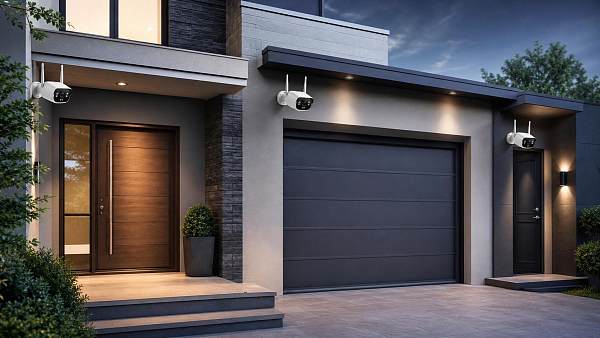
Choosing wireless smart security cameras for entry points is not only about image quality.
The right model should fit how people move around your home every day.
Doors, garages, porches, side gates, and back entries all create different security demands.
That is why smart camera selection should start with placement, lighting, traffic patterns, and alert needs.
Some buyers focus on price first, then discover weak battery life, delayed alerts, or poor night footage.
A better approach is to compare features based on actual entry-point risks.
This guide breaks down what matters most before buying wireless smart security cameras for home use.
Start With the Entry Point, Not the Camera
Every entry point has its own viewing angle, distance, and exposure to weather.
A front door camera usually needs facial detail and package visibility.
A garage camera often needs wider coverage, stronger night vision, and better motion zoning.
A side entrance may need a compact design that stays reliable in narrow spaces.
Before comparing brands, list each entrance and answer three practical questions.
- How far is the person or vehicle from the camera?
- What activity should trigger an alert?
- How important is live response versus recorded evidence?
This simple step makes wireless smart security cameras easier to compare in a useful way.
Video Quality That Helps Identification
Resolution matters, but it is only part of the picture.
Many wireless smart security cameras now offer 2K or higher video.
That sounds impressive, yet poor dynamic range can still wash out faces in bright sunlight.
At entry points, look for balanced image performance in both day and night conditions.
Prioritize These Video Features
- At least 1080p for basic entry monitoring
- 2K resolution for better face and package detail
- HDR for bright porch lights or backlit doorways
- A field of view wide enough for full doorway coverage
- Color night vision where exterior lighting supports it
A camera that records clear faces at six to ten feet is usually more useful than one with higher paper specs.
Motion Detection Should Be Precise, Not Noisy
Frequent false alerts quickly make smart cameras feel annoying instead of protective.
This is especially common at front doors near streets, sidewalks, or shared driveways.
The best wireless smart security cameras use smarter motion tools, not just broad detection.
Features That Reduce Alert Fatigue
- Custom activity zones
- Person detection instead of generic motion only
- Package, vehicle, or animal detection if relevant
- Adjustable sensitivity for narrow or busy spaces
- Pre-roll recording to catch what happened before the alert
From a daily-use perspective, better detection logic often matters more than higher resolution.
Night Vision Is a Core Buying Factor
Most entry-point incidents happen in low light, early morning, or at night.
That makes night performance central when comparing wireless smart security cameras.
Infrared night vision is standard, but not all systems handle shadows, glare, or long driveways equally well.
Color night vision can help identify clothing, vehicles, and objects more clearly.
Still, it usually performs best where porch lights or driveway lights already exist.
If the area is very dark, check real sample footage rather than relying on product claims.
Battery Life, Power Options, and Maintenance
One reason buyers choose wireless smart security cameras is installation flexibility.
But battery-powered convenience brings maintenance tradeoffs.
High traffic, cold weather, long clip lengths, and frequent live viewing can drain batteries faster than expected.
For busy front doors or active garages, rechargeable models may need more attention than buyers expect.
What to Check Before Buying
- Whether battery life estimates assume light traffic
- Whether the battery is removable or built in
- Whether solar charging is supported
- Whether hardwiring is available for key locations
For main entrances, a stable power option often improves long-term reliability.
Two-Way Audio and App Control Affect Everyday Use
Wireless smart security cameras are part of a daily routine, not just emergency monitoring.
That is why app quality and audio performance deserve careful attention.
Two-way audio is useful for deliveries, unexpected visitors, or checking activity around the garage.
What matters is not only whether the feature exists, but whether it works smoothly.
Look for quick app loading, stable live view, low audio delay, and clear notifications.
Shared access for family members can also make a real difference in day-to-day use.
Storage, Privacy, and Subscription Costs
Many wireless smart security cameras look affordable until cloud storage fees add up.
Before buying, check what is included without a subscription.
Some cameras offer local storage, while others lock useful features behind monthly plans.
This can affect long-term cost more than the purchase price itself.
Compare These Ownership Factors
In practical terms, the best wireless smart security cameras balance convenience with sensible data control.
Smart Home Compatibility and Weather Resistance
A camera may look great on paper but feel limited if it does not fit the rest of the home setup.
Check whether it supports the voice assistant or platform already in use.
This matters for routines, voice checks, and viewing footage on smart displays.
Outdoor durability is just as important.
For exposed entry points, look for strong weather resistance, temperature tolerance, and stable Wi-Fi performance.
A well-rated camera still needs proper placement under eaves or sheltered areas when possible.
A Simple Way to Choose the Right Setup
If the goal is better home protection, avoid treating every entrance the same.
Use one camera strategy for the front door, another for the garage, and another for lower-traffic side access.
That usually leads to better results than buying identical devices for every location.
- Map every entry point and its lighting conditions.
- Rank each area by risk and daily activity.
- Choose wireless smart security cameras based on detection, power, and footage needs.
- Compare total ownership cost, not just device price.
- Check app reviews and real nighttime video samples before deciding.
The strongest buying decision usually comes from matching features to real entry-point behavior.
When wireless smart security cameras are chosen this way, they become more useful, less frustrating, and far more effective over time.
Get weekly intelligence in your inbox.
No noise. No sponsored content. Pure intelligence.
 Oct 12, 2026How Predictive Maintenance AI Detects Machine Failures Before Unplanned DowntimeHow Predictive Maintenance AI Detects Machine Failures Before Unplanned Downtime
 Oct 10, 2026How to Scope Packaging Automation for High-Mix Lines Without Creating BottlenecksHow to Scope Packaging Automation for High-Mix Lines Without Creating Bottlenecks
 Oct 08, 2026How Digital Health Improves Diagnostic Accuracy and Workflow in Clinical LabsHow Digital Health Improves Diagnostic Accuracy and Workflow in Clinical Labs
 Oct 07, 2026Selecting Voice Picking Systems for German Warehouses: Integration, Languages and ROISelecting Voice Picking Systems for German Warehouses: Integration, Languages and ROI
 Oct 06, 2026How to Choose Last Mile Dispatch Software for On-Time Delivery at ScaleHow to Choose Last Mile Dispatch Software for On-Time Delivery at Scale
 Oct 05, 2026Vietnam’s Consumer Electronics Market: Demand Shifts and Sourcing OpportunitiesVietnam’s Consumer Electronics Market: Demand Shifts and Sourcing Opportunities
 Oct 04, 2026Digital Health Investment Priorities for Providers: Improving Access, Outcomes, and EfficiencyDigital Health Investment Priorities for Providers: Improving Access, Outcomes, and Efficiency
 Oct 03, 2026How to Specify an FR4 Custom PCB Board for High-Voltage and High-Heat DesignsHow to Specify an FR4 Custom PCB Board for High-Voltage and High-Heat Designs
 Oct 02, 2026ERP Software Market Intelligence: Adoption, Pricing, and Vendor Signals to WatchERP Software Market Intelligence: Adoption, Pricing, and Vendor Signals to Watch
 Oct 01, 2026How to Select Calibrated Temperature Data Loggers for GMP Cold Storage MonitoringHow to Select Calibrated Temperature Data Loggers for GMP Cold Storage Monitoring
 Sep 30, 2026Custom Molded Rubber Pricing: What Drives Unit Cost and Tooling Fees?Custom Molded Rubber Pricing: What Drives Unit Cost and Tooling Fees?
 Sep 29, 2026How to Evaluate Energy Management Software Vendors for Multi-Site OperationsHow to Evaluate Energy Management Software Vendors for Multi-Site Operations
 Sep 28, 2026How to Select a DIN Rail Smart Meter for Multi-Circuit Energy MonitoringHow to Select a DIN Rail Smart Meter for Multi-Circuit Energy Monitoring
 Sep 27, 2026TWS Earbuds in Vietnam: Demand Drivers, Price Tiers, and Retail Channel OpportunitiesTWS Earbuds in Vietnam: Demand Drivers, Price Tiers, and Retail Channel Opportunities
 Sep 26, 2026How UAE Clinics Can Qualify a Smart Glucometer Supplier for Accuracy and ComplianceHow UAE Clinics Can Qualify a Smart Glucometer Supplier for Accuracy and Compliance
 Sep 25, 2026Buying Aesthetic Lasers in the USA: FDA Status, Wavelengths, and Service SupportBuying Aesthetic Lasers in the USA: FDA Status, Wavelengths, and Service Support
 Sep 24, 2026Laser Cutting Brass Sheet: How to Prevent Burrs and Heat Marks on Thin PartsLaser Cutting Brass Sheet: How to Prevent Burrs and Heat Marks on Thin Parts
 Sep 23, 2026How to Choose Lightweight ANC Headphones for Comfortable All-Day TravelHow to Choose Lightweight ANC Headphones for Comfortable All-Day Travel
 Sep 22, 2026IPX5 TWS Bluetooth Earbuds: What Protection Do They Offer for Workouts?IPX5 TWS Bluetooth Earbuds: What Protection Do They Offer for Workouts?
 Sep 21, 2026What to Look for in a Grid Integration Company for Utility-Scale Solar ProjectsWhat to Look for in a Grid Integration Company for Utility-Scale Solar Projects
 Sep 20, 2026Microgrid Controller Pricing: What Drives Cost in Commercial Energy Projects?Microgrid Controller Pricing: What Drives Cost in Commercial Energy Projects?
 Sep 19, 2026How to Choose a GaN Charger for Laptops Without Compromising Power or PortabilityHow to Choose a GaN Charger for Laptops Without Compromising Power or Portability
 Sep 18, 2026Floating Solar Farm Costs: CAPEX, OPEX, and the Site Factors That Shape ROIFloating Solar Farm Costs: CAPEX, OPEX, and the Site Factors That Shape ROI
 Sep 17, 2026Drone Delivery Solutions for Last-Mile Routes: Site, Payload, and Range PlanningDrone Delivery Solutions for Last-Mile Routes: Site, Payload, and Range Planning
 Sep 16, 2026When Low-Volume Electronics Manufacturing Makes More Sense Than Mass ProductionWhen Low-Volume Electronics Manufacturing Makes More Sense Than Mass Production
 Sep 15, 2026Wholesale WiFi Smart Switches: What Buyers Should Verify Before OrderingWholesale WiFi Smart Switches: What Buyers Should Verify Before Ordering
 Sep 14, 2026How to Select IoT Sensors for Reliable Monitoring in Harsh Industrial EnvironmentsHow to Select IoT Sensors for Reliable Monitoring in Harsh Industrial Environments