Air Quality Monitors: What to Check Before Buying
Choosing the right air quality monitors requires more than comparing prices or basic specs. For buyers in facilities, healthcare, logistics, and energy efficiency projects, the real value lies in sensor accuracy, data reliability, calibration needs, connectivity, and long-term operating costs. This guide outlines the key factors to check before buying, helping technical evaluators, safety managers, and business decision-makers make informed, risk-aware purchasing decisions.
In B2B environments, air quality monitoring is tied to compliance, occupant wellbeing, process stability, and operating efficiency. A poor selection can lead to false alarms, missed contamination events, unnecessary maintenance, or weak audit records. A better selection supports faster response times, cleaner reporting, and more confident investment decisions across single sites or multi-location portfolios.
Whether the project involves office ventilation, hospital spaces, warehouses, production areas, clean-adjacent rooms, or smart building upgrades, buyers should assess not only what a monitor measures, but how it performs over 12–36 months. That means checking sensor type, expected drift, calibration intervals, integration options, alarm logic, and total cost of ownership before issuing a purchase order.
Start with the pollutants and operating conditions that actually matter
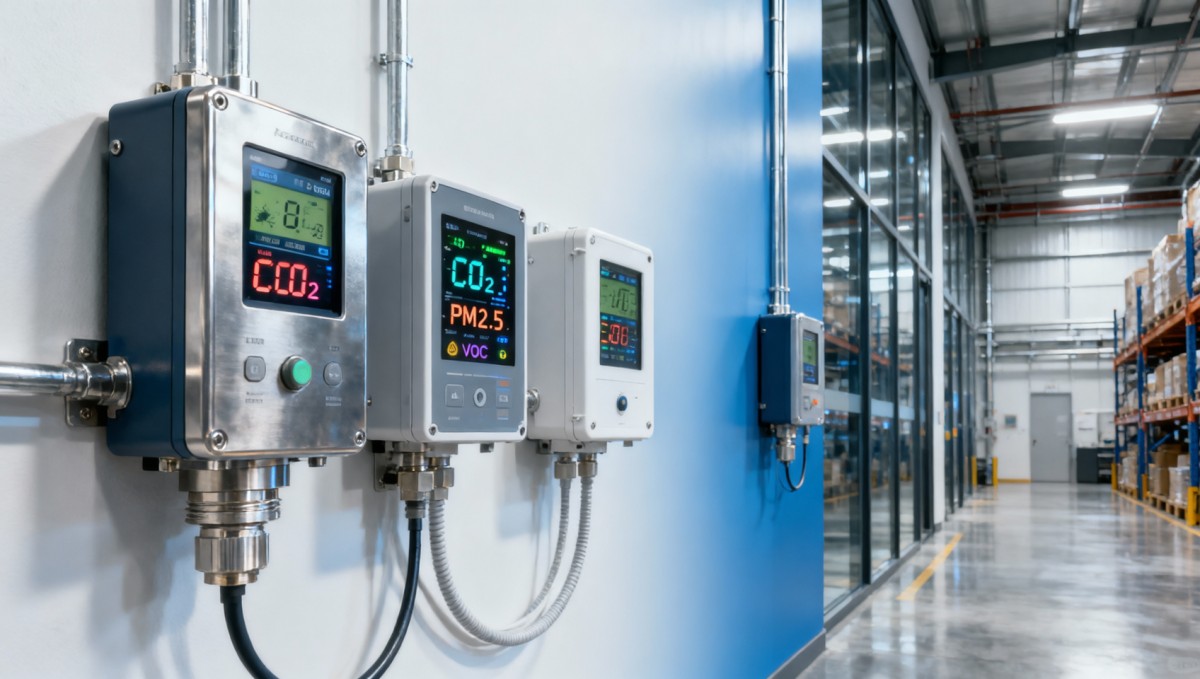
The first buying mistake is choosing an air quality monitor based on a generic feature list instead of the actual exposure profile. Different environments require different measurement priorities. An office retrofit may focus on CO2, PM2.5, temperature, and humidity, while a healthcare or lab-adjacent setting may need tighter tracking of VOCs, particulate matter, and pressure-related conditions.
A practical specification review should begin with 4 questions: what pollutants are relevant, what thresholds trigger action, what environmental conditions affect readings, and how often the data will be used. For example, a logistics warehouse with heavy forklift traffic may need stronger PM and gas monitoring than a conference room, especially during 8–12 hour shifts and seasonal ventilation changes.
It is also important to match monitor design to location risk. Portable monitors are useful for spot checks, incident investigation, and temporary assessments. Fixed monitors are better for continuous trending, central dashboards, and compliance documentation. In many larger facilities, a hybrid model works best: 1 fixed network for continuous visibility and 2–4 portable units for validation and troubleshooting.
Common measurement targets by application
The table below shows how measurement priorities often differ by commercial and industrial setting. It can help procurement teams narrow the specification before comparing suppliers.
This comparison shows why a one-size-fits-all monitor often underperforms. Buyers should define 3–5 required parameters and separate them from optional measurements. That avoids paying for features that are rarely used and reduces the risk of missing the sensors that matter most in daily operation.
Specification checkpoint
- Define whether the monitor is for continuous use, mobile inspections, or both.
- Set target pollutants and acceptable ranges before supplier comparison.
- Confirm operating temperature and humidity limits, especially if the device will be installed in loading bays, utility rooms, or production zones.
- Check whether the sampling interval is suitable for your use case, such as 1 minute, 5 minutes, or 15 minutes.
Check sensor accuracy, drift, and calibration requirements before price
In air quality monitors, sensor quality has a direct effect on data credibility. Low-cost devices may look attractive during tender review, but if the readings drift after 6–9 months or react poorly to humidity changes, the monitor can create more cost than it saves. Technical evaluators should review accuracy bands, repeatability, warm-up time, expected sensor life, and cross-sensitivity for each critical parameter.
For example, CO2 readings based on NDIR sensing are often preferred in commercial indoor monitoring because they are generally more stable than lower-grade estimation methods. For particulate matter, buyers should ask how the optical sensor performs under varying dust loads and whether the device is intended for trend monitoring, indicative screening, or higher-precision operational use. A stated reading is not enough; the method behind it matters.
Calibration is another major cost driver. Some devices require field calibration every 6 months, while others may be serviced every 12 months depending on operating conditions. If a site runs 20, 50, or 100 monitors, each maintenance cycle affects labor planning, spare inventory, and downtime. This is especially important for enterprise buyers managing multiple buildings or regulated workflows.
What to compare in sensor performance
The following table provides a practical framework for comparing sensor-related buying factors during technical review.
A supplier that clearly explains these items is often easier to work with during commissioning and support. If calibration details are vague, buyers should treat that as a commercial and technical risk, not a minor omission.
Warning signs during technical evaluation
- No clear calibration interval or no explanation of field service requirements.
- Only marketing language about “high precision” without numeric tolerance or operating conditions.
- No statement on sensor lifespan, environmental limitations, or replacement parts availability.
- No clarification on whether the device is suitable for compliance support, indicative monitoring, or comfort optimization only.
Assess connectivity, reporting, and system integration early in the project
An air quality monitor becomes much more valuable when its data can be used. For many B2B buyers, the decision is not just about sensing performance but about whether readings can flow into building management systems, cloud dashboards, ESG reporting workflows, or facility maintenance platforms. Integration should be reviewed before purchase, not after installation.
At minimum, buyers should verify the communication options available. Common choices include Wi-Fi, Ethernet, Bluetooth for local setup, and industrial protocols such as Modbus or BACnet where building automation is involved. A device that works well as a standalone monitor may still be a poor enterprise choice if data export is limited to manual downloads every 7 days or 30 days.
Data handling also matters. Safety managers may need real-time alerts within 1–5 minutes. Project managers may need trend reports over 30, 90, or 180 days. Finance approvers may want proof that monitoring supports ventilation tuning, reduced complaints, or lower unnecessary HVAC runtime. These are different outputs, and the monitor ecosystem should support all three.
Integration checklist for B2B deployments
- Confirm whether the monitor supports API, CSV export, or integration with existing building or maintenance platforms.
- Check data retention policy, including whether local memory covers 30–90 days during network interruption.
- Review user access levels for operators, supervisors, and corporate administrators across one site or multiple sites.
- Verify alarm configuration options, including threshold alerts, delayed alarms, and escalation to email or SMS.
If the monitor will be used in distributed facilities, centralized visibility becomes even more important. A network of 25 devices across 5 locations is difficult to manage if each unit requires separate manual configuration. Buyers should ask whether remote firmware updates, batch configuration, and centralized diagnostics are available. These features reduce support load and make scale-up more realistic.
Why reporting structure affects approval
Technical teams often focus on sensor performance, but commercial approval can depend on reporting clarity. Decision-makers usually want to see whether the solution helps meet internal air quality targets, speeds incident response, or supports audit readiness. A monitor that can produce usable trend charts, event logs, and threshold summaries is easier to justify than one that only shows numbers on a screen.
For enterprise procurement, it is useful to define 3 output layers in advance: live operational alerts, weekly or monthly management summaries, and long-term archive access. This approach helps ensure the selected monitor supports both daily operations and executive review without requiring extra manual reporting work.
Calculate total cost of ownership, deployment effort, and service burden
Purchase price is only one part of the cost equation. A lower upfront price can be offset by frequent calibration, short sensor life, paid software seats, battery replacement, subscription fees, or installation complexity. For many organizations, the more accurate comparison is 24-month or 36-month cost of ownership, especially when the deployment includes more than 10 units.
Deployment effort should also be reviewed in detail. Wall-mounted monitors may need site surveys, power access, commissioning time, and network registration. Portable devices may reduce installation effort but increase manual checking and data consolidation. In a multi-site roll-out, even an extra 30–45 minutes of setup per unit can add meaningful labor cost.
Support coverage is another overlooked item. Buyers should confirm warranty length, replacement process, average response time, firmware support period, and spare part availability. A monitor deployed in a safety-sensitive area should not depend on a vague service model or an unclear turnaround time of several weeks.
Key cost elements to compare
The table below helps procurement and finance teams evaluate cost beyond the initial quotation.
This analysis often changes the shortlist. A model with a 10% lower purchase price may become the more expensive option over 3 years if maintenance is frequent and software costs are layered on top. Cost review should therefore include hardware, service, software, labor, and downtime risk in one decision sheet.
A simple 5-step purchasing workflow
- Define monitoring objectives by site type, pollutant, and reporting need.
- Create a technical checklist covering sensor quality, calibration, and operating conditions.
- Review integration, alarm, and export requirements with IT or building systems teams.
- Estimate 24–36 month ownership cost, not just unit price.
- Run a pilot in 1–2 representative zones before large-scale rollout.
Avoid common buying mistakes and align the monitor with operational use
One common mistake is buying an air quality monitor with too many sensors and too little practical value. More parameters do not automatically mean better outcomes. If operators do not know what actions to take when thresholds are crossed, the system becomes noise rather than decision support. Good monitor selection includes response planning, not just hardware selection.
Another frequent error is installing too few devices in complex spaces. A large warehouse, open-plan floor, or mixed-use healthcare area can show strong variation between zones. One monitor near a clean air supply does not represent the entire environment. In many projects, zoning by activity, occupancy, or airflow pattern delivers more useful insight than a single central reading.
Buyers should also avoid assuming every reading is compliance-grade. Some monitors are designed for indicative indoor air quality management, while others are more suitable for formal reporting support. The supplier should clearly explain intended use, limitations, and recommended installation height, spacing, and service routine. That transparency reduces the risk of misuse later.
FAQ for procurement and technical teams
How many air quality monitors does a site usually need?
It depends on layout, airflow, occupancy, and risk zones. A small office may begin with 1 unit per major enclosed area, while a warehouse or manufacturing floor may require multiple zones based on traffic, doors, process activity, or ventilation differences. A pilot survey over 2–4 weeks often helps define the correct quantity before full deployment.
Which metrics are most important for indoor commercial spaces?
For many commercial indoor settings, CO2, PM2.5, temperature, and relative humidity are the core starting set. VOC monitoring becomes more important where cleaning chemicals, furnishings, packaging, adhesives, or process emissions are relevant. The exact priority should follow the site risk profile rather than a generic bundle.
How often should air quality monitors be recalibrated?
A common interval is 6–12 months, but this varies by sensor type, installation environment, and manufacturer guidance. Dusty, humid, or high-use areas may require more frequent checks. Buyers should always ask for both recommended calibration intervals and typical maintenance tasks over a 1-year and 3-year horizon.
Is cloud connectivity always necessary?
Not always. For a single site with local review, a standalone or local-network device may be sufficient. For portfolios with 3 or more locations, remote monitoring, shared dashboards, and central reporting usually create stronger operational value. The right choice depends on how often data is reviewed and who needs access.
Selecting air quality monitors is ultimately a cross-functional decision involving operations, safety, engineering, procurement, and budget control. The strongest buying outcomes come from matching the monitor to real pollutants, verifying sensor credibility, planning integration early, and evaluating total ownership cost over time rather than focusing only on unit price.
For organizations tracking indoor environmental quality, facility performance, or risk-sensitive operations, a well-chosen monitoring setup can support faster intervention, better documentation, and more reliable long-term planning. If you are comparing options for a new project or a multi-site upgrade, TradeNexus Pro can help you evaluate solution pathways, supplier positioning, and deployment priorities with a clearer B2B decision framework.
Contact us to discuss your monitoring objectives, request a tailored evaluation checklist, or explore more solution insights for facilities, healthcare, logistics, and technology-driven environments.
Get weekly intelligence in your inbox.
No noise. No sponsored content. Pure intelligence.
 Apr 20, 2026Ultrasound Machines: New vs Refurbished in 2026Ultrasound Machines: New vs Refurbished in 2026
 Apr 20, 2026How to Evaluate Clean Energy ROI in 2026How to Evaluate Clean Energy ROI in 2026
 Apr 20, 2026Clean Energy Projects: Where Savings Really Come FromClean Energy Projects: Where Savings Really Come From
 Apr 20, 2026Air Quality Monitors: What to Check Before BuyingAir Quality Monitors: What to Check Before Buying
 Apr 20, 2026How Accurate Are Air Quality Monitors Indoors?How Accurate Are Air Quality Monitors Indoors?
 Apr 20, 2026AED Defibrillators: What Buyers Often MissAED Defibrillators: What Buyers Often Miss
 Apr 20, 2026How to Compare 3PL Logistics Providers for GrowthHow to Compare 3PL Logistics Providers for Growth
 Apr 20, 20263PL Logistics Costs Explained Before You Outsource3PL Logistics Costs Explained Before You Outsource
 Apr 20, 2026WMS vs ERP: What Matters on the Warehouse Floor?WMS vs ERP: What Matters on the Warehouse Floor?
 Apr 20, 2026How to Choose a Warehouse Management System in 2026How to Choose a Warehouse Management System in 2026
 Apr 20, 2026Electronic Health Records Software: What Should You Compare First?Electronic Health Records Software: What Should You Compare First?
 Apr 20, 2026How to Pick Smart Thermostats That Fit Older HVAC SystemsHow to Pick Smart Thermostats That Fit Older HVAC Systems
 Apr 20, 2026Smart Thermostats: Do They Really Cut Energy Bills?Smart Thermostats: Do They Really Cut Energy Bills?
 Apr 20, 2026Are Portable Monitors Worth It for a Dual-Screen Setup?Are Portable Monitors Worth It for a Dual-Screen Setup?
 Apr 20, 2026Portable Monitors: Which Features Matter for Work Trips?Portable Monitors: Which Features Matter for Work Trips?
 Apr 20, 2026China Academy of IMT Releases Digital Passport White Paper for Industrial MaterialsChina Academy of IMT Releases Digital Passport White Paper for Industrial Materials
 Apr 20, 2026Suez Canal AI Speed & Load Limits Effective Apr 19, 2026Suez Canal AI Speed & Load Limits Effective Apr 19, 2026
 Apr 20, 2026IEC 63275:2026 Published for Warehouse Robotics EMC TestingIEC 63275:2026 Published for Warehouse Robotics EMC Testing
 Apr 20, 20262026 Shanghai Fastener Show: 1427 Exhibitors, Robot-Specific Fasteners in Focus2026 Shanghai Fastener Show: 1427 Exhibitors, Robot-Specific Fasteners in Focus
 Apr 20, 2026US BIS Expands EV Infrastructure Export ControlsUS BIS Expands EV Infrastructure Export Controls
 Apr 20, 2026TÜV Rheinland Updates ESS Certification with Propagation Blocking RequirementTÜV Rheinland Updates ESS Certification with Propagation Blocking Requirement
 Apr 20, 2026Shanghai Port Launches Green Clearance Channel for PV InvertersShanghai Port Launches Green Clearance Channel for PV Inverters
 Apr 20, 2026Vietnam Launches Anti-Circumvention Probe on Chinese Electronic ComponentsVietnam Launches Anti-Circumvention Probe on Chinese Electronic Components
 Apr 20, 2026CPSC Urges Recall of China-Made Smart Plugs Over Firmware VulnerabilitiesCPSC Urges Recall of China-Made Smart Plugs Over Firmware Vulnerabilities
 Apr 20, 2026EU AI Act CE Compliance for IoT Devices Takes Effect Apr 18, 2026EU AI Act CE Compliance for IoT Devices Takes Effect Apr 18, 2026
 Apr 19, 20262026 Dongguan Whole-House Customization List Released2026 Dongguan Whole-House Customization List Released
 Apr 19, 2026Global Shipping Alliances Launch Green Slot Priority for Asia-Europe RoutesGlobal Shipping Alliances Launch Green Slot Priority for Asia-Europe Routes