How to Pick Smart Thermostats That Fit Older HVAC Systems
Choosing smart thermostats for older HVAC systems requires more than checking app features or price. Compatibility with legacy wiring, control boards, staging, and system safety is critical for reliable performance and energy savings. For buyers, operators, and technical evaluators, this guide explains how to assess retrofit risks, avoid costly installation mistakes, and identify smart thermostats that deliver practical value in aging residential or commercial environments.
In retrofit projects, a thermostat is not just a wall control. It becomes the interface between aging mechanical equipment, occupant comfort expectations, maintenance workflows, and energy management goals. That is why procurement teams, facility managers, and project engineers need a structured way to evaluate compatibility before comparing user interface design or cloud features.
Older HVAC systems often remain in service for 15 to 30 years, especially in multifamily buildings, small commercial properties, schools, and light industrial sites. Many still operate reliably, but they were not designed for Wi-Fi scheduling, demand response, remote diagnostics, or granular occupancy control. Selecting the right smart thermostat means balancing modern functionality with the electrical and control limitations of legacy equipment.
Start with System Compatibility, Not Features
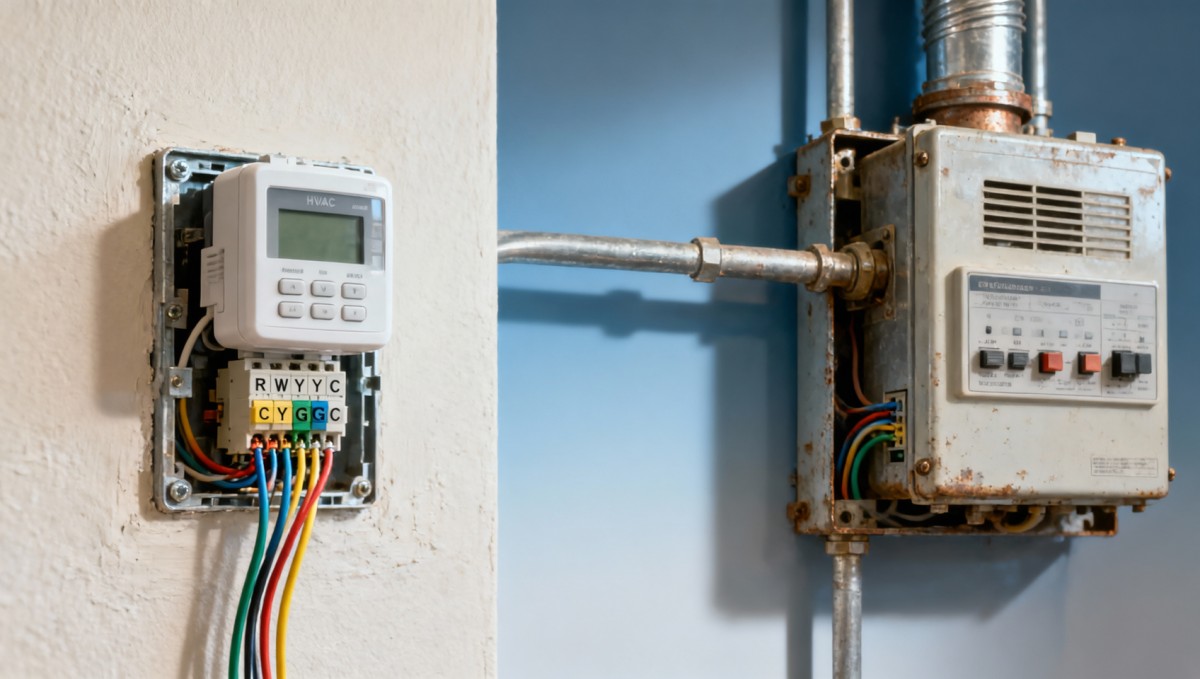
The first screening step is to identify exactly what the existing HVAC system is. In older properties, the installed equipment may include single-stage furnaces, 24V central air conditioners, boilers with zone valves, heat pumps with auxiliary heat, fan coils, packaged rooftop units, or proprietary controls. A smart thermostat that works well with one setup may fail or underperform on another.
A practical field review should cover at least 6 checkpoints: voltage type, terminal labels, number of heating and cooling stages, presence of a common wire, auxiliary or emergency heat, and whether the system uses conventional or communicating controls. If any of these points are unclear, installation risk rises sharply because the thermostat may power on but still control the system incorrectly.
Many older systems use low-voltage 24V wiring, but some line-voltage electric baseboard systems run at 120V or 240V. These cannot use standard low-voltage smart thermostats without the correct rated control device. Mixing these categories can damage the thermostat, create safety concerns, and delay commissioning by 1 to 3 days while replacement parts are sourced.
What technical teams should document on site
Before shortlisting products, document wiring labels such as R, Rc, Rh, W, Y, G, C, O/B, and Aux. Photograph the thermostat base, control board, and any zone panel. In buildings with multiple retrofit waves over 10 to 20 years, the wall thermostat wiring may not match the equipment wiring at the air handler or furnace, so visual confirmation at both ends matters.
- Confirm whether the system is 1-stage, 2-stage, or multi-stage.
- Check if a C-wire is present or if a power adapter is allowed by the manufacturer.
- Identify heat pump reversing valve logic and auxiliary heat call requirements.
- Verify whether there is a separate zone controller between thermostat and equipment.
- Review age and condition of contactors, relays, and transformer output.
This compatibility matrix helps non-specialist buyers align shortlist decisions with technical feasibility before issuing a pilot or full procurement request.
The key takeaway is simple: a smart thermostat should only move to commercial evaluation after electrical and control compatibility is confirmed. This reduces rework, avoids procurement waste, and shortens the pilot cycle by eliminating products that look attractive on paper but do not match field conditions.
Understand the Wiring and Control Limits of Older Installations
Legacy HVAC systems often present hidden wiring issues that do not appear in product brochures. A thermostat may advertise broad compatibility, but actual performance depends on transformer capacity, wire condition, splices behind walls, aging control boards, and whether the installer is relying on repurposed conductors. In buildings older than 20 years, these variables are common rather than exceptional.
One of the most frequent retrofit barriers is the missing C-wire. Some smart thermostats can use power-stealing methods or an add-a-wire adapter, but these solutions are not universal. On systems with marginal transformers or unstable loads, low available current can lead to random rebooting, poor relay actuation, or intermittent loss of connectivity. In a portfolio deployment, even a 5% failure rate can create disproportionate support costs.
Another issue is staging. If a 2-stage furnace or cooling system is connected to a thermostat configured only for single-stage operation, the equipment may never enter the higher capacity mode. That can increase runtime, reduce comfort in peak temperature periods, and lead operators to misjudge the system as underperforming. For technical evaluators, stage support should be treated as a mandatory control requirement, not a convenience feature.
Legacy control scenarios that need extra caution
Communicating systems, proprietary rooftop controllers, and older zoning panels deserve special attention. In these cases, the thermostat is only one part of a larger control architecture. Replacing the wall unit without reviewing the upstream control logic can disable economizer functions, occupancy schedules, or fault reporting. For commercial sites, that risk is often greater than the cost of the thermostat itself.
Minimum technical review before purchase approval
- Inspect thermostat wiring and confirm voltage type.
- Open the air handler, furnace, or RTU control compartment and verify terminal mapping.
- Check whether a zone controller, relay board, or building management interface is installed.
- Confirm the number of stages and any auxiliary heat sequence.
- Test transformer output and note if it falls outside the typical 24V control range.
When this 5-step review is completed before sourcing, buyers gain a more accurate basis for comparing products. They can filter out thermostats that require extensive rewiring, unsupported adapters, or technician work that would push installation time from 30 to 45 minutes up to 2 to 4 hours per unit.
Prioritize Functional Value for Real Retrofit Use Cases
Once compatibility is confirmed, the next question is which smart features create measurable value in older buildings. In many retrofit projects, the winning thermostat is not the one with the longest mobile app menu. It is the one that simplifies scheduling, protects equipment, supports lockouts or setpoint limits, and gives operators enough visibility to reduce complaint calls and unnecessary service visits.
For residential portfolios and small commercial sites, practical value often comes from 4 areas: remote setpoint adjustment, programmable schedules, alerts for temperature excursions, and simple occupancy-based control. These functions can help reduce waste from constant manual overrides. In facilities with irregular operating hours, even a 1 to 2 degree setback strategy can make a visible difference over a full cooling or heating season.
For decision-makers, the best smart thermostat for an older HVAC system should also lower management friction. A clean interface reduces operator errors. User permission tiers help separate occupant actions from facility controls. Exportable runtime or temperature history supports maintenance planning. These are often more valuable than voice assistant integration or lifestyle automation features that matter less in B2B environments.
Feature selection by retrofit objective
The following table maps common business goals to thermostat capabilities that matter in aging systems, where simplicity, stability, and serviceability often outrank novelty.
The most effective purchasing approach is to rank features by operational outcome, not by consumer appeal. If the target is fewer truck rolls, better schedule discipline, and manageable comfort control across 20, 50, or 100 zones, the thermostat should be evaluated as an operational tool rather than a lifestyle accessory.
Features that often matter less than expected
- Advanced learning modes that can conflict with predictable facility schedules.
- Complex geofencing functions in shared or multi-occupant environments.
- Consumer ecosystem integrations that add little maintenance or procurement value.
For older HVAC assets, stable control logic and straightforward administration usually outperform feature-heavy options. This is especially true where maintenance teams need standardization across multiple buildings and training time must stay under 1 to 2 hours per site team.
Evaluate Installation Risk, Cost, and Rollout Complexity
A thermostat that looks affordable at unit level may become costly after labor, troubleshooting, adapters, rewiring, access visits, and post-install support are included. For portfolio buyers, the relevant metric is installed cost and support burden, not just the product price. A difference of 30 to 60 minutes in average installation time can materially affect total rollout cost across dozens of sites.
Retrofit complexity also changes by asset type. A single-family upgrade may be straightforward, while a school campus, retail chain, or mixed-use property can involve occupancy windows, safety permits, multiple control generations, and coordination with existing maintenance contractors. Project leaders should segment the rollout into pilot, validation, and scaled deployment phases instead of assuming a one-size-fits-all schedule.
For many organizations, a pilot of 5 to 10 units is enough to validate wiring assumptions, onboarding workflow, and user acceptance. If failure patterns emerge during the pilot, the procurement specification can be revised before committing to a broader order. This lowers the risk of stranded inventory and avoids discovering field incompatibility after delivery.
Procurement and rollout checklist
The table below can support commercial and technical alignment during sourcing, especially when finance approvers and project managers need a clearer view of implementation exposure.
This type of screening keeps procurement disciplined. It turns thermostat selection into a controlled retrofit program with measurable checkpoints rather than a simple device purchase. That matters when the decision affects comfort, service continuity, labor scheduling, and budget approval across multiple stakeholders.
A practical 3-phase rollout model
- Phase 1: Audit 10% to 20% of candidate locations and classify equipment types.
- Phase 2: Run a pilot with representative wiring and use-case diversity.
- Phase 3: Standardize approved configurations and train installers and operators.
Organizations that follow this model usually gain clearer installation forecasting and fewer post-deployment exceptions. It also improves supplier discussions, because technical requirements are documented before commercial negotiation moves forward.
Common Mistakes, Maintenance Considerations, and Final Buying Questions
One common mistake is assuming that all smart thermostats are interchangeable if they physically mount on the wall. In reality, system logic, power requirements, and accessory support vary significantly. Another error is overlooking network policy. In commercial environments, Wi-Fi enrollment, password rotation, and app access rules can delay deployment if IT and facilities teams are not aligned early.
Maintenance teams should also consider long-term serviceability. A thermostat with a good app but poor local control can frustrate onsite staff during outages. Likewise, if filter reminders, temperature alerts, or lockout settings are difficult to configure, the device may not deliver the expected operational benefit. Training time, spare units, and documentation quality should be part of the buying decision.
In older systems, preventive maintenance remains essential even after thermostat upgrades. A smart control cannot compensate for dirty coils, failing capacitors, stuck dampers, or undersized transformers. For that reason, many retrofit programs pair thermostat installation with a basic HVAC health inspection covering 5 to 8 items such as airflow, drain condition, relay response, sensor accuracy, and cycle timing.
FAQ for buyers and technical evaluators
Can a smart thermostat work without a C-wire?
Sometimes yes, but only if the thermostat and HVAC system support an approved alternative power method. In older installations, success depends on transformer capacity and control board behavior. If the site has unstable power history, a proper C-wire or tested power adapter is usually the safer option.
Are smart thermostats suitable for commercial retrofits?
Yes, especially in small to mid-sized commercial spaces where centralized building automation is not justified. The right fit is often found in offices, retail units, clinics, and branch facilities with 1 to 20 controllable zones. The main requirement is that the thermostat supports the installed equipment and access controls needed by facility teams.
What should finance and procurement teams ask before approval?
They should ask for installed cost, expected installation time range, pilot results, support responsibility, and any accessory requirements such as power kits or sensors. It is also useful to ask whether one thermostat model can be standardized across at least 70% to 80% of the target equipment base.
How often should settings and performance be reviewed after installation?
A practical schedule is to review configuration after the first 2 to 4 weeks, then seasonally at least twice per year. This helps confirm that schedules, temperature limits, and alerts still match occupancy patterns and equipment behavior.
For organizations evaluating retrofit controls across aging assets, the most successful approach is disciplined and evidence-based: verify compatibility first, prioritize operationally useful features, pilot before scaling, and build maintenance and support into the procurement model. Smart thermostats can add real value to older HVAC systems, but only when chosen with the system’s electrical and control realities in mind.
TradeNexus Pro supports buyers, technical evaluators, and enterprise decision-makers with practical market intelligence for retrofit technology decisions that cross product, operations, and procurement boundaries. To compare solution paths, assess deployment risk, or explore sourcing strategies for smart building controls, contact us to get a tailored evaluation framework and learn more solutions for legacy HVAC modernization.
Get weekly intelligence in your inbox.
No noise. No sponsored content. Pure intelligence.
 Apr 21, 2026China Builds National Mine Safety Risk Monitoring 'Single Network'China Builds National Mine Safety Risk Monitoring 'Single Network'
 Apr 21, 2026MIIT Releases First List of AI+Manufacturing IncubatorsMIIT Releases First List of AI+Manufacturing Incubators
 Apr 21, 20262026 Shanghai Fastener Show: 1,423 Exhibitors, Robot-Specialized Fasteners in Focus2026 Shanghai Fastener Show: 1,423 Exhibitors, Robot-Specialized Fasteners in Focus
 Apr 21, 2026Vietnam Launches Anti-Circumvention Probe on Chinese-Assembled Electronic ComponentsVietnam Launches Anti-Circumvention Probe on Chinese-Assembled Electronic Components
 Apr 21, 2026China Academy Releases 2026 Digital Passport White PaperChina Academy Releases 2026 Digital Passport White Paper
 Apr 21, 2026Suez Canal AI Speed & Stowage Control Starts Apr 19, 2026Suez Canal AI Speed & Stowage Control Starts Apr 19, 2026
 Apr 21, 2026US BIS Adds EV Onboard Chargers with AES-256+ Encryption to Export ControlsUS BIS Adds EV Onboard Chargers with AES-256+ Encryption to Export Controls
 Apr 21, 2026TÜV Rheinland Updates BESS Certification: Thermal Cascade Protection Now MandatoryTÜV Rheinland Updates BESS Certification: Thermal Cascade Protection Now Mandatory
 Apr 21, 2026Shanghai Port Launches Green Clearance Channel for New Energy EquipmentShanghai Port Launches Green Clearance Channel for New Energy Equipment
 Apr 21, 2026IEC 63275:2026 Released: Global EMC Immunity Testing Standard for Warehouse RobotsIEC 63275:2026 Released: Global EMC Immunity Testing Standard for Warehouse Robots
 Apr 20, 2026How to Avoid Common Solar Street Light FailuresHow to Avoid Common Solar Street Light Failures
 Apr 20, 2026Solar Street Lights: When Do They Really Pay Off?Solar Street Lights: When Do They Really Pay Off?
 Apr 20, 2026What Makes an Ultrasound Machine Worth the Cost?What Makes an Ultrasound Machine Worth the Cost?
 Apr 20, 2026Ultrasound Machines: New vs Refurbished in 2026Ultrasound Machines: New vs Refurbished in 2026
 Apr 20, 2026How to Evaluate Clean Energy ROI in 2026How to Evaluate Clean Energy ROI in 2026
 Apr 20, 2026Clean Energy Projects: Where Savings Really Come FromClean Energy Projects: Where Savings Really Come From
 Apr 20, 2026Air Quality Monitors: What to Check Before BuyingAir Quality Monitors: What to Check Before Buying
 Apr 20, 2026How Accurate Are Air Quality Monitors Indoors?How Accurate Are Air Quality Monitors Indoors?
 Apr 20, 2026How AR Glasses Improve Remote MaintenanceHow AR Glasses Improve Remote Maintenance
 Apr 20, 2026AR Glasses for Field Work: Worth It or Not?AR Glasses for Field Work: Worth It or Not?
 Apr 20, 2026Which AED Defibrillators Are Easiest to Use?Which AED Defibrillators Are Easiest to Use?
 Apr 20, 2026AED Defibrillators: What Buyers Often MissAED Defibrillators: What Buyers Often Miss
 Apr 20, 2026How to Compare 3PL Logistics Providers for GrowthHow to Compare 3PL Logistics Providers for Growth
 Apr 20, 20263PL Logistics Costs Explained Before You Outsource3PL Logistics Costs Explained Before You Outsource
 Apr 20, 2026WMS vs ERP: What Matters on the Warehouse Floor?WMS vs ERP: What Matters on the Warehouse Floor?
 Apr 20, 2026How to Choose a Warehouse Management System in 2026How to Choose a Warehouse Management System in 2026
 Apr 20, 2026How to Choose TENS Units for Home Pain ReliefHow to Choose TENS Units for Home Pain Relief