How to choose point of sale terminals for a busy retail counter?
Choosing the right point of sale terminals for a busy retail counter affects checkout speed, staff efficiency, payment security, and customer satisfaction. For operators, managers, and financial decision-makers, the best solution should balance durability, seamless inventory management systems integration, and scalable connectivity with IoT sensors to support fast-paced daily operations and future business growth.
What matters most at a busy retail counter?
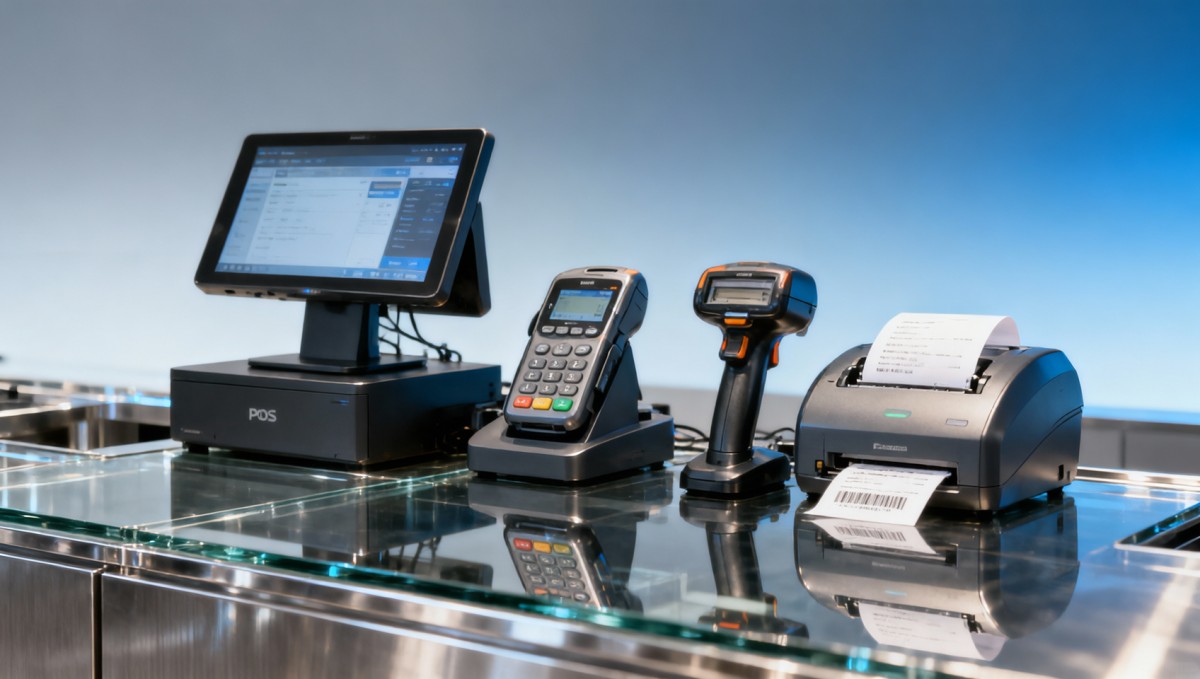
A point of sale terminal is no longer just a payment device. In high-traffic retail, it becomes the operational center for transaction processing, barcode scanning, receipt generation, customer verification, and stock synchronization. When counters handle steady queues for 8–12 hours a day, terminal selection directly influences throughput, staff fatigue, and error rates during peak trading windows.
For operators, the biggest concern is speed with minimal friction. A terminal that freezes during card authorization, requires too many taps, or struggles with peripheral connections can add 5–15 seconds per transaction. That delay seems small, but across hundreds of transactions in a single shift, it can create longer lines and lower service consistency.
For decision-makers and finance teams, the issue is broader than purchase price. They need to evaluate total cost over 24–48 months, including software compatibility, payment upgrades, device maintenance, replacement cycles, and downtime risk. For quality and safety managers, payment security, electrical safety, cable management, and stable operation under repetitive use are equally important.
In multi-sector retail environments connected to modern supply chains, the right point of sale terminal also supports better data visibility. This is why procurement teams increasingly compare terminal hardware with inventory integration, cloud reporting, and device management tools rather than selecting based on a generic checkout specification alone.
Key operational pressures behind terminal selection
- High checkout volumes during 2–4 daily peak windows, often requiring fast payment confirmation and quick cashier handover.
- Multiple payment methods, including chip, contactless, mobile wallet, and in some cases QR-based transactions.
- Frequent use of connected devices such as scanners, cash drawers, customer displays, receipt printers, and handheld stock tools.
- Need for stable integration with ERP, inventory management systems, loyalty functions, and remote monitoring dashboards.
How to compare point of sale terminal types for retail speed and durability
Not every point of sale terminal fits a busy retail counter. The correct choice depends on traffic density, counter layout, software ecosystem, and expected service life. In general, procurement teams compare three broad formats: traditional countertop terminals, all-in-one POS systems, and tablet-based POS setups with external payment devices. Each format has a different balance of cost, control, and scalability.
Countertop terminals usually win in durability and payment stability. They are common in stores with fixed lanes, repeatable workflows, and a need for long operating hours. All-in-one systems provide stronger back-office integration and support more peripherals, while tablet-based options offer flexibility for compact counters, pop-up formats, or mixed online-offline service models.
The comparison below helps teams align device format with queue pressure, maintenance demands, and long-term deployment plans. It is especially useful when an organization must standardize hardware across several stores or departments within a 1–3 year rollout cycle.
For busy retail counters, the strongest candidate is often not the cheapest device, but the one that performs consistently under repetitive payment volume and multi-device connection demands. If staff turnover is high, interfaces that can be learned within 1–2 shifts also reduce onboarding friction and transaction mistakes.
A practical way to choose between formats
If your counter processes simple payments with limited product lookup, a dedicated countertop point of sale terminal may be enough. If the checkout team frequently checks stock, applies promotions, or handles returns and exchanges, an all-in-one POS terminal usually offers better workflow continuity.
If the retail environment changes layout often or supports line-busting during rush periods, a tablet-based setup can work well, but only if battery management, wireless stability, and payment reader pairing are carefully controlled. In high-density counters, mobility is useful only when reliability remains predictable.
Three questions before shortlisting
- Will the point of sale terminal be used continuously for more than 6–8 hours each day?
- Does the store require 3 or more connected devices such as scanner, drawer, printer, and customer display?
- Will the system need software updates, remote support, and integration with stock or finance tools over the next 12–24 months?
Which technical specifications should buyers check first?
A retail point of sale terminal should be evaluated through real use conditions, not only brochure features. For busy counters, buyers should focus on processor responsiveness, memory capacity, screen readability, wired and wireless connectivity, peripheral port availability, payment module compatibility, and enclosure durability. These are the elements that shape daily checkout performance.
Response speed matters because cashier actions often happen in rapid sequence: scan, confirm, apply discount, collect payment, print receipt, and move to the next customer. Delays between these steps create operational drag. In practical terms, teams should test transaction completion, application switching, and peripheral response over repeated cycles, not just a single demonstration.
Connectivity matters just as much. A terminal may include USB, Ethernet, Wi-Fi, Bluetooth, or serial support, but the real question is whether it can maintain stable communication with existing systems. Retailers integrating stock visibility, smart shelf alerts, or basic IoT sensors should confirm whether the terminal ecosystem can pass data cleanly to central dashboards without requiring costly middleware.
For quality and safety teams, environmental fit should not be ignored. Busy counters expose devices to dust, repetitive touch input, occasional spills, cable strain, and constant human contact. A terminal intended for lighter service may not hold up well over a 24–36 month lifecycle in a demanding retail environment.
Core specifications to review during evaluation
The table below groups the most important technical checkpoints for point of sale terminal procurement. It helps operators, project leads, and finance approvers compare devices using criteria tied directly to retail checkout performance and deployment risk.
This checklist is most effective when combined with a live test over 3–5 realistic transaction scenarios. Buyers should include returns, discount application, receipt printing, and temporary network interruption recovery. A point of sale terminal that looks strong in a static demo may behave very differently under queue pressure.
Compliance and operational assurance
Retail teams should also ask about common compliance areas relevant to their market, such as payment security handling, electrical safety, wireless conformity, and software update procedures. The exact requirement depends on the country and payment ecosystem, but the supplier should be able to explain which certifications apply and what remains the retailer’s responsibility.
For project managers, this matters during rollout because technical approval often involves 4 steps: hardware review, software compatibility check, pilot installation, and final acceptance. If compliance questions are left too late, the deployment timeline can extend by 2–6 weeks depending on integration complexity and local sign-off requirements.
How should procurement teams balance cost, rollout speed, and long-term value?
A low sticker price can be misleading when selecting point of sale terminals for a busy retail counter. Finance approvers should compare acquisition cost with support burden, software dependency, peripheral replacement, and lost productivity from downtime. In B2B retail operations, the real cost difference often appears after deployment, not at purchase order stage.
One practical method is to assess total cost across a 24–36 month period. Include device purchase, licensing, implementation, accessories, maintenance, staff training, and contingency replacement. For stores with multiple counters, even one unstable terminal can create hidden labor cost through queue intervention, manual fallback processing, and delayed shift closure.
Rollout speed should also be reviewed realistically. A simple replacement of existing hardware can often be completed in 7–15 days once configuration is confirmed. A wider refresh involving software migration, inventory synchronization, and staff retraining may take 2–4 weeks per site, or longer if several integrations must be validated in sequence.
For project owners, the best procurement outcome is usually a terminal strategy that fits both current queue demand and future store digitization. That includes compatibility with cloud analytics, multi-store reporting, and additional customer engagement tools that may be introduced in later phases.
A 5-point procurement checklist
- Confirm daily transaction volume and peak-hour pressure at each counter before comparing device classes.
- Map all required integrations, including POS software, stock control, accounting interface, and connected peripherals.
- Request a pilot using 3–5 real retail workflows rather than accepting a basic showroom demo.
- Evaluate support response, spare unit policy, update process, and replacement lead time before approval.
- Check whether the platform can scale from one site to multiple sites without redesigning the core setup.
Common mistakes that increase long-term cost
Mistake 1: buying for payment only
Some buyers focus only on card acceptance and ignore stock sync, returns processing, customer display needs, and future software expansion. This can force a second hardware purchase within 12–18 months when operational needs grow.
Mistake 2: underestimating service access
A capable point of sale terminal is less valuable if service turnaround is slow. Procurement teams should ask about remote diagnostics, replacement workflow, and whether spare devices can be staged in advance for high-volume stores.
Mistake 3: skipping pilot acceptance criteria
Without measurable acceptance points, pilot projects become subjective. Teams should define at least 4–6 checks, such as transaction speed consistency, printer stability, inventory sync timing, user login control, and recovery from network interruption.
FAQ: practical questions buyers ask before ordering point of sale terminals
The final selection process often includes technical, financial, and operational questions from different stakeholders. The FAQ below addresses the issues most likely to affect approval speed, deployment confidence, and long-term system fit for a busy retail counter.
How many terminals should a busy retail counter deploy?
That depends on queue density, average transaction time, and available floor space. As a planning method, retailers often evaluate normal load versus peak load across 2–4 rush periods per day. If one terminal regularly creates spillover lines during peak periods, adding a second station or a mobile overflow setup may be more cost-effective than increasing labor alone.
Is a tablet POS enough for a high-volume checkout area?
Sometimes, but not always. A tablet POS can work well in compact or flexible environments, especially where mobility matters. However, for sustained heavy use, buyers should confirm mount stability, charging discipline, peripheral support, and payment reader reliability over full shifts of 6–10 hours. If the workflow includes frequent returns, promotions, and stock lookup, a full POS terminal may provide better consistency.
What should finance teams ask before approving the purchase?
They should ask for the full 24–36 month cost picture, not only hardware pricing. Important questions include software fees, maintenance terms, replacement policy, deployment services, peripheral costs, and whether future payment or integration upgrades will require additional hardware. This avoids underbudgeting and improves approval quality.
How long does deployment usually take?
A basic replacement project can often move in 7–15 days after requirement confirmation. A new point of sale terminal rollout with software mapping, integration, pilot validation, and staff training commonly takes 2–4 weeks. Multi-site deployment should include staged testing so issues at one store do not delay the full network.
What role does a market intelligence platform play in terminal selection?
For enterprise buyers, terminal procurement is part of a wider digital operations decision. A platform such as TradeNexus Pro helps teams compare solution pathways, understand supply chain shifts, track integration trends across smart electronics and retail tech, and identify credible vendor conversations faster. That is especially useful when a purchase must align with broader modernization, procurement governance, and multi-market rollout goals.
Why work with TradeNexus Pro when evaluating retail POS terminal options?
TradeNexus Pro supports enterprise buyers who need more than a product list. Our value lies in connecting procurement, operations, and strategic market insight. When selecting point of sale terminals for a busy retail counter, organizations often need help comparing solution architectures, understanding supplier positioning, and aligning hardware choices with future supply chain and digital commerce requirements.
Because TNP focuses on high-impact sectors such as smart electronics and supply chain SaaS, we are well positioned to support retail decision-makers who need cross-functional clarity. That includes interpreting integration pathways, reviewing deployment considerations, and identifying where hardware choices affect inventory visibility, data flow, and customer-facing performance.
If your team is comparing point of sale terminal formats, planning a 1-site pilot or a multi-site rollout, or trying to balance budget with operational durability, you can use TNP to narrow options with greater confidence. We can help frame discussions around parameter confirmation, terminal selection logic, expected delivery windows, software compatibility, compliance questions, and solution customization priorities.
Contact TradeNexus Pro to discuss your retail counter environment, transaction intensity, peripheral requirements, payment workflow, and rollout schedule. You can also consult us on sample evaluation strategy, quotation communication, integration concerns, and how to compare long-term POS terminal value across different supplier pathways.
Get weekly intelligence in your inbox.
No noise. No sponsored content. Pure intelligence.
 Apr 25, 2026Vietnam Enforces CN-EN Bilingual Safety Labels on Electronic Components from Apr 22, 2026Vietnam Enforces CN-EN Bilingual Safety Labels on Electronic Components from Apr 22, 2026
 Apr 25, 2026ANATEL Mandates Portuguese Offline Voice Assistants for Smart Home Devices in BrazilANATEL Mandates Portuguese Offline Voice Assistants for Smart Home Devices in Brazil
 Apr 25, 2026India BIS Mandates IS 13252:2025 for PLCs & HMIs by Oct 2026India BIS Mandates IS 13252:2025 for PLCs & HMIs by Oct 2026
 Apr 25, 2026SASO EV Charger Rules: Grid Compatibility & Sand Resistance RequiredSASO EV Charger Rules: Grid Compatibility & Sand Resistance Required
 Apr 25, 2026JIS T 0011:2026 Enforces IEC 62366-1:2024 for Rehab Devices in JapanJIS T 0011:2026 Enforces IEC 62366-1:2024 for Rehab Devices in Japan
 Apr 25, 2026THE Alliance Cuts Ningbo–Rotterdam Transit to 18 Days, +35% Spot RateTHE Alliance Cuts Ningbo–Rotterdam Transit to 18 Days, +35% Spot Rate
 Apr 25, 2026TÜV Rheinland Updates IoT EMC Standard: AI Edge Module Immunity Now MandatoryTÜV Rheinland Updates IoT EMC Standard: AI Edge Module Immunity Now Mandatory
 Apr 25, 2026USTR Launches Five-Year China Solar PV AD/CVD ReviewUSTR Launches Five-Year China Solar PV AD/CVD Review
 Apr 25, 2026EU New Battery Regulation Enters Force Apr 24, 2026EU New Battery Regulation Enters Force Apr 24, 2026
 Apr 25, 2026China Customs Launches RCEP Origin Smart Pre-Review for ASEAN机电 ExportsChina Customs Launches RCEP Origin Smart Pre-Review for ASEAN机电 Exports
 Apr 24, 2026India BIS Mandates IS 13252:2025 for PLCs & HMIs by Oct 2026India BIS Mandates IS 13252:2025 for PLCs & HMIs by Oct 2026
 Apr 24, 2026SASO EV Charger Regulation: Sand-Resistant Grid Compatibility Testing RequiredSASO EV Charger Regulation: Sand-Resistant Grid Compatibility Testing Required
 Apr 24, 2026Japan Updates JIS for Rehab Devices: IEC 62366-1:2024 Usability Compliance RequiredJapan Updates JIS for Rehab Devices: IEC 62366-1:2024 Usability Compliance Required
 Apr 24, 2026China Customs Launches RCEP Origin Smart Pre-Review SystemChina Customs Launches RCEP Origin Smart Pre-Review System
 Apr 24, 2026ANATEL Mandates Localized Voice Assistants for Smart Home Devices in BrazilANATEL Mandates Localized Voice Assistants for Smart Home Devices in Brazil
 Apr 24, 2026TÜV Rheinland Updates IoT EMC Standard with AI Edge抗扰度 RequirementTÜV Rheinland Updates IoT EMC Standard with AI Edge抗扰度 Requirement
 Apr 24, 20262M Alliance Shortens Ningbo–Rotterdam Route to 18 Days Amid 35% Slot Premium2M Alliance Shortens Ningbo–Rotterdam Route to 18 Days Amid 35% Slot Premium
 Apr 24, 2026Vietnam Enforces Bilingual Safety Labels for Imported Electronic Components from Apr 22, 2026Vietnam Enforces Bilingual Safety Labels for Imported Electronic Components from Apr 22, 2026
 Apr 24, 2026USTR Launches Sunset Review on China Solar PV AD/CVD DutiesUSTR Launches Sunset Review on China Solar PV AD/CVD Duties
 Apr 24, 2026EU New Battery Regulation Fully Effective Apr 24, 2026EU New Battery Regulation Fully Effective Apr 24, 2026
 Apr 23, 2026Taobao Factory Spark 3.0 Launches AI Workbench for SME Export FactoriesTaobao Factory Spark 3.0 Launches AI Workbench for SME Export Factories
 Apr 23, 2026TENENG Group Inspects IoT Safety Compliance at Jiangnan ChemicalTENENG Group Inspects IoT Safety Compliance at Jiangnan Chemical
 Apr 23, 2026China Launches First Embodied AI Open Data CommunityChina Launches First Embodied AI Open Data Community
 Apr 23, 2026PV Glass Prices Flat for 9 Weeks Amid Rising Integrated ProcurementPV Glass Prices Flat for 9 Weeks Amid Rising Integrated Procurement
 Apr 23, 20262984 NQI One-Stop Platforms Launched Nationwide2984 NQI One-Stop Platforms Launched Nationwide
 Apr 23, 2026China’s Green Smart Ship Tech Norms Accelerate BMS & Shore Power ExportChina’s Green Smart Ship Tech Norms Accelerate BMS & Shore Power Export
 Apr 23, 2026China Builds World's Largest Agri-Meteorological IoT NetworkChina Builds World's Largest Agri-Meteorological IoT Network