Portable monitors: what looks good on paper but disappoints
Portable monitors look like an easy win: more screen space, less laptop strain, and a cleaner setup wherever you work. In practice, many buyers find that the experience depends far less on the headline specs than on brightness, port compatibility, stand design, power delivery, and how often the screen will actually leave the desk.
If you are searching for whether portable monitors are worth it, the short answer is this: they can be excellent for a narrow set of use cases, but many models disappoint because they solve a theoretical problem better than a real one. For casual travel, email, presentations, and light multitasking, a good portable monitor can be genuinely useful. For color-critical work, bright environments, gaming without compromise, or daily rough travel, many options fall short.
For most end consumers, the real decision is not “Do I want another screen?” but “Will this specific portable monitor improve my daily workflow enough to justify the cost, weight, cables, and compromises?” That is the question worth answering before you buy.
Why portable monitors sound better than they often feel in real life
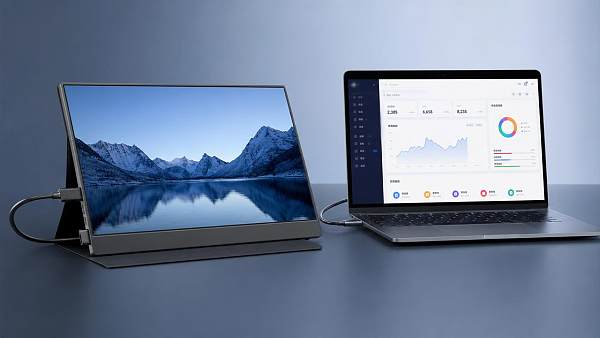
The appeal is obvious. A slim second display promises dual-screen productivity without a fixed desk setup. Product pages highlight full HD or 4K resolution, USB-C simplicity, low weight, and travel-friendly dimensions. On paper, that combination feels modern, efficient, and almost frictionless.
But actual ownership often reveals a different story. Many portable monitors are technically impressive while being ergonomically awkward. They may be thin yet flimsy, sharp yet too dim, easy to connect in theory yet picky about ports and cables. The gap between specifications and user satisfaction is where disappointment usually begins.
This is especially true for first-time buyers who assume a portable display will work like a smaller desktop monitor. It usually does not. A portable monitor is a compromise product by design. Its value comes from balancing convenience against image quality, durability, stability, and power needs. If you expect it to behave like a full-size premium display, you may be let down.
What buyers really care about before choosing a portable monitor
Most consumers are not comparing panel technology for fun. They want simple answers to practical questions. Will it work with my laptop, phone, tablet, or game console? Will it be bright enough in a hotel room, airport lounge, or café? Is the stand stable? Does it need a wall charger? Is it durable enough for a backpack? And after the novelty wears off, will I still use it?
Those concerns matter more than marketing claims such as ultra-slim profile or HDR support. A portable monitor can look impressive in a product listing and still create daily annoyances: too many cables, weak speakers, poor viewing angles, unreliable touchscreen behavior, or a cover-stand that collapses under minor movement.
Consumers also care about value. Many portable monitors cost enough that buyers start wondering whether a better laptop, a discounted desktop monitor, or even a tablet would have been the smarter purchase. That is a legitimate concern, because portable displays occupy an awkward middle ground between mobility and performance.
The biggest disappointments: where portable monitors often fall short
The most common frustration is brightness. A monitor can have perfectly acceptable resolution and still feel underwhelming if the display is dim. Many portable monitors are fine in controlled indoor settings but struggle in bright offices or daylight-facing spaces. If you work near windows or move around frequently, brightness can matter more than resolution.
Build quality is another weak point. To stay light and thin, many models use flexible housings and magnetic covers that double as stands. These stands are often serviceable on a table but frustrating on uneven surfaces, small café desks, or laps. Even a good panel feels less premium when the setup wobbles every time you type.
Connectivity is another source of disappointment. USB-C sounds simple, but not every USB-C port supports video output and power in the same way. Some laptops can handle one-cable operation; others need extra power or HDMI plus USB. Buyers who assume universal compatibility are often surprised when setup becomes a cable puzzle.
Audio is usually an afterthought. Built-in speakers, when included, tend to be weak. Touch support is also less useful than many expect unless your device and operating system fully support it. In many cases, touchscreen functionality becomes a feature you pay for but rarely enjoy.
Then there is the issue of durability. Portable monitors are marketed for mobility, yet some feel too fragile for frequent travel. A product designed to move with you should inspire confidence when packed, unpacked, and repositioned often. Not all of them do.
Who should actually buy a portable monitor
Portable monitors make the most sense for people with a clear and repeated need for a second screen away from a fixed workspace. That includes remote workers who regularly travel, students who split time between locations, sales professionals giving demos, and hybrid workers who want a larger setup without carrying a full desktop solution.
They are also useful for users who do a lot of document comparison, spreadsheet work, messaging alongside main tasks, or presentation support. In these scenarios, even a modest second display can reduce task-switching and improve comfort.
Some gamers also enjoy portable monitors for console travel or LAN-style convenience. But gaming buyers should be especially careful. High refresh rate claims, response times, and console compatibility may look attractive, yet the total experience depends on panel quality, input support, power requirements, and whether you are comfortable with a smaller screen in the first place.
On the other hand, if you mostly work at one desk, rarely travel, or only occasionally want extra screen space, a standard desktop monitor often offers far better value. Likewise, if your work depends on color accuracy, high sustained brightness, or long hours of ergonomic comfort, a portable monitor may feel like the wrong compromise.
Who is most likely to regret the purchase
Buyers often regret portable monitors when the purchase is driven more by aspiration than routine need. It is easy to imagine a stylish mobile workstation used in airports, co-working spaces, and hotels. In reality, many people spend most of their time at home or in one office, where a regular monitor would deliver a better experience for less money.
People who dislike cable clutter may also be disappointed. Unless your laptop and monitor support true one-cable operation reliably, portable monitors can add friction instead of removing it. If convenience is your top priority, make sure the connectivity setup is genuinely simple for your device.
Another regret group is buyers who focus on resolution while ignoring usability. A 4K portable monitor sounds premium, but on a small screen it may not transform your workflow the way stronger brightness, a better stand, or lower weight would. The most satisfying product is not always the one with the biggest spec headline.
Frequent travelers who pack tightly or work in demanding environments may also regret choosing a model that looks elegant but feels delicate. Mobility is not only about weight. It is also about confidence, setup speed, and how well the monitor handles repeated real-world use.
How to evaluate a portable monitor beyond the marketing page
Start with your actual use pattern, not the product description. Ask yourself where you will use it most: hotel desks, kitchen tables, client meetings, trains, dorm rooms, or a permanent home office. The answer changes everything. A model that is ideal for occasional travel may be poor for full-day productivity, while a sturdy high-brightness option may be too heavy for frequent carry.
Next, verify compatibility in detail. Do not stop at “USB-C supported.” Check whether your laptop’s USB-C port supports DisplayPort Alt Mode, whether the monitor can be powered from that port, and whether your phone, tablet, or console needs adapters. This one step prevents a large share of user frustration.
Pay close attention to brightness, stand design, and weight. These three factors often matter more than shoppers expect. Brightness affects whether the screen is pleasant to use. Stand design affects whether the screen feels stable and comfortable. Weight affects whether you will bring it along consistently or leave it at home.
Also consider power behavior. Some portable monitors draw enough power to noticeably reduce laptop battery life. Others perform best only when connected to external power. If your goal is mobile productivity away from outlets, this is a crucial trade-off.
Finally, read reviews that describe long-term use, not just unboxing impressions. Early excitement often hides issues that become obvious later: loose covers, port wear, inconsistent brightness, awkward menus, or poor day-to-day portability.
Features that matter more than the spec sheet suggests
Brightness is near the top of the list because it directly affects usability. A monitor that looks good only in ideal indoor lighting is less versatile than many buyers assume. If you move between spaces, a brighter panel often delivers more real value than higher resolution.
A stable stand or case matters more than many people expect. Since portable monitors are frequently used in temporary workspaces, weak support can turn every session into a small annoyance. Good ergonomics are not just about comfort; they influence whether the device becomes part of your routine or ends up unused.
Port placement is another underrated factor. Side-mounted ports, cable direction, and ease of access affect whether the setup feels tidy or messy. Small design choices can make a big difference when space is limited.
Protective design also deserves attention. A screen meant for travel should have a cover or casing that does more than look sleek in product photos. Real usefulness includes resistance to pressure in bags, confidence during transport, and fewer worries about scratches or corner impacts.
When a portable monitor is genuinely worth it
A portable monitor is worth it when it consistently solves a recurring problem. If you travel weekly and need dual screens for documents, dashboards, customer calls, or focused multitasking, the productivity gain can be real. In that case, the convenience of a second display outweighs the compromises.
It can also be worth it for users who need flexibility across rooms or locations but do not want multiple permanent monitors. For example, someone working from home in limited space may appreciate a screen that can appear when needed and disappear when not.
The key is repeated use. If the monitor will support your workflow several times a week, it is easier to justify the price and adapt to the limitations. If it is only for occasional trips or rare tasks, the cost-benefit case weakens quickly.
Better alternatives for some buyers
If your work is mostly desk-based, a standard monitor is usually the better buy. You will often get better brightness, ergonomics, connectivity, and overall viewing comfort for the same or lower price. That makes desktop monitors a stronger value choice for many households.
For highly mobile users, a tablet with keyboard support may sometimes be the smarter solution, especially if you want flexibility rather than just a second screen. Tablets can handle communication, light productivity, and entertainment in one device, while a portable monitor depends on another host device to be useful.
Some buyers may also be better served by improving their laptop setup first. A larger or better-quality laptop screen, a lighter charger, or a more efficient docking routine can deliver more daily benefit than adding a separate display.
Final verdict: should you trust the promise of portable monitors?
Portable monitors are not bad products. The problem is that they are often sold as universally smart upgrades when they are actually niche tools with clear trade-offs. They look excellent on paper because the concept is strong: extra screen space anywhere. They disappoint when buyers assume the real-world experience will be as seamless as the idea.
If you understand the compromises and have a real mobile workflow that benefits from a second display, a portable monitor can be a practical and satisfying purchase. If you are buying based on aesthetics, spec headlines, or an imagined future routine, disappointment is much more likely.
The smartest approach is to judge portable monitors by real use, not by promise. Focus on brightness, compatibility, stability, power needs, and how often you will truly carry and use one. That is where the difference lies between a clever productivity tool and an expensive accessory that spends most of its life in a drawer.
Get weekly intelligence in your inbox.
No noise. No sponsored content. Pure intelligence.
 Sep 21, 2026What to Look for in a Grid Integration Company for Utility-Scale Solar ProjectsWhat to Look for in a Grid Integration Company for Utility-Scale Solar Projects
 Sep 20, 2026Microgrid Controller Pricing: What Drives Cost in Commercial Energy Projects?Microgrid Controller Pricing: What Drives Cost in Commercial Energy Projects?
 Sep 19, 2026How to Choose a GaN Charger for Laptops Without Compromising Power or PortabilityHow to Choose a GaN Charger for Laptops Without Compromising Power or Portability
 Sep 18, 2026Floating Solar Farm Costs: CAPEX, OPEX, and the Site Factors That Shape ROIFloating Solar Farm Costs: CAPEX, OPEX, and the Site Factors That Shape ROI
 Sep 17, 2026Drone Delivery Solutions for Last-Mile Routes: Site, Payload, and Range PlanningDrone Delivery Solutions for Last-Mile Routes: Site, Payload, and Range Planning
 Sep 16, 2026When Low-Volume Electronics Manufacturing Makes More Sense Than Mass ProductionWhen Low-Volume Electronics Manufacturing Makes More Sense Than Mass Production
 Sep 15, 2026Wholesale WiFi Smart Switches: What Buyers Should Verify Before OrderingWholesale WiFi Smart Switches: What Buyers Should Verify Before Ordering
 Sep 14, 2026How to Select IoT Sensors for Reliable Monitoring in Harsh Industrial EnvironmentsHow to Select IoT Sensors for Reliable Monitoring in Harsh Industrial Environments
 Sep 13, 2026How Procurement Teams Can Improve Supplier Reliability With Supply Chain VisibilityHow Procurement Teams Can Improve Supplier Reliability With Supply Chain Visibility
 Sep 12, 2026Smart Manufacturing Trends 2026: What Leaders Should Prioritize for ROISmart Manufacturing Trends 2026: What Leaders Should Prioritize for ROI
 Sep 11, 2026B2B Market Analysis: How Buyers Evaluate Suppliers, Pricing, and Delivery RiskB2B Market Analysis: How Buyers Evaluate Suppliers, Pricing, and Delivery Risk
 Sep 10, 2026Residential Solar Kits in Canada: How to Size a System for Your Home and ClimateResidential Solar Kits in Canada: How to Size a System for Your Home and Climate
 Sep 09, 2026How to Specify a Syringe Assembly Line for High-Volume Sterile ProductionHow to Specify a Syringe Assembly Line for High-Volume Sterile Production
 Sep 08, 2026How to Evaluate Warehouse Robotics System Suppliers for Reliable Multi-Site DeploymentHow to Evaluate Warehouse Robotics System Suppliers for Reliable Multi-Site Deployment
 Sep 07, 2026Renewable Geothermal Energy Explained: How It Works for Heating and PowerRenewable Geothermal Energy Explained: How It Works for Heating and Power
 Sep 07, 2026How to Choose an Industrial Packaging Robot Manufacturer for Your Production LineHow to Choose an Industrial Packaging Robot Manufacturer for Your Production Line
 Sep 05, 2026How to Evaluate a Turnkey Hydro Turbine Generator Supplier for Remote Power ProjectsHow to Evaluate a Turnkey Hydro Turbine Generator Supplier for Remote Power Projects
 Sep 04, 2026Automated Ultrasonic Welding for Thermoplastic Assemblies: Process Controls That MatterAutomated Ultrasonic Welding for Thermoplastic Assemblies: Process Controls That Matter
 Sep 03, 2026Energy Forecasting for Grid Planning: Sizing Solar and Storage CapacityEnergy Forecasting for Grid Planning: Sizing Solar and Storage Capacity
 Sep 02, 2026Which Metrics Should an Energy Analytics Dashboard Track for Factory Energy Management?Which Metrics Should an Energy Analytics Dashboard Track for Factory Energy Management?
 Sep 01, 2026How Warehouse Voice Picking Improves Accuracy and Throughput in Order FulfillmentHow Warehouse Voice Picking Improves Accuracy and Throughput in Order Fulfillment
 Aug 31, 2026How to Automate Dropshipping Order Processing Without Overselling StockHow to Automate Dropshipping Order Processing Without Overselling Stock
 Aug 30, 2026How to Evaluate a Smart Lighting Supplier for Multi-Site Commercial ProjectsHow to Evaluate a Smart Lighting Supplier for Multi-Site Commercial Projects
 Aug 29, 2026Recent Advances in Smart Manufacturing and Materials Reshaping Factory InvestmentRecent Advances in Smart Manufacturing and Materials Reshaping Factory Investment
 Aug 29, 2026Selecting Lightweight Aluminum Extrusions for Strength-Critical Industrial DesignsSelecting Lightweight Aluminum Extrusions for Strength-Critical Industrial Designs
 Aug 29, 2026Vertical Powder Anodizing Explained: Process Controls for Uniform Coating QualityVertical Powder Anodizing Explained: Process Controls for Uniform Coating Quality
 Aug 29, 2026PV Module Product Due Diligence: What Buyers Should Verify Before ContractingPV Module Product Due Diligence: What Buyers Should Verify Before Contracting