USB C docking stations and the bandwidth bottleneck issue
USB C docking stations promise one-cable simplicity, but bandwidth limits can quickly turn convenience into performance frustration. For everyday users and operators managing multiple displays, peripherals, and high-speed data transfers, understanding this bottleneck is essential. This article explains why bandwidth issues happen, how they affect real-world workflows, and what to look for when choosing a docking solution that delivers stable, efficient connectivity.
Why a checklist is the fastest way to judge bandwidth problems
Most users do not struggle because a dock is “bad” in general. They struggle because the total data demand from displays, storage, networking, charging, and USB devices exceeds what the connection between the host and the dock can actually carry. That is why usb c docking stations often look similar on product pages yet behave very differently at the desk.
A checklist-based approach helps operators avoid vague marketing terms and focus on practical limits: host port capability, display resolution, refresh rate, protocol support, power delivery, and how the dock shares bandwidth internally. In business environments where uptime matters, this is more useful than comparing ports alone. For professionals sourcing accessories through expert platforms such as TradeNexus Pro, these checks also create a clearer basis for vendor comparison and procurement decisions.
Start here: the five checks that matter most
Before buying or troubleshooting usb c docking stations, prioritize these checks in order. If one fails, the whole setup may underperform even if every cable is plugged in correctly.
- Check 1: Confirm the host port standard. USB-C is only the connector shape. The actual capability may be USB 3.2, USB4, Thunderbolt 3, or Thunderbolt 4. A laptop with a basic USB-C port may physically fit the dock but still lack enough bandwidth for dual 4K displays plus fast storage.
- Check 2: Count total display demand. One 1080p monitor is easy. Dual 1440p displays are more demanding. Dual 4K, especially at 60Hz or above, can become the main source of congestion. If the dock uses DisplayLink, performance depends partly on software compression and CPU resources.
- Check 3: Review high-speed peripheral usage. External SSDs, capture devices, webcams, and 2.5GbE adapters all compete for bandwidth. Users often assume video output and data transfer are separate, but many docks share the same upstream link.
- Check 4: Verify power delivery requirements. Some docks charge at 60W, others at 85W, 90W, or more. If the laptop needs higher power than the dock can supply, performance throttling or battery drain may occur during heavy workloads.
- Check 5: Read the resolution-and-port matrix. The fine print usually shows what combinations are possible. A dock may support dual displays only at lower refresh rates, or it may disable certain USB speeds when multiple monitors are connected.
Understand the bottleneck: where bandwidth is really being lost
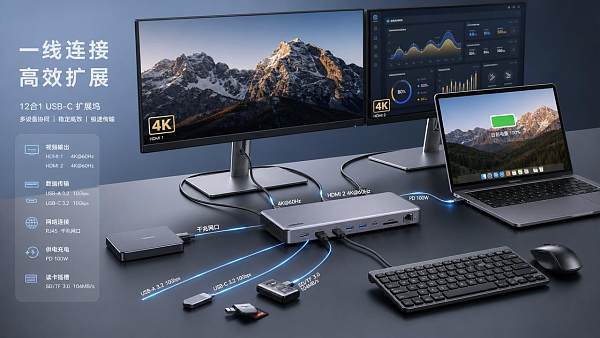
The bottleneck in usb c docking stations usually appears at the upstream connection between the computer and the dock, not at the individual port you are using. Think of the dock as a traffic manager. It may offer HDMI, DisplayPort, Ethernet, USB-A, USB-C, audio, and card readers, but all those functions often share one main data path back to the computer.
Display output is often the biggest consumer. Higher resolution and refresh rate dramatically increase demand. Once video takes a large share, there may be less room for storage traffic or network throughput. This is why users may notice stuttering external drives, laggy webcams, or reduced network speed when extra monitors are attached.
Another common issue is lane allocation. Some USB-C implementations split available lanes between video and data. In practice, that means enabling more display bandwidth can reduce USB data speed. Without understanding this tradeoff, operators may believe the dock is defective when it is actually working within design limits.
Use this practical judging standard before choosing a dock
When comparing usb c docking stations, do not start with the number of ports. Start with the workload profile. The right dock for office productivity is not always the right dock for engineering, media transfer, or multi-display operations.
Profile A: Standard office productivity
If the user runs email, browser tabs, office software, a headset, keyboard, mouse, and one or two 1080p displays, a mid-range dock may be sufficient. In this case, stability, charging, and port reliability matter more than absolute throughput.
Profile B: Multi-display operations
If the desk setup includes dual 1440p or dual 4K displays, prioritize dock models with clearly stated display support, verified host compatibility, and enough upstream bandwidth. This is where higher-end USB4 or Thunderbolt-based solutions generally perform better.
Profile C: Data-heavy workflows
If the user frequently moves large files to external SSDs while also driving external displays, then shared-bandwidth limits become critical. Look for docks that specify high-speed data support under active display loads, not just in ideal single-use conditions.
Profile D: Mixed enterprise desks
For IT teams or procurement managers standardizing across many employees, consistency is key. A slightly more capable dock can reduce support tickets caused by hidden compatibility differences among laptops. This matters in scalable B2B deployment planning and is exactly the kind of evaluation framework decision-makers seek on intelligence-led platforms like TradeNexus Pro.
Checklist of overlooked details that often cause performance frustration
- The cable is not fully featured. Many users upgrade the dock but keep a low-spec USB-C cable that cannot carry the required video, data, and power combination.
- The laptop port is limited. One USB-C port on a device may support charging only, while another supports data and display output.
- Refresh rate is ignored. A setup that works at 4K 30Hz may fail or downgrade at 4K 60Hz.
- Driver dependence is underestimated. Some docks, especially DisplayLink-based models, rely on software drivers. In managed enterprise systems, update policies can affect user experience.
- Ethernet expectations are too high. A dock may include Gigabit Ethernet, but network speed can still be affected when storage and displays are heavily active.
- Power adapters are swapped. Using a lower-wattage adapter than the dock requires can reduce charging stability and downstream performance.
How to test usb c docking stations in real-world conditions
A good test should mirror the actual desk workflow, not just a clean lab setup. Operators can use a simple sequence to identify where the bandwidth bottleneck appears.
- Connect the dock with the certified cable supplied by the vendor.
- Attach the intended displays first and confirm resolution plus refresh rate.
- Add Ethernet and run a network speed check.
- Transfer a large file to an external SSD while displays remain active.
- Join a video call or activate a webcam to observe any lag, frame drops, or audio issues.
- Check whether the laptop is charging at an acceptable rate under load.
If performance drops only after a specific device is added, the bottleneck is easier to identify. This method also helps purchasing teams create a repeatable validation process before a larger deployment.
A simple decision framework for buyers and operators
Use the following judging logic when selecting among usb c docking stations:
Choose a basic dock if the setup is one display, standard USB accessories, and moderate charging needs. Choose a higher-bandwidth dock if the setup includes multiple high-resolution displays, fast storage, wired networking, or demanding multitasking. Choose a managed, enterprise-friendly solution if you need firmware support, compatibility documentation, and predictable behavior across many devices.
The best choice is rarely the cheapest or the one with the most visible ports. It is the model whose real bandwidth behavior matches the user’s workflow and the company’s support tolerance.
FAQ: quick answers users search for
Why do usb c docking stations lag when two monitors are connected?
Because dual displays can consume a large share of available bandwidth, leaving less capacity for storage, network, and USB devices. The issue is more common when the host port has lower bandwidth or the dock shares lanes aggressively.
Can a better cable fix docking station performance?
Sometimes, yes. A full-featured cable can improve support for power, video, and high-speed data. However, a cable cannot overcome the hard bandwidth limit of the host port or dock chipset.
Are Thunderbolt docks always better than standard USB-C docks?
Not always, but they are often better for demanding multi-display and high-speed data scenarios. The value depends on whether the laptop also supports the same standard.
Final action guide: what to confirm before you buy or standardize
Before choosing usb c docking stations for personal use, team deployment, or channel sourcing, confirm six points: the exact host port standard, the display plan, required refresh rates, power delivery needs, expected data workload, and whether your environment allows needed drivers or firmware updates. These six items prevent most mismatches.
If you need to move forward with a purchasing decision, vendor shortlist, or enterprise rollout, the most useful next questions are practical: Which laptop models must be supported? How many displays per user? What file transfer speeds are required during active display use? Is centralized IT management needed? What is the acceptable power range? What is the budget per desk and the expected deployment timeline?
For organizations navigating cross-border sourcing, technical comparisons, and supplier evaluation, this structured approach turns bandwidth confusion into a measurable buying decision. That is the kind of signal-driven assessment that helps users, operators, and procurement leaders choose docking solutions with fewer surprises and stronger long-term reliability.
Get weekly intelligence in your inbox.
No noise. No sponsored content. Pure intelligence.
 Sep 21, 2026What to Look for in a Grid Integration Company for Utility-Scale Solar ProjectsWhat to Look for in a Grid Integration Company for Utility-Scale Solar Projects
 Sep 20, 2026Microgrid Controller Pricing: What Drives Cost in Commercial Energy Projects?Microgrid Controller Pricing: What Drives Cost in Commercial Energy Projects?
 Sep 19, 2026How to Choose a GaN Charger for Laptops Without Compromising Power or PortabilityHow to Choose a GaN Charger for Laptops Without Compromising Power or Portability
 Sep 18, 2026Floating Solar Farm Costs: CAPEX, OPEX, and the Site Factors That Shape ROIFloating Solar Farm Costs: CAPEX, OPEX, and the Site Factors That Shape ROI
 Sep 17, 2026Drone Delivery Solutions for Last-Mile Routes: Site, Payload, and Range PlanningDrone Delivery Solutions for Last-Mile Routes: Site, Payload, and Range Planning
 Sep 16, 2026When Low-Volume Electronics Manufacturing Makes More Sense Than Mass ProductionWhen Low-Volume Electronics Manufacturing Makes More Sense Than Mass Production
 Sep 15, 2026Wholesale WiFi Smart Switches: What Buyers Should Verify Before OrderingWholesale WiFi Smart Switches: What Buyers Should Verify Before Ordering
 Sep 14, 2026How to Select IoT Sensors for Reliable Monitoring in Harsh Industrial EnvironmentsHow to Select IoT Sensors for Reliable Monitoring in Harsh Industrial Environments
 Sep 13, 2026How Procurement Teams Can Improve Supplier Reliability With Supply Chain VisibilityHow Procurement Teams Can Improve Supplier Reliability With Supply Chain Visibility
 Sep 12, 2026Smart Manufacturing Trends 2026: What Leaders Should Prioritize for ROISmart Manufacturing Trends 2026: What Leaders Should Prioritize for ROI
 Sep 11, 2026B2B Market Analysis: How Buyers Evaluate Suppliers, Pricing, and Delivery RiskB2B Market Analysis: How Buyers Evaluate Suppliers, Pricing, and Delivery Risk
 Sep 10, 2026Residential Solar Kits in Canada: How to Size a System for Your Home and ClimateResidential Solar Kits in Canada: How to Size a System for Your Home and Climate
 Sep 09, 2026How to Specify a Syringe Assembly Line for High-Volume Sterile ProductionHow to Specify a Syringe Assembly Line for High-Volume Sterile Production
 Sep 08, 2026How to Evaluate Warehouse Robotics System Suppliers for Reliable Multi-Site DeploymentHow to Evaluate Warehouse Robotics System Suppliers for Reliable Multi-Site Deployment
 Sep 07, 2026Renewable Geothermal Energy Explained: How It Works for Heating and PowerRenewable Geothermal Energy Explained: How It Works for Heating and Power
 Sep 07, 2026How to Choose an Industrial Packaging Robot Manufacturer for Your Production LineHow to Choose an Industrial Packaging Robot Manufacturer for Your Production Line
 Sep 05, 2026How to Evaluate a Turnkey Hydro Turbine Generator Supplier for Remote Power ProjectsHow to Evaluate a Turnkey Hydro Turbine Generator Supplier for Remote Power Projects
 Sep 04, 2026Automated Ultrasonic Welding for Thermoplastic Assemblies: Process Controls That MatterAutomated Ultrasonic Welding for Thermoplastic Assemblies: Process Controls That Matter
 Sep 03, 2026Energy Forecasting for Grid Planning: Sizing Solar and Storage CapacityEnergy Forecasting for Grid Planning: Sizing Solar and Storage Capacity
 Sep 02, 2026Which Metrics Should an Energy Analytics Dashboard Track for Factory Energy Management?Which Metrics Should an Energy Analytics Dashboard Track for Factory Energy Management?
 Sep 01, 2026How Warehouse Voice Picking Improves Accuracy and Throughput in Order FulfillmentHow Warehouse Voice Picking Improves Accuracy and Throughput in Order Fulfillment
 Aug 31, 2026How to Automate Dropshipping Order Processing Without Overselling StockHow to Automate Dropshipping Order Processing Without Overselling Stock
 Aug 30, 2026How to Evaluate a Smart Lighting Supplier for Multi-Site Commercial ProjectsHow to Evaluate a Smart Lighting Supplier for Multi-Site Commercial Projects
 Aug 29, 2026Recent Advances in Smart Manufacturing and Materials Reshaping Factory InvestmentRecent Advances in Smart Manufacturing and Materials Reshaping Factory Investment
 Aug 29, 2026Selecting Lightweight Aluminum Extrusions for Strength-Critical Industrial DesignsSelecting Lightweight Aluminum Extrusions for Strength-Critical Industrial Designs
 Aug 29, 2026Vertical Powder Anodizing Explained: Process Controls for Uniform Coating QualityVertical Powder Anodizing Explained: Process Controls for Uniform Coating Quality
 Aug 29, 2026PV Module Product Due Diligence: What Buyers Should Verify Before ContractingPV Module Product Due Diligence: What Buyers Should Verify Before Contracting