Why smart lighting bulbs flicker even in new installations
Even in brand-new setups, smart lighting bulbs can still flicker—turning a simple installation into a frustrating callback for maintenance teams. From incompatible dimmers and unstable voltage to wiring faults and driver sensitivity, the causes are often more technical than they first appear. This article breaks down why smart lighting bulbs flicker in new installations and how after-sales professionals can diagnose the issue faster, reduce repeat service visits, and restore reliable performance.
Why do smart lighting bulbs flicker in new installations?
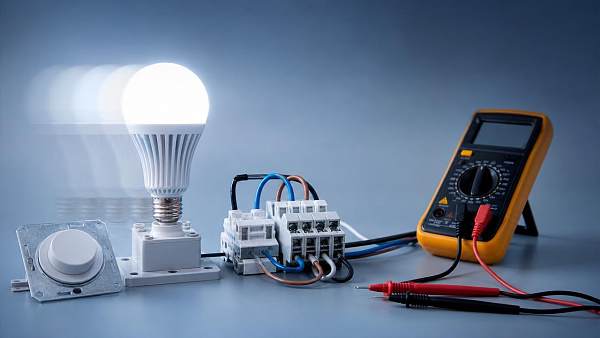
For after-sales maintenance personnel, flicker in a newly installed system is rarely just a “bad bulb” problem. In many cases, smart lighting bulbs are responding to upstream electrical conditions, control-device mismatch, or installation details that were overlooked during commissioning. Because these lamps contain drivers, wireless modules, and sensitive control circuits, they react differently from standard incandescent or basic LED products.
The practical challenge is that a new installation creates an assumption of correctness. Site teams may insist the wiring is new, the switch is new, and the lamp is new, so the product gets blamed first. That assumption can waste service hours, trigger unnecessary replacements, and inflate warranty cost. A structured fault path is more effective than swapping components at random.
In mixed-use facilities, offices, smart homes, clinics, workshops, and retrofit commercial sites, smart lighting bulbs can flicker due to a combination of low-load dimmer behavior, neutral leakage, poor driver compatibility, voltage fluctuation, electromagnetic interference, or firmware handshaking issues. Understanding which category the symptom belongs to is the fastest route to resolution.
- Short, irregular flicker often points to unstable mains voltage, loose terminals, or intermittent communication resets.
- Repeated pulsing at low brightness frequently indicates dimmer incompatibility or poor minimum-load behavior.
- Flicker when another device starts up can suggest shared-circuit disturbance, driver sensitivity, or power-quality issues.
- Flicker only in grouped control scenes may indicate software, gateway, or mesh-network synchronization issues.
What are the most common root causes maintenance teams should check first?
When smart lighting bulbs flicker in a new installation, first-line troubleshooting should focus on the highest-probability faults rather than the most visible component. A stable diagnostic sequence helps service teams reduce return visits and gives procurement or project managers a clearer record of whether the issue is product-related, installation-related, or system-related.
Top failure points in the field
- Incompatible dimmers. Many smart lighting bulbs are not designed to work with legacy TRIAC wall dimmers, especially in retrofits where existing controls were retained.
- Loose neutral or line connections. New installations can still have torque issues, poor terminal seating, or damaged conductors inside back boxes and junction points.
- Voltage instability. Long cable runs, heavily loaded circuits, or shared industrial environments can produce fluctuations that sensitive drivers translate into visible flicker.
- Driver and control sensitivity. Some bulbs react poorly to low standby current, switch leakage, or capacitive coupling from parallel wiring.
- Firmware or pairing issues. Smart lighting bulbs may flicker during provisioning, repeated reboots, or failed mesh synchronization.
The table below helps maintenance personnel separate symptom patterns from likely causes, useful tools, and first actions on site.
A table like this is especially useful in cross-functional projects where electrical contractors, facility managers, and procurement teams need the same troubleshooting language. It also helps document whether smart lighting bulbs failed due to product defect or integration mismatch.
How should after-sales teams diagnose smart lighting bulbs step by step?
A disciplined service workflow matters more than fast assumptions. In new installations, many callbacks happen because the first visit resolves the symptom temporarily but not the cause. For after-sales maintenance personnel, the target is not just to stop the flicker today, but to avoid another site visit next week.
Recommended field sequence
- Confirm the exact behavior: constant flicker, pulsing, off-state glow, low-dim flutter, or scene-triggered instability.
- Isolate the bulb from smart controls where possible. Test with a known stable on/off supply and no dimmer.
- Inspect the circuit path: line, neutral, earth continuity, switch type, junction terminations, and any shared loads.
- Measure voltage behavior under normal load and during switching events from nearby equipment.
- Review firmware, hub pairing, scene logic, and control topology if the issue appears only in smart mode.
- Substitute one known-compatible lamp or control device before replacing the whole batch.
This process narrows the issue quickly. If the bulb performs correctly on a non-dimmed, stable circuit, the service team can stop treating the lamp as the primary suspect and move upstream toward control and power-quality analysis.
What data should be recorded on every call?
- Lamp type, wattage, protocol, and quantity on the same circuit.
- Whether a dimmer, illuminated switch, sensor, relay, or smart hub is present.
- Circuit length, load sharing, and whether motors, HVAC units, or power supplies switch nearby.
- Voltage readings, frequency stability, and the exact time or trigger of flicker events.
Which installation scenarios create the highest flicker risk?
Not every new installation carries the same risk. Smart lighting bulbs behave differently in simple residential circuits than in complex mixed-load environments. For maintenance teams supporting multiple sectors, scenario awareness improves triage speed and spare-parts planning.
The following table compares common environments where smart lighting bulbs are deployed and the risk factors most likely to trigger flicker soon after commissioning.
This comparison matters in procurement and support planning. The correct response for a residential dimmer issue is very different from the response required in a supply-chain warehouse or healthcare environment where uptime, visibility, and complaint tolerance are more demanding.
What should procurement and service teams check before selecting smart lighting bulbs?
Many flicker complaints originate before installation, during specification. If the buying team chooses smart lighting bulbs based only on price, brightness, or app features, service teams inherit the operational risk. A better approach is to align product selection with the actual electrical environment and support conditions.
Selection checkpoints that reduce callbacks
- Confirm whether the site uses non-dim, trailing-edge dim, leading-edge dim, relay, or sensor-based switching.
- Review supported voltage range and expected tolerance in local supply conditions.
- Ask for low-flicker performance information where visual comfort or technical tasks matter.
- Check whether firmware updates, reset methods, and local override control are practical for field teams.
- Verify operating environment, heat dissipation limits, and enclosed-fixture restrictions.
The next table can be used as a practical pre-purchase review sheet for cross-functional teams handling smart lighting bulbs in new builds, retrofits, or distributed service contracts.
For organizations managing multiple sites, this is where market intelligence becomes valuable. TradeNexus Pro helps buyers and technical teams compare technology maturity, supplier responsiveness, and integration practicality across smart electronics and adjacent sectors rather than relying only on catalog claims.
Which standards and compliance considerations matter?
After-sales teams do not always control procurement, but they often face the consequences of weak specification. In professional projects, smart lighting bulbs should be assessed not only for connectivity and brightness but also for electrical safety, electromagnetic compatibility, and performance consistency relevant to the market where they are installed.
Practical compliance checkpoints
- Electrical safety conformity appropriate to the destination market should be verified before rollout.
- EMC expectations are important in environments with dense electronics, automation systems, and wireless devices.
- Low-flicker or visual comfort requirements may be relevant in healthcare, office, education, and precision-task spaces.
- Documentation for installation method, control compatibility, and operating limits should be available to service teams, not only to buyers.
Where projects span multiple countries or sectors, fragmented documentation becomes a real support problem. One advantage of an intelligence-led platform such as TradeNexus Pro is the ability to connect technical review, supplier communication, and regional compliance expectations into one procurement conversation, reducing the risk of incompatible smart lighting bulbs entering the field.
Common misconceptions about flickering smart lighting bulbs
Several field assumptions continue to create unnecessary replacements and poor root-cause analysis. Correcting them can improve first-time fix rates.
Misconception 1: New wiring means the circuit is fault-free
New does not mean verified. Loose terminations, mixed neutrals, incorrect switch selection, or untested dimmer retention can all exist in fresh installations. Commissioning quality varies by contractor and schedule pressure.
Misconception 2: All LED-compatible dimmers work with smart lighting bulbs
“LED-compatible” is too broad. A dimmer that works with a basic LED lamp may still perform poorly with a connected bulb that contains additional electronics, standby power needs, and communication circuitry.
Misconception 3: Flicker always means product defect
Product failure is possible, but field data often shows system interaction as the main cause. Replacing the lamp without checking the control path can hide the problem temporarily while leaving the site vulnerable to repeat failure.
FAQ for after-sales maintenance personnel
Can smart lighting bulbs flicker even if the voltage reading looks normal?
Yes. A static voltage reading may look acceptable while short-duration dips, waveform distortion, or switching transients still affect the driver. If smart lighting bulbs flicker only during equipment startup or scene changes, use a more detailed power-quality check instead of relying on a quick multimeter reading alone.
Should a maintenance team remove the dimmer first when troubleshooting?
In many retrofit cases, yes. Temporarily testing the bulb on a direct on/off circuit is one of the fastest ways to rule in or rule out dimmer incompatibility. It is not the final fix by itself, but it prevents wasted time on unrelated theories.
Are smart lighting bulbs suitable for every new commercial project?
Not automatically. They are suitable when the control architecture, electrical conditions, and support process are aligned. In large commercial environments, integrated luminaires or professional control systems may be more appropriate than consumer-style bulbs, depending on maintenance access, scalability, and compatibility requirements.
What information should be sent to procurement after a flicker incident?
Provide the circuit type, switch or dimmer model, quantity of lamps on the circuit, symptom timing, test results with alternate controls, and any measured voltage behavior. This allows procurement and engineering teams to adjust future smart lighting bulbs specifications instead of repeating the same mismatch across more sites.
Why choose us for smarter sourcing and faster troubleshooting insight?
TradeNexus Pro supports decision-makers who need more than product listings. For teams dealing with flickering smart lighting bulbs, we help connect technical symptoms with sourcing reality: supplier positioning, compatibility risk, sector-specific deployment patterns, and service implications across Advanced Manufacturing, Green Energy, Smart Electronics, Healthcare Technology, and Supply Chain SaaS.
If your organization is evaluating smart lighting bulbs for new projects or trying to reduce after-sales cost, you can consult with us on practical issues such as parameter confirmation, control compatibility, product selection, sample support, delivery lead times, regional compliance expectations, and quotation alignment for multi-site rollouts.
For exporters, OEMs, procurement teams, and service managers, TNP provides a focused environment to compare technical pathways, identify supply-chain signals, and turn field problems into better purchasing standards. That means fewer avoidable callbacks, clearer specifications, and more reliable lighting performance from the start.
Get weekly intelligence in your inbox.
No noise. No sponsored content. Pure intelligence.
 Sep 21, 2026What to Look for in a Grid Integration Company for Utility-Scale Solar ProjectsWhat to Look for in a Grid Integration Company for Utility-Scale Solar Projects
 Sep 20, 2026Microgrid Controller Pricing: What Drives Cost in Commercial Energy Projects?Microgrid Controller Pricing: What Drives Cost in Commercial Energy Projects?
 Sep 19, 2026How to Choose a GaN Charger for Laptops Without Compromising Power or PortabilityHow to Choose a GaN Charger for Laptops Without Compromising Power or Portability
 Sep 18, 2026Floating Solar Farm Costs: CAPEX, OPEX, and the Site Factors That Shape ROIFloating Solar Farm Costs: CAPEX, OPEX, and the Site Factors That Shape ROI
 Sep 17, 2026Drone Delivery Solutions for Last-Mile Routes: Site, Payload, and Range PlanningDrone Delivery Solutions for Last-Mile Routes: Site, Payload, and Range Planning
 Sep 16, 2026When Low-Volume Electronics Manufacturing Makes More Sense Than Mass ProductionWhen Low-Volume Electronics Manufacturing Makes More Sense Than Mass Production
 Sep 15, 2026Wholesale WiFi Smart Switches: What Buyers Should Verify Before OrderingWholesale WiFi Smart Switches: What Buyers Should Verify Before Ordering
 Sep 14, 2026How to Select IoT Sensors for Reliable Monitoring in Harsh Industrial EnvironmentsHow to Select IoT Sensors for Reliable Monitoring in Harsh Industrial Environments
 Sep 13, 2026How Procurement Teams Can Improve Supplier Reliability With Supply Chain VisibilityHow Procurement Teams Can Improve Supplier Reliability With Supply Chain Visibility
 Sep 12, 2026Smart Manufacturing Trends 2026: What Leaders Should Prioritize for ROISmart Manufacturing Trends 2026: What Leaders Should Prioritize for ROI
 Sep 11, 2026B2B Market Analysis: How Buyers Evaluate Suppliers, Pricing, and Delivery RiskB2B Market Analysis: How Buyers Evaluate Suppliers, Pricing, and Delivery Risk
 Sep 10, 2026Residential Solar Kits in Canada: How to Size a System for Your Home and ClimateResidential Solar Kits in Canada: How to Size a System for Your Home and Climate
 Sep 09, 2026How to Specify a Syringe Assembly Line for High-Volume Sterile ProductionHow to Specify a Syringe Assembly Line for High-Volume Sterile Production
 Sep 08, 2026How to Evaluate Warehouse Robotics System Suppliers for Reliable Multi-Site DeploymentHow to Evaluate Warehouse Robotics System Suppliers for Reliable Multi-Site Deployment
 Sep 07, 2026Renewable Geothermal Energy Explained: How It Works for Heating and PowerRenewable Geothermal Energy Explained: How It Works for Heating and Power
 Sep 07, 2026How to Choose an Industrial Packaging Robot Manufacturer for Your Production LineHow to Choose an Industrial Packaging Robot Manufacturer for Your Production Line
 Sep 05, 2026How to Evaluate a Turnkey Hydro Turbine Generator Supplier for Remote Power ProjectsHow to Evaluate a Turnkey Hydro Turbine Generator Supplier for Remote Power Projects
 Sep 04, 2026Automated Ultrasonic Welding for Thermoplastic Assemblies: Process Controls That MatterAutomated Ultrasonic Welding for Thermoplastic Assemblies: Process Controls That Matter
 Sep 03, 2026Energy Forecasting for Grid Planning: Sizing Solar and Storage CapacityEnergy Forecasting for Grid Planning: Sizing Solar and Storage Capacity
 Sep 02, 2026Which Metrics Should an Energy Analytics Dashboard Track for Factory Energy Management?Which Metrics Should an Energy Analytics Dashboard Track for Factory Energy Management?
 Sep 01, 2026How Warehouse Voice Picking Improves Accuracy and Throughput in Order FulfillmentHow Warehouse Voice Picking Improves Accuracy and Throughput in Order Fulfillment
 Aug 31, 2026How to Automate Dropshipping Order Processing Without Overselling StockHow to Automate Dropshipping Order Processing Without Overselling Stock
 Aug 30, 2026How to Evaluate a Smart Lighting Supplier for Multi-Site Commercial ProjectsHow to Evaluate a Smart Lighting Supplier for Multi-Site Commercial Projects
 Aug 29, 2026Recent Advances in Smart Manufacturing and Materials Reshaping Factory InvestmentRecent Advances in Smart Manufacturing and Materials Reshaping Factory Investment
 Aug 29, 2026Selecting Lightweight Aluminum Extrusions for Strength-Critical Industrial DesignsSelecting Lightweight Aluminum Extrusions for Strength-Critical Industrial Designs
 Aug 29, 2026Vertical Powder Anodizing Explained: Process Controls for Uniform Coating QualityVertical Powder Anodizing Explained: Process Controls for Uniform Coating Quality
 Aug 29, 2026PV Module Product Due Diligence: What Buyers Should Verify Before ContractingPV Module Product Due Diligence: What Buyers Should Verify Before Contracting