Biometric safes: fingerprint or keypad for better access
Biometric safes can be excellent for fast, controlled access, but there is no universal winner between fingerprint and keypad entry. In most real-world buying decisions, fingerprint safes are better for speed and convenience, while keypad safes are often better for predictable reliability, multi-user control, and lower failure anxiety. For households, small offices, retail counters, and commercial sites evaluating biometric safes alongside video doorbells, smart security cameras, and matter compatible devices, the right choice comes down to who needs access, how often the safe is opened, what happens if access fails, and how much operational risk you can tolerate.
Fingerprint or keypad: which is actually better for access?
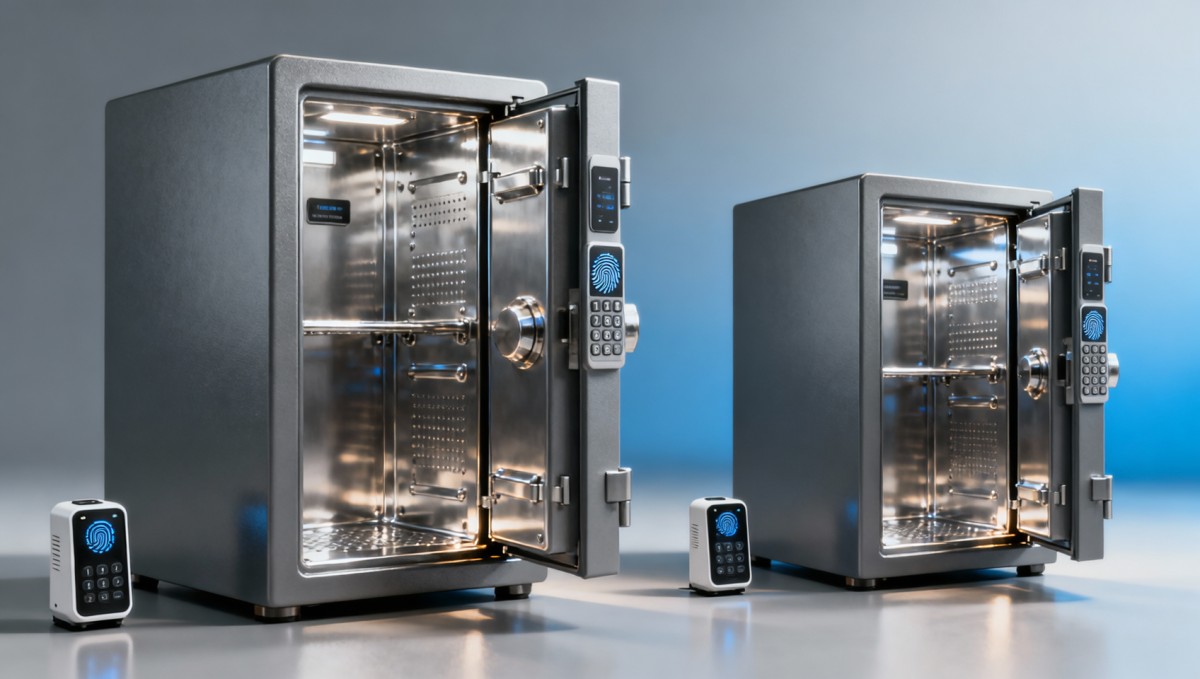
The short answer is this: fingerprint access is usually better when rapid entry matters most, while keypad access is often better when consistency, shared use, and simple backup procedures matter more.
That distinction is important because many buyers start by asking which option is more “advanced,” when the more useful question is which option works better in the exact access environment. A homeowner storing a defensive item may prioritize one-touch entry in low light. A pharmacy, office, or retail operation may care more about user turnover, auditability, and making sure authorized staff can always get in without sensor-related issues.
For most buyers, the decision should be based on five practical factors:
- Speed of access: fingerprint is often faster when the sensor is high quality and the user is enrolled correctly.
- Reliability under real conditions: keypad entry is generally less affected by dirty fingers, moisture, cuts, gloves, or sensor wear.
- User management: keypads are often easier for shared access, temporary codes, and staff changes.
- Failure risk: biometric systems can fail if fingerprints are not recognized; keypads can fail if codes are forgotten or observed.
- Backup options: the best safes do not force buyers to choose one method only, but combine biometric, keypad, and override access.
If you are comparing products for enterprise, commercial, or security-managed environments, the strongest buying position is usually not “fingerprint vs keypad” in isolation. It is choosing a safe with layered access methods and clear fallback procedures.
What do buyers care about most before choosing a biometric safe?
Across consumer and business use cases, the biggest concern is not the marketing claim. It is whether the safe opens when needed and stays locked when it should.
That means target readers typically focus on questions such as:
- Will the fingerprint reader still work with dry skin, sweat, age-related skin changes, or minor cuts?
- How fast can the safe be opened during an urgent situation?
- Can multiple users be enrolled securely without creating confusion?
- What happens if batteries die or electronics fail?
- Is keypad access vulnerable to shoulder surfing or code sharing?
- How difficult is setup, enrollment, and day-to-day operation?
- Does the safe fit home use, office use, retail environments, or regulated storage requirements?
- What is the total value relative to risk, not just the purchase price?
For procurement teams and enterprise decision-makers, there are additional concerns. These include maintenance burden, user training needs, replacement cycle, support quality, false rejection rates, and whether the manufacturer provides credible specifications rather than vague promotional language.
For operators and safety managers, usability under stress matters even more. A theoretically secure safe that causes delays, inconsistent access, or repeated lockouts can create operational friction or even safety exposure.
When fingerprint safes make the most sense
Fingerprint safes are best suited to scenarios where speed and convenience are the primary goals, and where the number of authorized users is relatively limited.
Typical strong-fit scenarios include:
- Home access for quickly retrieving valuables or personal security items.
- Executive office use where one or two people need fast, private access.
- Low-complexity user environments where enrollment can be carefully managed.
- Users who want no-code entry and prefer not to remember combinations.
The biggest advantage of a good fingerprint safe is frictionless access. A properly configured sensor can reduce opening steps, especially in dark rooms or high-stress moments. That ease of use may also improve compliance, because users are more likely to store items securely when access feels simple rather than cumbersome.
However, fingerprint systems are only as good as their sensors, enrollment process, and real-world conditions. Low-cost biometric safes often disappoint because they rely on mediocre readers and weak software. If the safe is expected to perform consistently across multiple users or in environments with dust, grease, moisture, or gloves, fingerprint-only access becomes less attractive.
When keypad safes are the better choice
Keypad safes are usually the safer operational choice when multiple people need access or when reliability must remain predictable across changing physical conditions.
They are often a better fit for:
- Shared business environments such as retail, clinics, workshops, and back offices.
- Teams with rotating users where codes can be updated more easily than biometric enrollment.
- Users wearing gloves or working in dusty, wet, or variable conditions.
- Situations requiring simpler administration for managers or security personnel.
A keypad also avoids one of the most common frustrations in biometric access: false rejection. While keypads create their own risks, such as weak PIN selection, code sharing, or visible wear patterns, those risks are often easier to mitigate through policy and training.
From a business perspective, keypad safes can be easier to standardize. A facilities manager or procurement lead may prefer them because setup is more straightforward, user turnover is simpler to handle, and support issues tend to be easier to diagnose than biometric read failures.
Reliability under stress: the issue that matters more than features
Many buying mistakes happen because buyers compare features instead of failure modes. In access control, reliability is not just about daily convenience. It is about what happens when conditions are imperfect.
Fingerprint readers may struggle with:
- Wet, dirty, or damaged fingers
- Very dry skin or weak fingerprint definition
- Poor initial enrollment
- Low battery power affecting performance
- Cheaper sensors with limited matching accuracy
Keypads may struggle with:
- Forgotten codes
- Shared credentials between unauthorized users
- Code observation in public or semi-public spaces
- Wear traces on frequently used buttons
For quality evaluators and technical assessors, this is where product selection becomes practical. Ask not only how the safe opens, but how it behaves when the user is rushed, tired, wearing gloves, or dealing with a battery warning. A safe that tests well in ideal showroom conditions may underperform in actual field use.
The most dependable products reduce single-point failure by offering at least two access methods. If biometric access is the primary mode, there should be a keypad or secure override option. If keypad access is primary, there should be a robust process for reset and emergency entry.
How to evaluate biometric safes before buying
Whether you are a household buyer, distributor, or B2B procurement specialist, a good decision framework should include more than basic specs.
Use this checklist:
- Check primary use case
Is the safe for quick personal access, shared commercial use, regulated storage, or occasional access to valuables? - Define the user group
How many users need access, how often will they change, and what is their technical comfort level? - Review access redundancy
Does the unit support backup code entry, mechanical override, or emergency power connection? - Assess sensor quality or keypad design
For fingerprint models, look for consistent enrollment and strong recognition reputation. For keypad models, evaluate tactile response, visibility, and secure code management. - Confirm battery and power behavior
How does the safe alert users to low battery, and what happens if power is lost? - Consider installation context
Will the safe be mounted in a humid, dusty, customer-facing, or low-light environment? - Review physical security too
Access technology matters, but steel thickness, pry resistance, hinges, lock strength, and anchoring options matter just as much. - Examine brand credibility
Prioritize manufacturers with support documentation, warranty clarity, and real user feedback instead of vague claims.
For commercial buyers, it is also wise to request product documentation that addresses access logs, user capacity, service procedures, and expected lifecycle under normal operating conditions.
Should you choose one system or a hybrid safe?
In many cases, the best answer is neither fingerprint-only nor keypad-only. It is a hybrid safe.
A hybrid safe combines the speed advantage of fingerprint entry with the administrative and backup value of keypad access. This is especially useful when the safe may be used by different people, in varying conditions, or in environments where access failure has meaningful consequences.
Hybrid configurations are often the strongest choice for:
- Small businesses
- Professional offices
- Retail back rooms
- Homeowners wanting both convenience and fallback security
- Buyers who are unsure how usage needs may evolve
The additional cost is often justified by reduced access risk and broader usability. For buyers thinking in total value rather than entry price alone, a hybrid model often delivers the most balanced return.
Final verdict: fingerprint or keypad for better access?
If “better access” means the fastest possible opening for one or two regular users, fingerprint safes often come out ahead. If “better access” means dependable operation across multiple users, changing conditions, and lower uncertainty, keypad safes usually have the advantage.
For most serious buyers, especially those evaluating security products as part of a wider smart protection strategy that may also include video doorbells, smart security cameras, and matter compatible devices, the smartest purchase is to focus on reliability, fallback access, and fit-for-use rather than novelty.
In practical terms:
- Choose fingerprint if speed and convenience are your top priorities.
- Choose keypad if consistency, shared access, and easier administration matter more.
- Choose hybrid access if you want the most balanced solution with fewer compromises.
A biometric safe is only a strong investment when it works the way your users actually need it to work. The best buying decision is the one that reduces access friction without increasing access risk.
Get weekly intelligence in your inbox.
No noise. No sponsored content. Pure intelligence.
 Apr 27, 2026Algeria’s Oil & Steel FDI Push Opens Valve, Corrosion-Resistant Material OrdersAlgeria’s Oil & Steel FDI Push Opens Valve, Corrosion-Resistant Material Orders
 Apr 27, 2026Azerbaijan’s New PV Mounting Standard Opens Path for Chinese SuppliersAzerbaijan’s New PV Mounting Standard Opens Path for Chinese Suppliers
 Apr 27, 2026Fitch Cuts East Africa Growth Forecasts, Raises Cross-Border Trade RisksFitch Cuts East Africa Growth Forecasts, Raises Cross-Border Trade Risks
 Apr 27, 2026ADB Raises Vietnam GDP Forecast to 7.2% on Electronics Export GrowthADB Raises Vietnam GDP Forecast to 7.2% on Electronics Export Growth
 Apr 27, 2026Maine Halts Large Data Centers: AI Server Export ImpactMaine Halts Large Data Centers: AI Server Export Impact
 Apr 27, 2026OFID $500M for Côte d'Ivoire: Boost to Factory Automation & Warehouse RoboticsOFID $500M for Côte d'Ivoire: Boost to Factory Automation & Warehouse Robotics
 Apr 27, 2026Morocco Ranks 4th in EU Energy Aid to AfricaMorocco Ranks 4th in EU Energy Aid to Africa
 Apr 27, 2026UAE Emerges as Global AI Hub, Opening Fast-Track for Chinese Smart DevicesUAE Emerges as Global AI Hub, Opening Fast-Track for Chinese Smart Devices
") Apr 26, 2026China Releases Green Design Guidelines for Industrial Products (2026)China Releases Green Design Guidelines for Industrial Products (2026)
Apr 26, 2026China Releases Green Design Guidelines for Industrial Products (2026)China Releases Green Design Guidelines for Industrial Products (2026) Apr 26, 2026ANATEL Mandates Portuguese Offline Voice Assistant for Smart Home Devices in BrazilANATEL Mandates Portuguese Offline Voice Assistant for Smart Home Devices in Brazil
 Apr 26, 2026Vietnam Enforces Bilingual Safety Labels for Electronic Components from Apr 22, 2026Vietnam Enforces Bilingual Safety Labels for Electronic Components from Apr 22, 2026
 Apr 26, 2026Japan Updates JIS for Rehab Devices: IEC 62366-1:2024 RequiredJapan Updates JIS for Rehab Devices: IEC 62366-1:2024 Required
 Apr 26, 2026THE Alliance Cuts Ningbo–Rotterdam Transit to 18 Days, Spot Rates Up 35%THE Alliance Cuts Ningbo–Rotterdam Transit to 18 Days, Spot Rates Up 35%
 Apr 26, 2026India BIS Mandates PLC & HMI Certification under IS 13252:2025 by Oct 2026India BIS Mandates PLC & HMI Certification under IS 13252:2025 by Oct 2026
") Apr 26, 2026SASO Enforces New EV Charger Rules in Saudi Arabia (2026)SASO Enforces New EV Charger Rules in Saudi Arabia (2026)
Apr 26, 2026SASO Enforces New EV Charger Rules in Saudi Arabia (2026)SASO Enforces New EV Charger Rules in Saudi Arabia (2026) Apr 26, 2026TÜV Rheinland Updates IoT EMC Guidelines: AI Edge Modules Now Mandatory for Immunity TestingTÜV Rheinland Updates IoT EMC Guidelines: AI Edge Modules Now Mandatory for Immunity Testing
 Apr 26, 2026USTR Launches First Annual Review of China Solar PV AD/CVD OrdersUSTR Launches First Annual Review of China Solar PV AD/CVD Orders
 Apr 26, 2026EU New Battery Regulation Fully Enforced Apr 24, 2026EU New Battery Regulation Fully Enforced Apr 24, 2026
 Apr 25, 2026Vietnam Enforces CN-EN Bilingual Safety Labels on Electronic Components from Apr 22, 2026Vietnam Enforces CN-EN Bilingual Safety Labels on Electronic Components from Apr 22, 2026
 Apr 25, 2026ANATEL Mandates Portuguese Offline Voice Assistants for Smart Home Devices in BrazilANATEL Mandates Portuguese Offline Voice Assistants for Smart Home Devices in Brazil
 Apr 25, 2026India BIS Mandates IS 13252:2025 for PLCs & HMIs by Oct 2026India BIS Mandates IS 13252:2025 for PLCs & HMIs by Oct 2026
 Apr 25, 2026SASO EV Charger Rules: Grid Compatibility & Sand Resistance RequiredSASO EV Charger Rules: Grid Compatibility & Sand Resistance Required
 Apr 25, 2026JIS T 0011:2026 Enforces IEC 62366-1:2024 for Rehab Devices in JapanJIS T 0011:2026 Enforces IEC 62366-1:2024 for Rehab Devices in Japan
 Apr 25, 2026THE Alliance Cuts Ningbo–Rotterdam Transit to 18 Days, +35% Spot RateTHE Alliance Cuts Ningbo–Rotterdam Transit to 18 Days, +35% Spot Rate
 Apr 25, 2026TÜV Rheinland Updates IoT EMC Standard: AI Edge Module Immunity Now MandatoryTÜV Rheinland Updates IoT EMC Standard: AI Edge Module Immunity Now Mandatory
 Apr 25, 2026USTR Launches Five-Year China Solar PV AD/CVD ReviewUSTR Launches Five-Year China Solar PV AD/CVD Review
 Apr 25, 2026EU New Battery Regulation Enters Force Apr 24, 2026EU New Battery Regulation Enters Force Apr 24, 2026