Patient monitors: which features actually improve bedside response
Patient monitors can do far more than display vital signs, but not every feature truly helps clinicians act faster at the bedside. For operators and frontline users, the real value lies in functions that improve alarm clarity, workflow visibility, and response speed under pressure. This article examines which patient monitors features make a practical difference in daily care and which ones add complexity without improving outcomes.
For hospitals, day clinics, step-down units, and emergency departments, the decision is rarely about buying the monitor with the longest specification sheet. It is about selecting patient monitors that reduce missed cues, shorten the path from alarm to action, and fit the realities of a 12-hour shift. Frontline users need displays that are readable in seconds, controls that require few steps, and alarm systems that distinguish between a true deterioration event and routine bedside noise.
This matters for both clinical performance and procurement planning. A monitor may offer 20 or more configurable functions, but if only 5 to 7 of them consistently improve response behavior, those are the features that deserve priority in evaluation, training, and budget discussions. In healthcare technology procurement, practical usability often matters as much as advanced sensing capability.
What bedside teams actually need from patient monitors
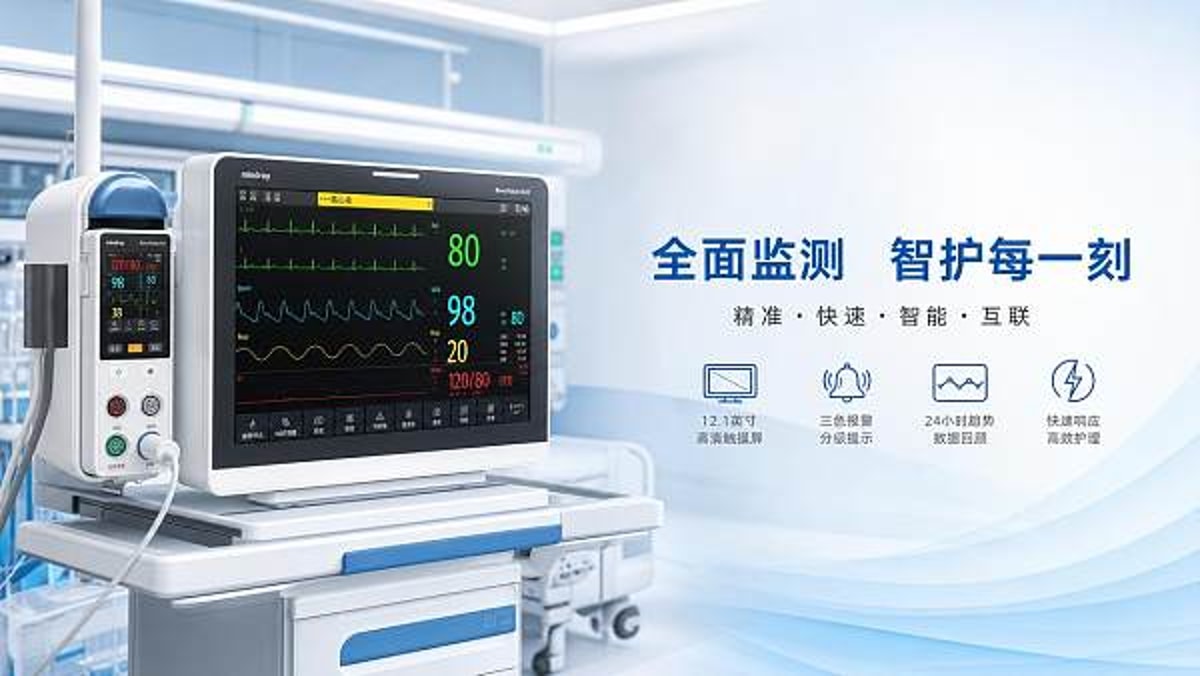
Operators do not interact with patient monitors in ideal lab conditions. They use them during admissions, transfers, medication rounds, overnight coverage, and rapid changes in patient status. In these conditions, a feature only adds value if it reduces decision time by seconds or prevents avoidable confusion. In many wards, even a 15- to 30-second delay in understanding an alarm can affect escalation speed.
The 4 bedside priorities that improve response
- Clear alarm differentiation between advisory, medium, and high-priority events
- Readable waveform and numeric layout visible from 1 to 3 meters away
- Fast access to trends covering at least 1 hour, 8 hours, and 24 hours
- Low-step workflow for silencing, reviewing, and escalating alarms
These four priorities influence real bedside behavior more than decorative interface elements or rarely used advanced menus. For example, trend visibility helps users confirm whether a heart rate of 120 is new, persistent for 20 minutes, or part of a longer deterioration pattern. That context changes whether staff observe, intervene, or escalate.
Features that improve recognition speed
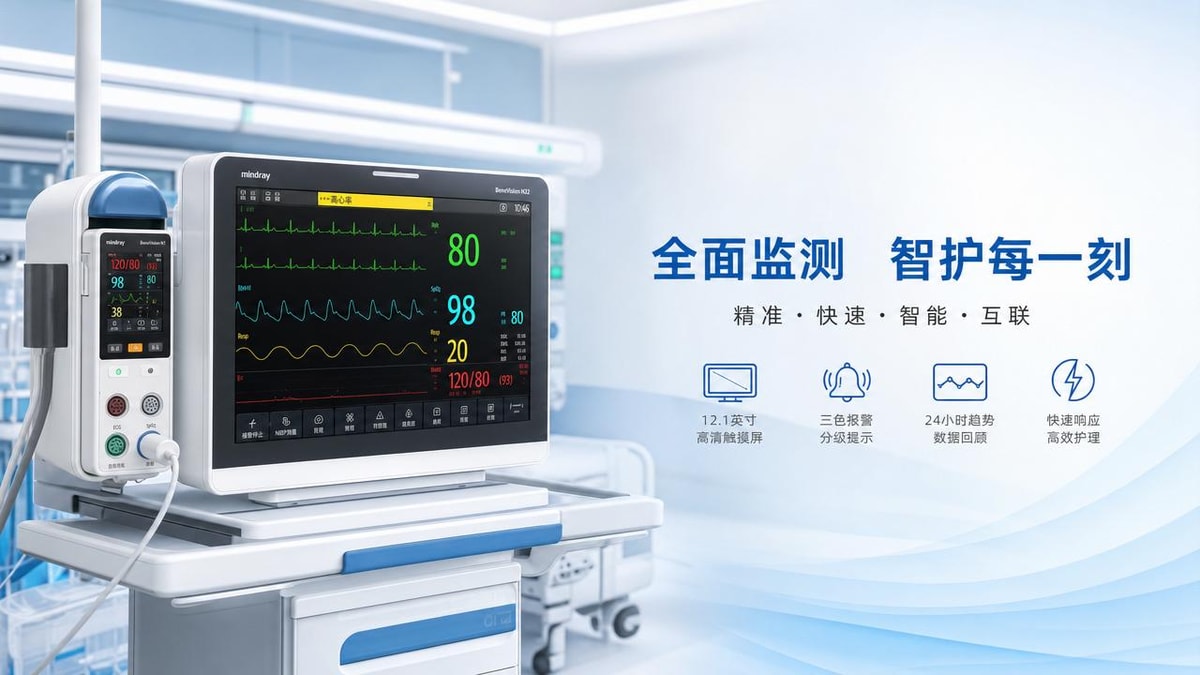
Among patient monitors, screen design is often underestimated. A monitor that shows SpO2, ECG, respiratory rate, non-invasive blood pressure, and temperature is only useful if the hierarchy is clear. Large numerics, color consistency, and uncluttered waveform spacing typically outperform feature-dense screens with too many secondary indicators. In busy care areas, users should identify the priority parameter within 2 to 5 seconds.
The same principle applies to touchscreen workflow. If accessing alarm history takes 4 or 5 taps, the function may be technically present but operationally weak. Frontline users usually prefer interfaces that keep the most common actions within 1 or 2 steps: pause alarm, review cause, check trends, and confirm sensor status.
Why alarm fatigue changes feature value
Alarm fatigue is one of the main reasons certain patient monitors underperform in real care settings. When non-actionable alarms occur every few minutes, staff attention drops. Features such as customizable thresholds, delay settings for transient changes, and technical alarm labeling can be more valuable than adding extra derived metrics. A monitor that produces fewer false or low-value interruptions often supports better care than one with broader monitoring depth but poor filtering logic.
The table below summarizes which patient monitors features usually help bedside users most and which features require careful justification before procurement.
The key takeaway is simple: patient monitors should first support rapid recognition, then trend interpretation, then escalation. Feature expansion should only come after those three layers are solid. That is especially important for multi-unit procurement where one platform may be used by users with different experience levels.
The features that most directly improve bedside response time
When healthcare teams ask which patient monitors features truly change outcomes at the operator level, the answer usually centers on six functions. None of them are flashy, but they consistently affect speed, clarity, and confidence during patient assessment.
1. Smart alarm prioritization
Not all alarms deserve the same sensory treatment. Good patient monitors use distinct sound profiles, visual cues, and color coding for low, medium, and high urgency. That helps users decide within seconds whether to check the patient immediately, verify a lead issue, or continue another task briefly. Systems that separate technical alarms from physiological alarms can reduce unnecessary interruption and improve trust in the device.
2. Reliable trend review across multiple time windows
Single values can mislead. Trend views over 15 minutes, 1 hour, 8 hours, and 24 hours help bedside staff distinguish short noise from meaningful change. This is particularly useful for respiratory rate, oxygen saturation, and blood pressure, where deterioration may be gradual rather than abrupt. For users, trend visibility often matters more than extra derived scores they do not routinely interpret.
3. Clear sensor and signal-quality feedback
A monitor should tell the operator whether the problem is the patient or the signal. Poor electrode adhesion, motion artifact, low perfusion, and cuff positioning can all distort readings. Patient monitors with direct signal-quality prompts reduce the time spent guessing. In practical terms, a clear “check sensor” or “low signal quality” indicator is more actionable than a number that simply disappears.
4. Adjustable profiles for care setting and patient type
Threshold needs differ across adult, pediatric, post-op, and monitored transport workflows. Patient monitors that allow user-friendly profile switching can save time and reduce manual reset errors. However, configuration must remain controlled. Too much flexibility without guardrails can create inconsistency between shifts or units.
5. Network visibility and central review support
At the bedside, local usability comes first. But in larger facilities, patient monitors are stronger when they also feed central stations, escalation workflows, or remote review points. Even a 20- to 40-second earlier recognition by a central observer can matter during staffing peaks. For procurement teams, this means bedside features should be evaluated together with system integration, not as isolated hardware decisions.
6. Fast patient transfer and reconnect workflow
Transfers are a weak point in many monitoring environments. The best patient monitors preserve trends, settings, and patient association through handoff with minimal re-entry. If staff must reconfigure alarms or confirm patient identity across 6 to 8 manual steps, response reliability drops. Transfer efficiency is particularly important in ED, PACU, and step-down areas.
Which features often add complexity without improving bedside care
Not every added capability improves bedside response. In some cases, extra functions increase training burden, clutter displays, or create more alarms without raising clinical usefulness for the unit involved. This does not mean advanced functions are bad. It means their value depends on context, skill mix, and workflow design.
Common overbuilt configurations
- Specialty hemodynamic modules purchased for general ward use without a defined protocol
- Excessive on-screen parameters that shrink waveform visibility
- Alarm defaults left unchanged across very different patient populations
- Complex menu customization granted to too many users
These issues can create a hidden cost. A monitor that needs 6 hours of unit-wide retraining, frequent troubleshooting, or repeated threshold correction may look advanced on paper but perform poorly at the bedside. For operators, complexity becomes a risk when it slows routine recognition or increases doubt about what the monitor is actually signaling.
When advanced features are justified
Advanced modules can absolutely be worthwhile in ICU, surgical recovery, or specialty pathways where the staff interpret them regularly and the escalation process is defined. The problem arises when procurement decisions are driven by feature count rather than use case match. A good selection process asks three operational questions: who will use it, how often, and what action follows the reading within 5 minutes?
The following comparison helps users and buyers separate essential bedside value from optional complexity during patient monitors evaluation.
For many facilities, this comparison leads to a more disciplined buying strategy. Instead of purchasing the most advanced patient monitors available, they choose a platform with strong core response features and add advanced capability only where clinical pathways justify it.
How operators and procurement teams should evaluate patient monitors together
The most reliable evaluation process combines user feedback with technical review. Procurement teams may focus on integration, service terms, and total cost, while operators focus on alarm trust, screen clarity, and workflow speed. Both perspectives are needed. A strong shortlist usually emerges after structured trials over 2 to 4 weeks in a live or simulated unit setting.
A practical 5-step evaluation workflow
- Define unit type and patient profile: ICU, ED, PACU, ward, transport, or mixed use
- List the 6 to 8 most common operator actions performed per shift
- Test alarm clarity, trend access, and transfer workflow in realistic scenarios
- Review network compatibility, service support, and consumable supply risk
- Score usability, training effort, and actionability before price comparison
This sequence reduces the chance of choosing patient monitors based mainly on brochure features. It also helps organizations align bedside priorities with broader healthcare technology strategy, including interoperability, maintenance planning, and staff adoption.
Questions that reveal real-world value
- Can a new user identify the active priority issue in under 5 seconds?
- How many taps are needed to review the last alarm event?
- Does the monitor clearly distinguish sensor fault from patient deterioration?
- Can trend review support handoff within 30 to 60 seconds?
- How often will staff actually use the advanced parameters being purchased?
These are the questions that turn patient monitors from a catalog category into an operational tool. They also help avoid underused features that increase cost without improving bedside response.
Implementation, training, and maintenance factors that protect performance
Even the right monitor can underperform if rollout is weak. Implementation should include default threshold review, user-role permissions, cleaning workflow, accessory management, and service response planning. In many facilities, performance problems appear not in the first week but after 60 to 90 days, when temporary workarounds become routine habits.
Training priorities for frontline users
Training should focus first on the functions used daily: alarm response, patient profile selection, trend review, sensor troubleshooting, and transfer workflow. A 45- to 60-minute hands-on session is often more effective than a longer theory-heavy class. Refresher training every 6 to 12 months is especially useful in units with rotating staff or mixed acuity.
Maintenance and support checkpoints
From a service perspective, patient monitors should be evaluated for battery runtime, accessory durability, preventive maintenance intervals, software update process, and replacement part availability. A battery that reliably supports 3 to 5 hours of transport or temporary disconnection can be a meaningful operational advantage. Likewise, cable and sensor reliability directly affects alarm trust and downtime.
Facilities should also ask whether support teams can respond within the service windows they actually need. For critical care areas, a difference between same-day support and a 72-hour delay is not minor. It can change staffing burden, backup inventory needs, and continuity of monitoring coverage.
For bedside users, the best patient monitors are not the ones with the most features. They are the ones that help teams recognize change quickly, trust the alarm, verify the signal, and act with fewer steps. Features such as smart alarm prioritization, clear trend review, signal-quality feedback, and fast transfer workflow consistently deliver more bedside value than broad but rarely used complexity.
For healthcare organizations evaluating new monitoring platforms, the strongest results come from matching patient monitors to unit workflow, training capacity, and escalation practice rather than buying for specification depth alone. If you want a more practical framework for comparing bedside monitoring options, assessing deployment risks, or refining a healthcare technology sourcing strategy, contact TradeNexus Pro to explore tailored solutions, product detail reviews, and market-informed procurement guidance.
Get weekly intelligence in your inbox.
No noise. No sponsored content. Pure intelligence.
 May 05, 2026Inventory management systems that fix stock errors at the sourceInventory management systems that fix stock errors at the source
 May 05, 2026Medical disposables sourcing gets risky when prices drop too fastMedical disposables sourcing gets risky when prices drop too fast
 May 05, 2026Supply Chain Management gaps that create hidden inventory costsSupply Chain Management gaps that create hidden inventory costs
 May 05, 2026Why ERP software rollouts fail even with strong vendor supportWhy ERP software rollouts fail even with strong vendor support
 May 05, 2026Patient monitors: which features actually improve bedside responsePatient monitors: which features actually improve bedside response
 May 05, 2026Medical PPE shortages are easing, but quality gaps remainMedical PPE shortages are easing, but quality gaps remain
 May 05, 2026Portable oxygen concentrators: what matters beyond battery lifePortable oxygen concentrators: what matters beyond battery life
 May 05, 2026Medical diagnostic equipment buying mistakes that cost more laterMedical diagnostic equipment buying mistakes that cost more later
 May 05, 2026Cold chain logistics failures often start before transitCold chain logistics failures often start before transit
 May 05, 2026Hydrogen energy projects face one cost issue few plan forHydrogen energy projects face one cost issue few plan for
 May 05, 2026Digital Footprint risks that grow when suppliers scale fastDigital Footprint risks that grow when suppliers scale fast
 May 05, 2026Cross border ecommerce fulfillment problems that hurt repeat salesCross border ecommerce fulfillment problems that hurt repeat sales
 May 05, 2026N95 respirators: why fit matters more than many expectN95 respirators: why fit matters more than many expect
 May 05, 2026Ultrasound machines: when image quality and workflow clashUltrasound machines: when image quality and workflow clash
 May 05, 2026LED displays for retail spaces: brightness is not the only issueLED displays for retail spaces: brightness is not the only issue
 May 05, 2026What to check before placing wheelchairs wholesale ordersWhat to check before placing wheelchairs wholesale orders
 May 05, 2026Freight forwarding services that help avoid customs delaysFreight forwarding services that help avoid customs delays
 May 05, 2026Aesthetic lasers: the difference between power and precisionAesthetic lasers: the difference between power and precision
 May 05, 2026How rehabilitation equipment choices affect recovery routinesHow rehabilitation equipment choices affect recovery routines
 May 05, 2026Robot vacuum cleaners with mapping: what changes in daily useRobot vacuum cleaners with mapping: what changes in daily use
 May 05, 2026Where logistics drones make sense and where they still do notWhere logistics drones make sense and where they still do not
 May 05, 2026B2B SaaS solutions that reduce manual trade workflowsB2B SaaS solutions that reduce manual trade workflows
 May 05, 2026What makes 3PL logistics performance hard to measure fairlyWhat makes 3PL logistics performance hard to measure fairly
 May 05, 2026Shipping rates are shifting again: what costs are easy to missShipping rates are shifting again: what costs are easy to miss
 May 05, 2026Trade Leaders in 2026: what will separate winners from the restTrade Leaders in 2026: what will separate winners from the rest
 May 05, 2026Why smart warehousing projects stall after the pilot stageWhy smart warehousing projects stall after the pilot stage
 May 05, 2026AGV robots or forklifts: which fits busy warehouses better?AGV robots or forklifts: which fits busy warehouses better?