Rugged Enterprise Tablets: Which Specs Matter in Harsh Field Use?
When field teams rely on rugged enterprise tablets, the wrong spec can trigger downtime, failed inspections, lost records, and faster replacement cycles.
In real field use, headline features rarely tell the full story. A bright display means little if touch input fails in rain. A large battery matters less if radios drain power.
This guide explains which specifications matter most, how needs shift by environment, and how to evaluate rugged enterprise tablets for reliable long-term deployment.
Why harsh field environments change how rugged enterprise tablets should be evaluated
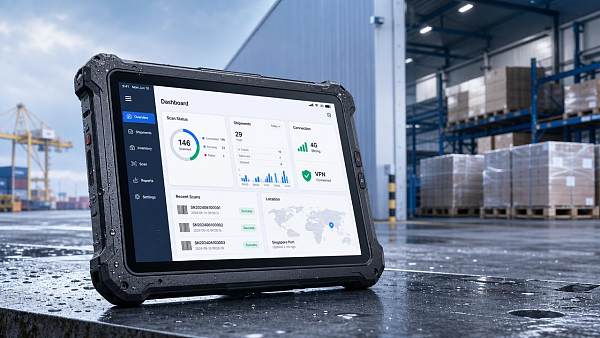
A tablet used in a warehouse aisle faces different risks than one mounted in a service vehicle or carried through offshore wind maintenance routes.
That is why rugged enterprise tablets should be judged by operational context, not consumer-style comparisons.
Across advanced manufacturing, green energy, healthcare technology, smart electronics, and supply chain SaaS workflows, device failure creates process disruption beyond hardware cost.
The right decision usually depends on five practical questions:
- What environmental hazards appear daily?
- How critical is always-on connectivity?
- Will the device run heavy applications or light data capture?
- How many shifts must one battery support?
- Can it be repaired, updated, and supported for years?
These questions turn a spec sheet into a deployment decision. They also reveal why not every “rugged” label offers equal real-world value.
Which specs matter most in outdoor inspection and utility service scenarios
Outdoor crews often work under direct sunlight, rain, dust, vibration, and glove-heavy conditions. In this setting, display usability and ingress protection become first-line requirements.
For outdoor rugged enterprise tablets, screen brightness should support daylight readability. Many deployments need 800 to 1,000 nits or more for dependable visibility.
Touch technology also matters. Look for glove mode, wet-touch support, and stylus compatibility for signatures, diagrams, and inspection forms.
Environmental durability checks
IP65 or higher is common for dust and water exposure. Drop ratings should be reviewed alongside test height, surface type, and whether protective corners are standard.
MIL-STD-810H can indicate resistance to shock, vibration, temperature, and humidity. Still, buyers should confirm which test methods were actually validated.
Connectivity priorities in remote coverage zones
Outdoor field work often depends on 4G LTE or 5G, GNSS accuracy, Wi-Fi handoff, and Bluetooth accessory reliability.
If maps, work orders, photos, and cloud forms must sync continuously, modem quality matters as much as advertised network support.
What matters most in warehousing, logistics, and vehicle-mounted use
In warehouses and logistics operations, rugged enterprise tablets often support barcode workflows, route updates, exception handling, and dock-to-yard visibility.
Here, shock resistance still matters, but battery continuity, scanner integration, and wireless roaming often rank higher than maximum brightness.
Battery and shift continuity
A long battery claim is not enough. Check whether the device supports hot-swappable batteries, fast charging, and battery health analytics.
Multi-shift operations benefit from user-replaceable power packs because they reduce charging bottlenecks and avoid work interruption.
Docking and peripheral ecosystem
Vehicle docks, keyboard attachments, pistol grips, and external scanners can define actual productivity. Weak accessory ecosystems often create hidden integration costs.
For rugged enterprise tablets used in fleets, secure docking and reliable charging under vibration are especially important.
How manufacturing floors and technical service teams should judge performance specs
Manufacturing and technical service environments may run CAD viewers, digital work instructions, machine dashboards, AR assistance, or image-rich maintenance applications.
In these settings, processor efficiency and memory capacity directly shape responsiveness. Underpowered hardware may pass pilot testing but struggle after software expansion.
Processor, RAM, and storage choices
Choose CPU and RAM based on workload complexity, not only current apps. Background syncing, security agents, and browser-based tools all consume system resources.
For many enterprise workflows, SSD speed, 8GB to 16GB RAM, and efficient thermal design matter more than peak benchmark numbers.
Ports, cameras, and data capture
USB-C, legacy USB, Ethernet options, serial support, and expansion modules can be essential in industrial environments with mixed equipment generations.
Cameras should be judged for documentation quality, autofocus speed, and low-light performance, not megapixel count alone.
How healthcare and regulated field documentation change tablet requirements
Some field workflows demand not only durability, but also traceability, sanitization compatibility, and secure identity control.
For healthcare technology support, mobile diagnostics, or regulated inspections, rugged enterprise tablets should be evaluated for security and service governance.
Security and device management
Important features include TPM, biometric login, secure boot, remote wipe, and compatibility with enterprise mobility management platforms.
Longer OS support windows reduce lifecycle risk. Short support timelines can force early replacement before hardware value is fully realized.
Cleaning resistance and enclosure design
If tablets are frequently disinfected or handled across sites, enclosure materials and sealed port design should be confirmed during evaluation.
Side-by-side spec differences by field scenario
Practical recommendations for selecting rugged enterprise tablets by use case
The best way to compare rugged enterprise tablets is to score them against workflow demands instead of generic hardware rankings.
- Map each workflow to hazards, software load, connectivity needs, and shift length.
- Define pass-fail thresholds for brightness, IP level, drop resistance, and battery replacement method.
- Test accessories early, including docks, scanners, styluses, and vehicle mounts.
- Run pilot trials in actual rain, glare, vibration, and coverage conditions.
- Confirm service parts availability, warranty response terms, and OS update commitments.
This structured approach helps avoid overbuying premium specs that add little value, while preventing under-spec decisions that create operational friction.
Common mistakes when comparing rugged enterprise tablets
One frequent mistake is treating durability labels as equivalent. An IP rating does not confirm drop performance, and a military test claim may not match your actual exposure.
Another mistake is focusing on battery size without checking power draw from radios, screen brightness, or background software.
A third mistake is ignoring long-term manageability. The value of rugged enterprise tablets often depends on repairability, accessory continuity, and software support maturity.
Finally, many evaluations skip field realism. A short indoor demo cannot reveal glare problems, dock looseness, or roaming failures at operational scale.
Next-step evaluation framework for rugged enterprise tablets
Start with the environment, not the brochure. List exposure conditions, critical applications, and required uptime before narrowing any device shortlist.
Then compare rugged enterprise tablets using a weighted matrix for durability, connectivity, usability, performance, and lifecycle service.
For organizations tracking global supply chain resilience and technology deployment, this method supports better capital efficiency and fewer field disruptions.
TradeNexus Pro continues to analyze how industrial mobility, hardware sourcing, and digital field operations intersect across tomorrow’s most critical sectors.
Get weekly intelligence in your inbox.
No noise. No sponsored content. Pure intelligence.
 Oct 08, 2026How Digital Health Improves Diagnostic Accuracy and Workflow in Clinical LabsHow Digital Health Improves Diagnostic Accuracy and Workflow in Clinical Labs
 Oct 07, 2026Selecting Voice Picking Systems for German Warehouses: Integration, Languages and ROISelecting Voice Picking Systems for German Warehouses: Integration, Languages and ROI
 Oct 06, 2026How to Choose Last Mile Dispatch Software for On-Time Delivery at ScaleHow to Choose Last Mile Dispatch Software for On-Time Delivery at Scale
 Oct 05, 2026Vietnam’s Consumer Electronics Market: Demand Shifts and Sourcing OpportunitiesVietnam’s Consumer Electronics Market: Demand Shifts and Sourcing Opportunities
 Oct 04, 2026Digital Health Investment Priorities for Providers: Improving Access, Outcomes, and EfficiencyDigital Health Investment Priorities for Providers: Improving Access, Outcomes, and Efficiency
 Oct 03, 2026How to Specify an FR4 Custom PCB Board for High-Voltage and High-Heat DesignsHow to Specify an FR4 Custom PCB Board for High-Voltage and High-Heat Designs
 Oct 02, 2026ERP Software Market Intelligence: Adoption, Pricing, and Vendor Signals to WatchERP Software Market Intelligence: Adoption, Pricing, and Vendor Signals to Watch
 Oct 01, 2026How to Select Calibrated Temperature Data Loggers for GMP Cold Storage MonitoringHow to Select Calibrated Temperature Data Loggers for GMP Cold Storage Monitoring
 Sep 30, 2026Custom Molded Rubber Pricing: What Drives Unit Cost and Tooling Fees?Custom Molded Rubber Pricing: What Drives Unit Cost and Tooling Fees?
 Sep 29, 2026How to Evaluate Energy Management Software Vendors for Multi-Site OperationsHow to Evaluate Energy Management Software Vendors for Multi-Site Operations
 Sep 28, 2026How to Select a DIN Rail Smart Meter for Multi-Circuit Energy MonitoringHow to Select a DIN Rail Smart Meter for Multi-Circuit Energy Monitoring
 Sep 27, 2026TWS Earbuds in Vietnam: Demand Drivers, Price Tiers, and Retail Channel OpportunitiesTWS Earbuds in Vietnam: Demand Drivers, Price Tiers, and Retail Channel Opportunities
 Sep 26, 2026How UAE Clinics Can Qualify a Smart Glucometer Supplier for Accuracy and ComplianceHow UAE Clinics Can Qualify a Smart Glucometer Supplier for Accuracy and Compliance
 Sep 25, 2026Buying Aesthetic Lasers in the USA: FDA Status, Wavelengths, and Service SupportBuying Aesthetic Lasers in the USA: FDA Status, Wavelengths, and Service Support
 Sep 24, 2026Laser Cutting Brass Sheet: How to Prevent Burrs and Heat Marks on Thin PartsLaser Cutting Brass Sheet: How to Prevent Burrs and Heat Marks on Thin Parts
 Sep 23, 2026How to Choose Lightweight ANC Headphones for Comfortable All-Day TravelHow to Choose Lightweight ANC Headphones for Comfortable All-Day Travel
 Sep 22, 2026IPX5 TWS Bluetooth Earbuds: What Protection Do They Offer for Workouts?IPX5 TWS Bluetooth Earbuds: What Protection Do They Offer for Workouts?
 Sep 21, 2026What to Look for in a Grid Integration Company for Utility-Scale Solar ProjectsWhat to Look for in a Grid Integration Company for Utility-Scale Solar Projects
 Sep 20, 2026Microgrid Controller Pricing: What Drives Cost in Commercial Energy Projects?Microgrid Controller Pricing: What Drives Cost in Commercial Energy Projects?
 Sep 19, 2026How to Choose a GaN Charger for Laptops Without Compromising Power or PortabilityHow to Choose a GaN Charger for Laptops Without Compromising Power or Portability
 Sep 18, 2026Floating Solar Farm Costs: CAPEX, OPEX, and the Site Factors That Shape ROIFloating Solar Farm Costs: CAPEX, OPEX, and the Site Factors That Shape ROI
 Sep 17, 2026Drone Delivery Solutions for Last-Mile Routes: Site, Payload, and Range PlanningDrone Delivery Solutions for Last-Mile Routes: Site, Payload, and Range Planning
 Sep 16, 2026When Low-Volume Electronics Manufacturing Makes More Sense Than Mass ProductionWhen Low-Volume Electronics Manufacturing Makes More Sense Than Mass Production
 Sep 15, 2026Wholesale WiFi Smart Switches: What Buyers Should Verify Before OrderingWholesale WiFi Smart Switches: What Buyers Should Verify Before Ordering
 Sep 14, 2026How to Select IoT Sensors for Reliable Monitoring in Harsh Industrial EnvironmentsHow to Select IoT Sensors for Reliable Monitoring in Harsh Industrial Environments
 Sep 13, 2026How Procurement Teams Can Improve Supplier Reliability With Supply Chain VisibilityHow Procurement Teams Can Improve Supplier Reliability With Supply Chain Visibility
 Sep 12, 2026Smart Manufacturing Trends 2026: What Leaders Should Prioritize for ROISmart Manufacturing Trends 2026: What Leaders Should Prioritize for ROI