Choosing Digital Blood Pressure Monitors for Accurate Home Readings
For most people, the best choice among digital blood pressure monitors is a clinically validated, automatic upper-arm model with a cuff that fits properly. A clear display and useful memory can make regular checks easier, but neither compensates for a poorly fitting cuff or a device that has not been independently validated.
Before comparing apps, screens, or prices, measure your upper arm and identify models validated for the people who will use them. Then consider how comfortably each device fits into your routine. A monitor is most useful when you can position it correctly, read it easily, and record results consistently.
Start with clinical validation, not the feature list
Blood pressure monitors estimate pressure using a sensor and an algorithm. A device may display a precise-looking number, but that does not establish that its measurements are accurate. Clinical validation means that a specific device has been tested against a recognized protocol designed to assess its measurement performance.
Look for the exact model in an independent listing of validated blood pressure devices, such as the US Blood Pressure Validated Device Listing (ValidateBP) or STRIDE BP. Match the model name and number carefully: a similar-looking monitor or a different version from the same brand should not automatically be assumed to have the same validation status.
Claims such as “hospital grade,” “professional accuracy,” or “approved” are not substitutes for validation. Regulatory clearance and clinical validation address different questions; a device’s ability to be marketed does not, by itself, establish that it has passed a recognized validation protocol.
Validation should also be relevant to the intended user. If the monitor is needed during pregnancy, for a child, or for someone with a condition that can affect blood pressure measurement, ask a healthcare professional which validated devices are appropriate. Some monitors have been assessed in specific populations, while others have not.
Get the cuff size right before you buy
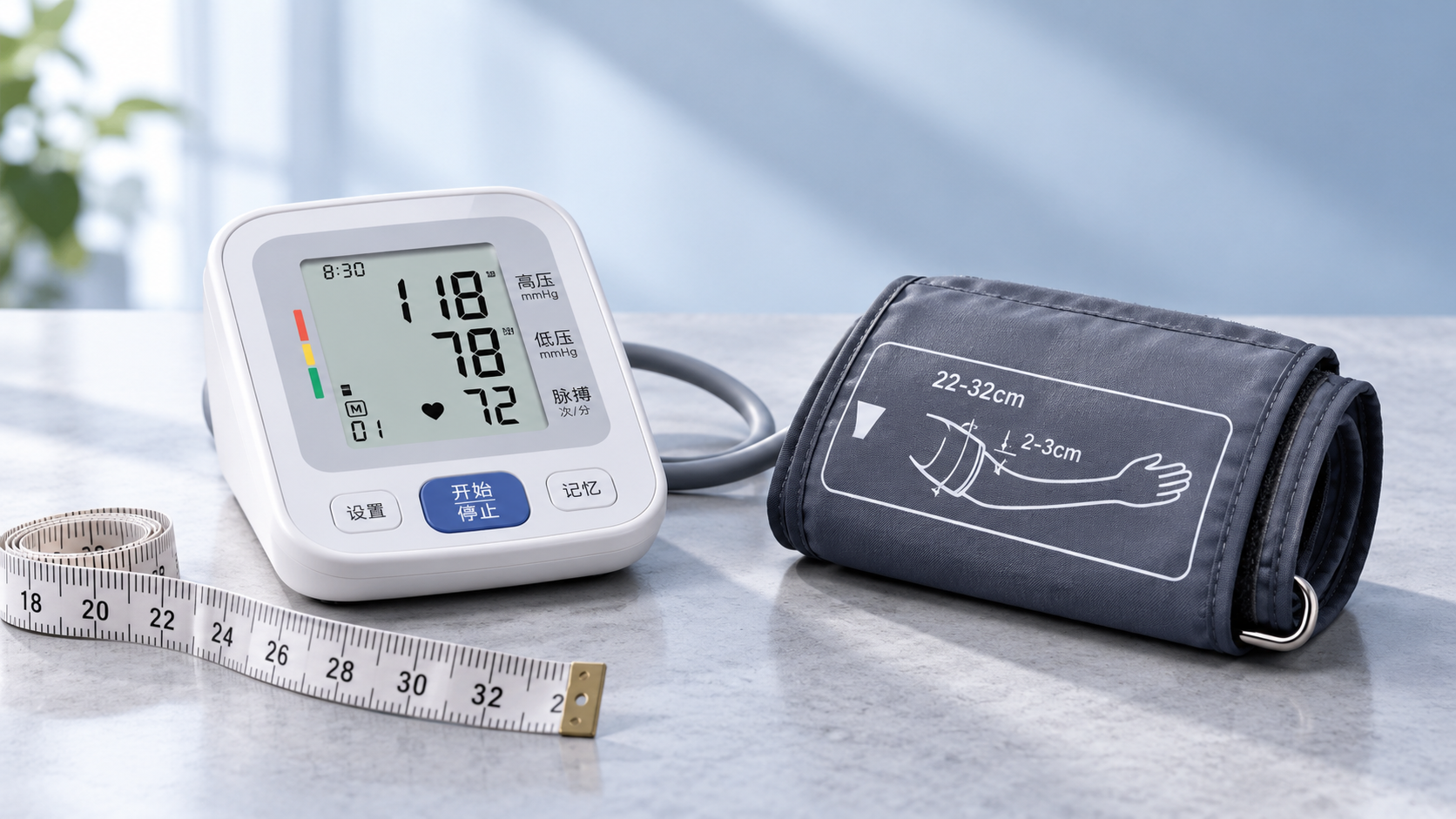
A cuff that is too small or too large can distort a reading, even when the monitor itself is well designed. Use a flexible measuring tape around the bare upper arm, midway between the shoulder and elbow, with the arm relaxed. Compare the measurement with the circumference range printed on the cuff or listed in the product specifications.
Check the range for the cuff included in the box, not just the ranges available from the manufacturer. Some models offer alternative cuffs, but they may need to be purchased separately. Use only cuffs specified as compatible with the monitor; a cuff that connects to the tubing is not necessarily suitable for that device.
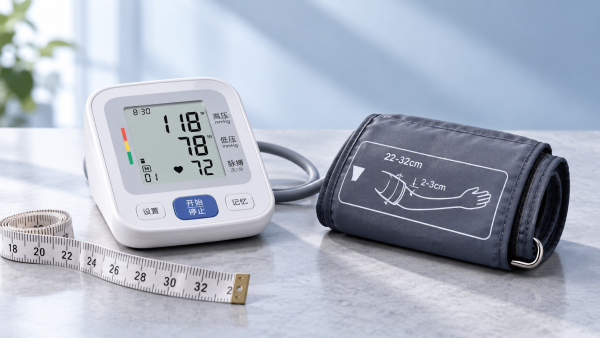
If more than one person will use the monitor, measure each person’s arm. One adjustable cuff may fit everyone, but a household may need two compatible sizes. For an arm near the edge of a stated range, check the manufacturer’s fitting instructions and make sure the cuff can be positioned securely without straining or leaving excessive overlap.
Cuff shape matters as well as circumference. A person with a conical upper arm, limited shoulder movement, or difficulty wrapping a cuff may find a preformed cuff easier to place. Ease of application is not merely a comfort feature: it can affect whether the cuff sits correctly every time.
Upper-arm or wrist monitor?
An automatic upper-arm monitor is generally the better starting point for home use. The cuff is usually easier to position consistently at heart level, and there are more validated upper-arm options to choose from.
A wrist monitor may be useful when an upper-arm cuff cannot be used comfortably or fitted appropriately. It is also compact, which can matter for travel. The trade-off is that wrist readings are particularly sensitive to position. The wrist must be held at heart level during measurement; resting the hand on a lap or letting the wrist hang can produce misleading results.
If you choose a wrist device, look for a clinically validated model and practice its positioning with a healthcare professional. Finger devices and cuffless wearables should not be treated as interchangeable with a validated cuff-based monitor for routine blood pressure decisions.
Choose features that make measurements easier to use
Once validation and cuff fit are established, the most useful features depend on who will operate the monitor and what happens to the readings afterward.
- Display: Large, high-contrast numbers are helpful when eyesight is limited. Check that the screen clearly distinguishes systolic pressure, diastolic pressure, and pulse.
- Controls: A prominent start button and straightforward cuff connection can make independent use easier. Consider whether the person using the device can manage the cuff and buttons without assistance.
- Memory: Stored readings help when paper records are inconvenient. Separate user profiles can prevent a shared household monitor from mixing people’s results.
- Connectivity: An app can simplify recordkeeping or sharing, but it should not be necessary for a basic reading. Check whether the app works with your phone and whether it can export or share results in a useful format.
- Power: Battery operation is convenient away from an outlet. An adapter can reduce battery changes, but check whether one is included and whether the device retains saved readings when power is lost.
Automatic averaging can be convenient, but check what the device actually averages and whether its process matches the schedule recommended by your clinician. A monitor that stores a reading immediately is also useful if you tend to forget to write results down.
Some devices display an irregular heartbeat indicator. This is not a diagnosis, and the absence of an alert does not rule out a rhythm problem. If you have a known irregular heartbeat, ask your clinician whether the monitor and your measurement method are appropriate; an irregular rhythm can make automated readings harder to interpret.
Check the details behind a connected monitor
A connected device is worthwhile when its records make it easier to follow a care plan or share readings. Before buying, consider who will manage the phone, account, and app updates. A simpler monitor with a written log may be a better fit for someone who does not regularly use a smartphone.
Review what the app collects and how it handles health information. Look for understandable privacy settings, a way to access your history, and an option to export readings if you change phones or stop using the app. Also check whether multiple people need separate accounts. Keeping records distinct matters more than having a visually elaborate dashboard.
Even a well-chosen monitor needs good technique
Home readings can vary with activity, posture, conversation, and timing. Follow the monitor’s instructions and any schedule provided by your healthcare professional. For a routine measurement:
- Avoid smoking, caffeine, and exercise for 30 minutes beforehand, and empty your bladder if needed.
- Sit quietly for at least five minutes, with your back supported, feet flat on the floor, and legs uncrossed.
- Place the cuff on a bare upper arm as directed. Support the arm on a table so the cuff is at heart level.
- Stay still and do not talk during the reading. Take two readings one minute apart and record both, unless your clinician has given you different instructions.
Measure at consistent times, such as morning and evening, when following a home monitoring plan. Keep a record of the date, time, and readings, including any circumstances your clinician has asked you to note. Do not discard an unexpected number simply because it differs from the previous one; rest, repeat the measurement as directed, and keep a record.
One reading is a snapshot, not a complete diagnosis. Avoid changing or stopping prescribed medication based on home readings without speaking to your healthcare professional.
When readings seem wrong
If results are unexpectedly different from what you normally see, check the practical causes first: cuff size, placement on bare skin, supported arm position, and whether you rested before measuring. Movement or talking can also interfere. Replace low batteries if the device indicates a power problem, and follow its instructions for error messages.
Bring the monitor, cuff, and your log to a healthcare appointment. A clinician can observe your technique and compare your device with office equipment. Differences do not automatically mean the home monitor is faulty: readings can change between measurements and settings. A comparison is most useful when cuff fit and measurement conditions are considered.
If a reading is over 180 systolic or over 120 diastolic, wait at least one minute and measure again. If it remains that high, contact a healthcare professional promptly. If you also have symptoms such as chest pain, shortness of breath, weakness, a change in vision, or difficulty speaking, call emergency services immediately rather than waiting for the pressure to come down.
Make the final comparison
Shortlist monitors in this order: exact-model validation, a cuff that fits each intended user, and an interface the user can manage comfortably. Then compare memory, connectivity, power options, and the availability of replacement cuffs. Confirm what is included in the package and how warranty or support requests are handled.
A basic validated upper-arm monitor can be a sound choice if it fits and produces a record you can use. A connected or more automated model is worth considering when its features solve a specific problem, such as separating two users’ histories or sharing readings with a care team. The best purchase is the one you can use correctly and consistently.
Get weekly intelligence in your inbox.
No noise. No sponsored content. Pure intelligence.
 Nov 06, 2026China's New Energy Storage Capacity Reaches 167 GWChina's New Energy Storage Capacity Reaches 167 GW
 Nov 06, 2026Geothermal Heat Pumps for Schools: Site and Retrofit ConsiderationsGeothermal Heat Pumps for Schools: Site and Retrofit Considerations
 Nov 05, 2026Australian Grid-Forming Battery Trial Completed as Akaysha Seeks ContractsAustralian Grid-Forming Battery Trial Completed as Akaysha Seeks Contracts
 Nov 05, 2026Smart Kitchen Appliances for Meal Prep: Which Ones Save the Most Time?Smart Kitchen Appliances for Meal Prep: Which Ones Save the Most Time?
 Nov 04, 2026Solar Inverter Makers Raise Prices, Fueling Margin Recovery ExpectationsSolar Inverter Makers Raise Prices, Fueling Margin Recovery Expectations
 Nov 04, 2026Choosing Ophthalmic Equipment for Hospitals: Key Clinical and Purchasing CriteriaChoosing Ophthalmic Equipment for Hospitals: Key Clinical and Purchasing Criteria
 Nov 03, 2026Amazon Raises European FBA Fuel and Logistics Surcharge to 2% From November 2Amazon Raises European FBA Fuel and Logistics Surcharge to 2% From November 2
 Nov 03, 2026How Exporters Can Build an Editorial Framework for Overseas MarketsHow Exporters Can Build an Editorial Framework for Overseas Markets
 Nov 02, 2026China-Peru Free Trade Agreement Upgrade Takes Effect November 1China-Peru Free Trade Agreement Upgrade Takes Effect November 1
 Nov 02, 2026Choosing Digital Blood Pressure Monitors for Accurate Home ReadingsChoosing Digital Blood Pressure Monitors for Accurate Home Readings
 Nov 01, 2026Laboratory Equipment Prices: Budgeting for Purchase and Operating CostsLaboratory Equipment Prices: Budgeting for Purchase and Operating Costs
 Oct 31, 2026Chinese Portable Energy Storage Firms Report Overseas Order Growth in Q3Chinese Portable Energy Storage Firms Report Overseas Order Growth in Q3
 Oct 31, 2026SCARA Robot Cycle Times: How Payload and Travel Distance Affect SpeedSCARA Robot Cycle Times: How Payload and Travel Distance Affect Speed
 Oct 30, 2026Walmart and Symbotic Sign $6 Billion Global Automation AgreementWalmart and Symbotic Sign $6 Billion Global Automation Agreement
 Oct 30, 2026Choosing a Waterproof Folding Solar Charger: IP Ratings and Power OutputChoosing a Waterproof Folding Solar Charger: IP Ratings and Power Output
 Oct 29, 2026Poland to End SENT Registration for Certain Scrap Metal Road Shipments on October 28Poland to End SENT Registration for Certain Scrap Metal Road Shipments on October 28
 Oct 29, 2026Energy Storage System Quotation: How to Compare Scope and Hidden CostsEnergy Storage System Quotation: How to Compare Scope and Hidden Costs
 Oct 28, 2026BNEF Raises US Battery Storage Forecast 30%, Sees 213.9 GW by 2030BNEF Raises US Battery Storage Forecast 30%, Sees 213.9 GW by 2030
 Oct 28, 2026Global Trade Intelligence Pricing: Data Coverage, User Seats, and API CostsGlobal Trade Intelligence Pricing: Data Coverage, User Seats, and API Costs
 Oct 27, 2026Western Australia 1GW Data Centre With 5GWh Battery Enters Federal Review ProcessWestern Australia 1GW Data Centre With 5GWh Battery Enters Federal Review Process
 Oct 27, 2026USB-C Docking Stations in the UK: A Buyer's Guide to Compatibility and ChargingUSB-C Docking Stations in the UK: A Buyer's Guide to Compatibility and Charging
 Oct 26, 2026AgiBot Scales Up Production as 100 Expedition A3 Robots Stage Guinness Record AttemptAgiBot Scales Up Production as 100 Expedition A3 Robots Stage Guinness Record Attempt
 Oct 26, 2026Rehabilitation Equipment for Outpatient Clinics: What to Check Before BuyingRehabilitation Equipment for Outpatient Clinics: What to Check Before Buying
 Oct 25, 2026Teradyne Robotics and Sereact Partner on AI-Powered Returns AutomationTeradyne Robotics and Sereact Partner on AI-Powered Returns Automation
 Oct 25, 2026Smart Warehousing Integration: How to Connect Robots to an Existing WMSSmart Warehousing Integration: How to Connect Robots to an Existing WMS
 Oct 24, 2026Tesla Q3 2026 Storage Deployments Rank Second Highest as Revenue Falls 16%Tesla Q3 2026 Storage Deployments Rank Second Highest as Revenue Falls 16%
 Oct 24, 2026Freight Forwarding Services Pricing: Comparing Quotes Beyond Base RatesFreight Forwarding Services Pricing: Comparing Quotes Beyond Base Rates