Why some wireless chargers run hot during daily use
If some wireless chargers feel unusually warm during everyday use, you are not alone. Heat buildup can come from power loss, poor alignment, phone cases, charging speed, or even the charger’s internal design. Understanding why wireless chargers run hot helps consumers protect battery health, improve charging efficiency, and choose safer products for daily use.
Why do wireless chargers run hot in normal daily charging?
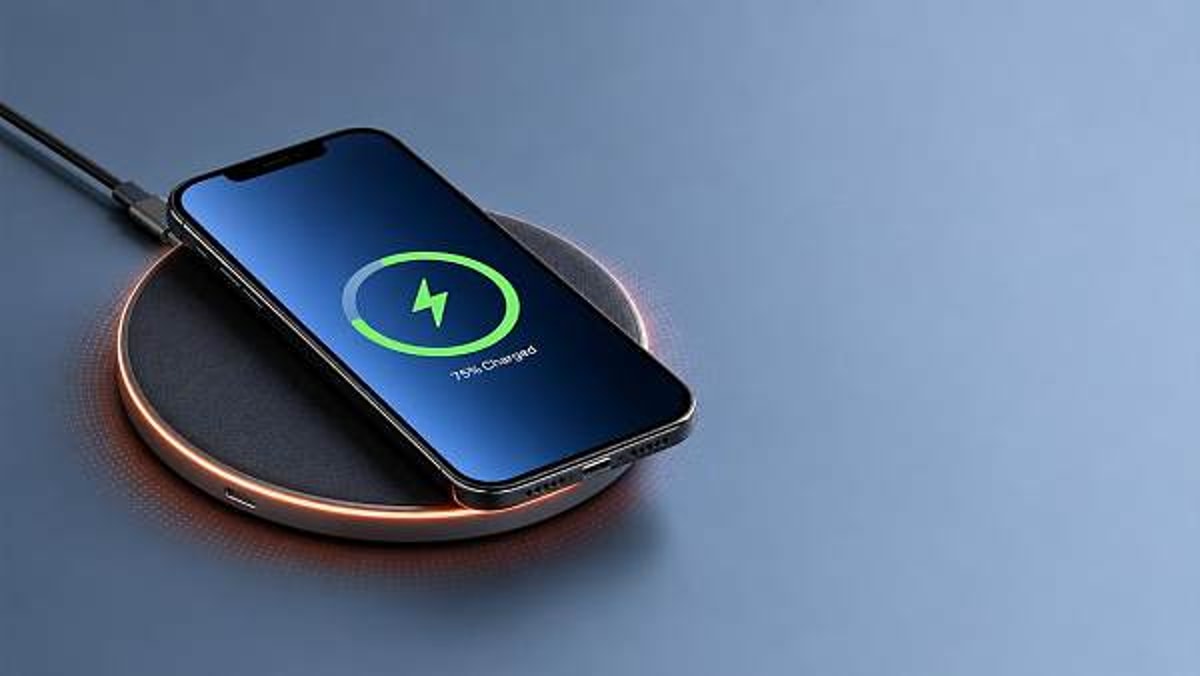
Wireless chargers generate heat because they transfer energy through electromagnetic induction rather than direct metal-to-metal contact. That process is convenient, but it is never perfectly efficient. Some power is always lost during conversion, and that lost power becomes heat. In light daily use, a mild temperature rise is expected. The concern starts when a charger becomes too warm to touch comfortably, slows down repeatedly, or makes the phone hot even during short sessions.
For end consumers, the issue is not only comfort. Excessive heat can reduce charging efficiency, increase charge time, and contribute to long-term battery wear. In the smart electronics market, thermal management has become one of the key differentiators between low-cost accessories and better-engineered charging products. That is why understanding how wireless chargers behave in real conditions matters before making a purchase.
- The charging pad converts wall power into a high-frequency current.
- A transmitter coil inside the pad creates a magnetic field.
- A receiver coil inside the phone captures that energy and converts it back into electrical power.
- At every step, small losses occur through resistance, conversion circuitry, and imperfect coil coupling.
This basic mechanism explains why wireless chargers usually run warmer than wired chargers under similar power levels. The question is not whether any heat exists, but whether the amount of heat remains within reasonable operating limits.
Which factors make wireless chargers hotter than expected?
Several practical factors can push wireless chargers from slightly warm to noticeably hot. Consumers often blame the charger alone, but heat usually comes from the interaction between charger, phone, environment, and charging habits. The table below summarizes the most common causes behind hot wireless chargers in home, office, and bedside use.
The most important takeaway is that heat is often cumulative. A slightly misaligned phone on a thick case, placed on a high-speed charger in a warm room, can create much more heat than any one factor alone. This is why some wireless chargers seem fine in one room but run hot on another desk or during overnight charging.
Environmental conditions matter more than many buyers expect
Ambient temperature, desk material, and airflow all influence performance. A charger used on a fabric sofa, under a blanket, or next to a laptop exhaust vent will retain more heat. Likewise, gaming, video calls, navigation, or app downloads during charging raise the phone’s internal temperature before wireless charging heat is added.
In consumer electronics supply chains, brands that focus on thermal design usually test products across different real-life conditions rather than only ideal lab setups. That is one reason why two pads with the same advertised wattage can feel very different in daily use.
Is a warm wireless charger normal, or is it a safety warning?
A warm wireless charger is generally normal. A hot charger that triggers charging interruptions, causes the phone to become uncomfortable to hold, or produces unusual odor is not something consumers should ignore. The difference lies in severity, duration, and consistency.
Signs of normal operation
- The pad feels mildly warm after 20 to 40 minutes of charging.
- The phone warms up slightly but remains comfortable to handle.
- Charging continues steadily without frequent stopping or restarting.
- The temperature drops once the battery nears full or charging ends.
Signs that deserve attention
- The charger or phone becomes very hot within a short time.
- Charging repeatedly pauses because of thermal protection.
- The surface shows discoloration, warping, or unusual smell.
- The same setup performs worse over time without any clear reason.
Most reputable wireless chargers include over-temperature protection, foreign object detection, and power management features. These do not eliminate heat, but they reduce the chance that routine warmth turns into a more serious problem. If a product lacks clear safety labeling, compatible power input guidance, or traceable manufacturing information, caution is justified.
Wireless chargers vs wired charging: where does the heat difference come from?
Consumers often compare wireless chargers with cables and assume the hotter option must be poorly made. In reality, the technologies work differently. Wired charging sends power directly through physical connectors, so conversion losses are usually lower. Wireless charging adds another transfer step, which makes thermal management more challenging from the start.
This comparison table helps clarify why wireless chargers tend to run warmer, especially in compact consumer devices.
The key decision is not whether wireless charging is better than wired charging in every case. It is whether the convenience tradeoff matches your habits. For many consumers, a cooler wired charger remains the better choice for rapid charging, while wireless chargers are more suitable for top-ups throughout the day or overnight use on stable surfaces.
How should consumers choose wireless chargers that manage heat better?
Choosing wireless chargers only by price or maximum advertised wattage often leads to disappointment. A smarter purchase decision looks at compatibility, thermal control, build quality, and usage context. In the broader electronics market, buyers increasingly value reliable daily performance over headline specs that only apply in perfect conditions.
A practical selection checklist
- Check device compatibility first. Confirm whether your phone supports the charger’s standard and maximum wireless power profile.
- Review the required power adapter. Some wireless chargers need a higher-rated adapter to operate efficiently and safely.
- Look for features such as foreign object detection, temperature control, and clear charging status indicators.
- Consider form factor. Stands can improve airflow and alignment, while flat pads may be simpler for bedside use.
- Read product information carefully for supported case thickness and placement tolerance.
The table below can help consumers compare wireless chargers from a heat-management perspective instead of focusing only on charging speed.
A charger that advertises slightly lower peak speed but maintains stable temperature may provide a better daily experience than a faster model that throttles often. For many households, consistency matters more than peak numbers on packaging.
What daily habits reduce heat when using wireless chargers?
Heat control is not only about product design. User habits make a measurable difference. Consumers can improve wireless charger performance without buying a new device simply by removing avoidable sources of thermal stress.
- Place the phone carefully in the charging zone instead of dropping it loosely onto the pad.
- Remove thick, rugged, or metal-backed cases if charging seems unstable or unusually warm.
- Avoid running processor-heavy tasks such as gaming, 4K video recording, or hotspot sharing while charging wirelessly.
- Use the recommended adapter and cable rather than random low-cost accessories from mixed sources.
- Keep the charger on a hard, open surface with room for airflow.
If your routine is mainly overnight charging, moderate-speed wireless chargers often produce less heat than high-speed models. If your routine is short daytime top-ups, a properly matched fast wired charger may be more efficient. Matching the charging method to your schedule is one of the easiest ways to limit unnecessary thermal exposure.
What standards, compliance signals, and market cues should buyers watch?
In the consumer market, not every charger sold online offers the same level of engineering discipline. Buyers should pay attention to compatibility claims, electrical specifications, and clear product documentation. While labels alone do not guarantee quality, the absence of basic information is often a warning sign.
Useful checkpoints before purchase
- Check whether the charger states supported wireless charging standards or compatibility families clearly.
- Verify the input requirement, such as the adapter profile needed to reach the advertised charging speed.
- Look for safety-related features including over-temperature control and foreign object detection.
- Read the user instructions for case thickness limits, charging surface requirements, and ventilation advice.
For readers who follow electronics trends through TradeNexus Pro, this is also where supply chain insight becomes useful. Thermal materials, controller chips, coil design, and power management components vary significantly across manufacturing tiers. Better sourcing and design discipline upstream often show up downstream as lower operating heat, fewer charging interruptions, and more reliable customer satisfaction.
FAQ: common questions about wireless chargers running hot
Do wireless chargers damage phone batteries faster?
Wireless chargers do not automatically damage batteries, but persistent high heat can accelerate battery aging over time. The main risk is not the wireless method itself. It is repeated exposure to elevated temperatures during charging. Choosing well-designed wireless chargers, maintaining good alignment, and avoiding heavy phone use while charging can reduce that risk.
Why do some wireless chargers get hotter than others with the same phone?
Differences in coil placement, charging control logic, casing materials, airflow, and included power accessories all affect thermal behavior. Two products may advertise similar output levels, yet one may manage heat more effectively because it is better engineered for real-world alignment and sustained charging conditions.
Should I stop using a wireless charger if it feels hot?
If the warmth is mild and charging remains stable, it is usually normal. If the charger becomes very hot, stops frequently, smells unusual, or causes the phone to overheat quickly, stop using it and review the setup. Test with the correct adapter, remove the case, reposition the phone, and inspect the charger for damage. If the issue remains, replacement is the safer option.
Are cheap wireless chargers always a bad choice?
Not always, but low price often means tighter compromises in materials, thermal design, documentation, or included accessories. For end consumers, the better question is whether the product gives clear compatibility details, realistic performance claims, and basic protection features. A modestly priced but well-documented charger can be a better buy than a flashy high-speed model with vague specifications.
Why choose us for market insight and smarter charging decisions?
TradeNexus Pro helps readers move beyond surface-level product claims. In categories like wireless chargers, the real buying decision depends on component quality, thermal design logic, compatibility standards, and broader smart electronics supply trends. Our analysis is built to help consumers and commercial buyers interpret these signals with more confidence.
If you are comparing wireless chargers for retail selection, private label planning, sourcing review, or product content strategy, you can reach out to explore practical topics such as:
- Parameter confirmation for charging power, adapter matching, and case compatibility.
- Product selection guidance based on bedside, office, travel, or multi-device usage scenarios.
- Delivery cycle and sourcing considerations for consumer electronics programs.
- Compliance and labeling questions related to safety features and market readiness.
- Sample evaluation priorities for heat control, user experience, and charging consistency.
Whether you are an end consumer looking for a safer everyday option or a business team evaluating smart electronics opportunities, TradeNexus Pro provides the structured insight needed to make better decisions with fewer surprises.
Get weekly intelligence in your inbox.
No noise. No sponsored content. Pure intelligence.
 May 04, 2026FDA AI Diagnostic Software Guidance: Continuous Validation for Overseas FirmsFDA AI Diagnostic Software Guidance: Continuous Validation for Overseas Firms
 May 04, 2026MIIT Launches Export Compliance Support for Warehouse RoboticsMIIT Launches Export Compliance Support for Warehouse Robotics
 May 04, 2026India BIS Mandates ISI Certification for Smart Home Devices from July 2026India BIS Mandates ISI Certification for Smart Home Devices from July 2026
 May 04, 2026Global Shipping Alliance Raises Heavy-Lift Surcharges from May 2026Global Shipping Alliance Raises Heavy-Lift Surcharges from May 2026
 May 04, 2026GCC EV Charging Certification Unified: 35% Cost Cut for Chinese ExportersGCC EV Charging Certification Unified: 35% Cost Cut for Chinese Exporters
 May 04, 2026TÜV Rheinland Updates IoT Security Standard with AI Voice Data AnonymizationTÜV Rheinland Updates IoT Security Standard with AI Voice Data Anonymization
 May 04, 2026Yangshan Port Launches Green Energy Equipment Express LaneYangshan Port Launches Green Energy Equipment Express Lane
 May 04, 2026Vietnam Enforces Local IoT Certification for Smart Home Devices from May 2026Vietnam Enforces Local IoT Certification for Smart Home Devices from May 2026
 May 04, 2026US CBP Launches Battery Cargo Inspection: ESS Export Delays to 7–12 DaysUS CBP Launches Battery Cargo Inspection: ESS Export Delays to 7–12 Days
 May 04, 2026EU SVHC Update Effective May 1, 2026: Impact on Electronic Components ExportsEU SVHC Update Effective May 1, 2026: Impact on Electronic Components Exports
 May 04, 2026Portable power stations: what matters more than wattage on paperPortable power stations: what matters more than wattage on paper
 May 04, 2026Automotive injection molding machines and the scrap rate problemAutomotive injection molding machines and the scrap rate problem
 May 04, 2026Smart thermostats save energy only when setup is done rightSmart thermostats save energy only when setup is done right
 May 04, 2026Why TWS earbuds sound great in ads but not on callsWhy TWS earbuds sound great in ads but not on calls
 May 04, 2026Industrial robotics for material handling: where downtime startsIndustrial robotics for material handling: where downtime starts
 May 04, 2026LiFePO4 battery lifespan drops faster under these conditionsLiFePO4 battery lifespan drops faster under these conditions
 May 04, 2026Solar grid systems: when storage changes the project mathSolar grid systems: when storage changes the project math
 May 04, 2026Smart manufacturing for pharma fails when data stays isolatedSmart manufacturing for pharma fails when data stays isolated
 May 04, 2026Wearable technology trends that are finally useful in 2026Wearable technology trends that are finally useful in 2026
 May 04, 2026Bluetooth speakers: why battery life claims often miss real useBluetooth speakers: why battery life claims often miss real use
 May 04, 2026Home automation systems that solve everyday annoyances firstHome automation systems that solve everyday annoyances first
 May 04, 2026Solar street lights that underperform after the first rainy seasonSolar street lights that underperform after the first rainy season
 May 04, 2026Why sheet metal bending services in Canada cost more than expectedWhy sheet metal bending services in Canada cost more than expected
 May 04, 2026Factory automation systems for electronics and the ROI gapFactory automation systems for electronics and the ROI gap
 May 04, 2026OEM machined parts supplier Vietnam: quality checks that matterOEM machined parts supplier Vietnam: quality checks that matter
 May 04, 2026What to check before choosing a 5 axis machine for defenseWhat to check before choosing a 5 axis machine for defense
 May 04, 2026Smart grid solutions that fix peak load without major rebuildsSmart grid solutions that fix peak load without major rebuilds