HMI Touch Panels with Gloves: Why Response Still Varies
Why do hmi touch panels respond differently when operators wear gloves, even under similar settings? For researchers comparing industrial interfaces, the answer lies in a mix of screen technology, glove material, environmental conditions, and tuning sensitivity. This article explores the key factors behind inconsistent touch performance and what they reveal about reliability, usability, and real-world application demands.
For procurement teams, interface engineers, and technical researchers, glove performance is not a minor usability detail. In many industrial settings, from cleanrooms and food processing lines to warehouse terminals and outdoor energy assets, operators cannot remove gloves to complete a task. When hmi touch panels fail to detect input consistently, the impact can extend from slower cycle times to data entry errors, operator frustration, and avoidable downtime.
The challenge is that two hmi touch panels can look similar on a spec sheet yet behave very differently in real use. A panel rated for glove touch may work with a 0.6 mm nitrile glove but struggle with a thicker insulated glove above 2 mm. Another may perform well indoors at 22°C but lose responsiveness in wet or cold environments. Understanding why this happens is essential for better product evaluation, system design, and supplier comparison.
How Touch Technology Shapes Glove Performance
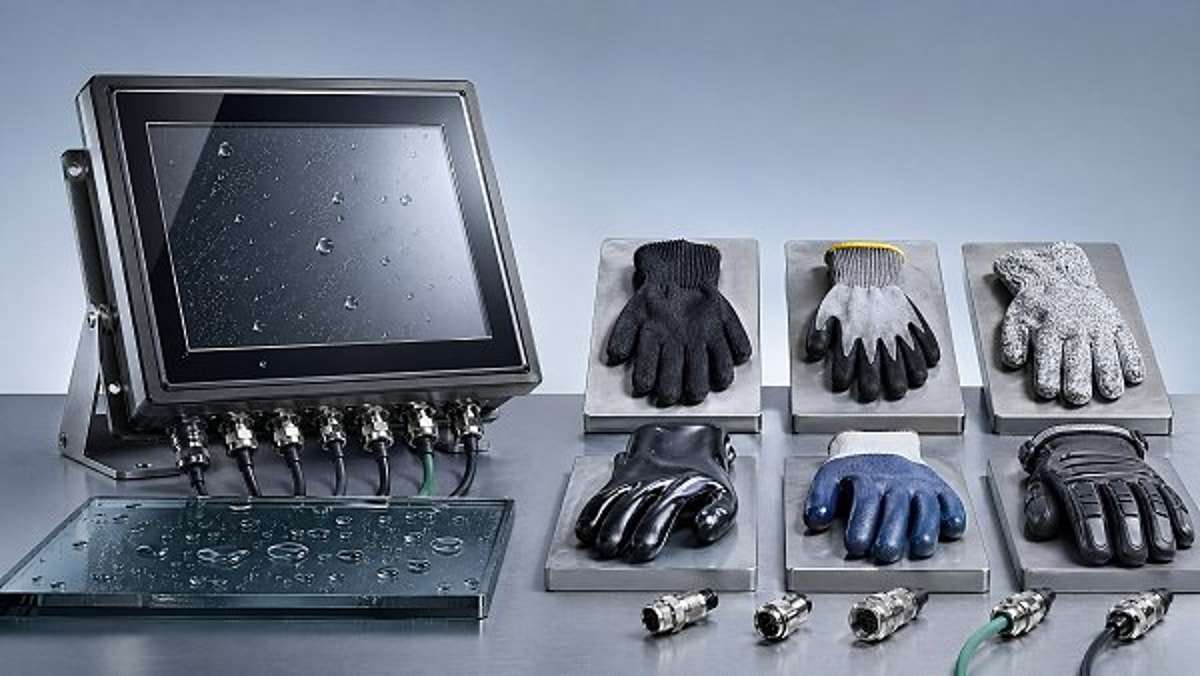
Not all hmi touch panels use the same sensing method, and that is the first reason response varies with gloves. In broad terms, industrial panels are commonly built around resistive, projected capacitive, or less frequently infrared touch architectures. Each technology detects input differently, so glove compatibility depends on physical pressure, conductivity, panel stack-up, and controller calibration rather than on a single “glove mode” label.
Resistive screens respond to pressure, which makes them historically reliable for thick gloves, styluses, and wet conditions. However, they can offer lower optical clarity and shorter operational life under heavy use. Projected capacitive designs dominate modern hmi touch panels because they support multi-touch, stronger glass surfaces, and cleaner interface design, but they rely on electrical field changes. That means glove input is sensitive to glove material, finger contact area, and firmware tuning.
Even within projected capacitive systems, performance differs by electrode pattern, cover glass thickness, controller quality, and signal processing. A panel with 1.1 mm cover glass may behave differently from one with 3 mm chemically strengthened glass, even if both are advertised for industrial use. Thicker glass often improves impact durability but can reduce sensitivity unless the controller is tuned for higher signal gain and noise rejection.
Why “glove support” is not a complete specification
Many product listings mention glove operation without defining the test conditions. That creates confusion during sourcing. A useful evaluation should ask at least 4 questions: what glove type was used, what glove thickness range was validated, under what temperature and humidity conditions was it tested, and whether water rejection remained active during glove use. Without those details, one supplier’s claim may not match another’s.
For research-driven buyers, it helps to compare the basic strengths and limits of the main technologies before moving to brand-specific qualification. The table below summarizes how common industrial touch approaches behave when gloves are involved.
The key takeaway is simple: touch response starts with physics, not marketing terminology. When comparing hmi touch panels for industrial deployment, the touch architecture should be treated as a first-level decision, especially if operators use gloves for 70% to 100% of their shift.
Why Glove Material, Thickness, and Fit Change Results
Gloves differ in conductivity, surface texture, moisture retention, and finger shape. Those differences directly affect how hmi touch panels interpret input. A thin nitrile glove can transmit a weak capacitive signal more effectively than a dry leather glove. A snug glove creates a better contact patch than a loose glove with wrinkled fingertips. In practical use, operators often switch glove types by task, season, or safety standard, which explains why panel behavior may seem inconsistent over time.
Thickness is especially important. In projected capacitive systems, every extra layer between the finger and the sensor reduces signal strength. A glove around 0.2–0.5 mm may work acceptably on a tuned industrial panel, while a thermal glove in the 1.5–3.0 mm range can reduce response accuracy, require longer press time, or cause missed touches near small on-screen buttons. This is one reason interface design and touch hardware should be evaluated together rather than separately.
Fit also matters more than many buyers expect. If the fingertip compresses unevenly or the operator presses at an angle, the effective touch area can shift by several millimeters. On a 10-inch panel with tightly packed controls, that small variation can lead to wrong selections, especially when button spacing is below 8–10 mm. The problem is often blamed on the screen, even though the interface layout and glove ergonomics are part of the same performance chain.
Typical glove variables that affect industrial touch response
- Material type: nitrile, latex, polyurethane, cotton, leather, and insulated composite gloves behave differently on capacitive surfaces.
- Thickness range: response can change noticeably between sub-0.5 mm disposable gloves and 2 mm or thicker safety gloves.
- Moisture condition: dry gloves, damp gloves, and oil-contaminated gloves can each alter conductivity and friction.
- Finger geometry: tight-fit gloves usually provide more repeatable input than loose or folded fingertips.
Practical implications for interface evaluation
Researchers and sourcing teams should test hmi touch panels using the actual gloves from the intended site, not a generic lab sample. A warehouse picking station, a sterile medical preparation area, and a solar field maintenance terminal can all involve very different glove types. Testing only one glove profile can lead to an incomplete conclusion and a higher risk of operator complaints after deployment.
A useful approach is to define 3 glove categories during evaluation: primary-use glove, worst-case glove, and seasonal glove. This allows buyers to see whether the panel remains usable across daily operations and peak-risk conditions rather than only under ideal assumptions.
Environmental and Electrical Factors That Reduce Reliability
Many inconsistent results blamed on gloves are actually caused by the surrounding environment. Industrial hmi touch panels often operate near motors, variable-frequency drives, metal enclosures, handheld radios, or long cable runs. These sources can introduce electrical noise that weakens touch detection margins. A panel that works on a benchtop may become less stable once mounted in a machine cabinet with imperfect grounding.
Temperature and humidity also matter. In outdoor or semi-outdoor installations, panel response can change between -10°C winter starts and 40°C summer exposure. Condensation, rain mist, or washdown residue can create false inputs or force the controller to reject touches more aggressively. When glove mode and water rejection must work at the same time, tuning becomes a balancing act rather than a simple on-off feature.
Mechanical integration adds another layer. Mounting pressure, grounding path, bezel design, and the air gap or optical bonding method can all influence signal stability. For example, a panel integrated behind thicker protective glass or a rugged overlay may need stronger controller tuning than the same touch module in an open-frame test setup. This is why OEM-level integration reviews are often more useful than catalog-only comparisons.
Common operating conditions that change glove response
The table below highlights several site conditions that can make hmi touch panels appear inconsistent even when the glove type stays the same. These factors are especially relevant in advanced manufacturing, energy infrastructure, logistics terminals, and healthcare equipment environments.
The important conclusion is that glove compatibility should be tested as part of the full operating system, not as a standalone screen claim. For global buyers comparing hmi touch panels across suppliers, site condition mapping often reveals more risk than a simple laboratory pass or fail result.
How to Evaluate and Specify HMI Touch Panels for Gloved Use
A strong procurement specification goes beyond panel size and brightness. If gloved operation is essential, the evaluation process should define measurable acceptance criteria. This may include response latency, touch success rate, minimum button size, false touch tolerance, and performance across 2 to 3 glove categories. Without predefined benchmarks, supplier comparisons become subjective and post-installation disputes become more likely.
A practical qualification plan typically includes bench testing, integrated system testing, and pilot-site validation. Bench testing checks the raw capability of hmi touch panels under controlled conditions. Integrated testing evaluates the unit inside the real enclosure, with production cabling and local power architecture. Pilot validation then confirms performance with actual operators over 1 to 2 weeks of daily tasks. This 3-stage method helps expose issues that spec sheets rarely show.
User interface design should be part of the same decision. If workers use medium-thickness gloves, touch targets below 10 mm may be too small for reliable operation. Larger controls, more spacing, swipe alternatives, and reduced dependency on edge gestures can significantly improve usable performance without changing the panel hardware. In many cases, the best result comes from moderate hardware tuning plus smarter interface layout.
A 5-point qualification checklist for buyers
- Define the primary glove set, including material, thickness range, and whether gloves may be wet, oily, or insulated.
- Verify operating environment, including temperature range, washdown exposure, and nearby electrical noise sources.
- Ask suppliers whether sensitivity tuning is fixed, configurable, or adjustable in firmware during integration.
- Test actual task flows, not just isolated taps, across at least 50 to 100 repeated inputs per scenario.
- Set acceptance criteria for both accuracy and operator effort, including missed-touch threshold and average input speed.
Selection factors researchers should compare side by side
Before final selection, many teams find it useful to compare suppliers using a structured matrix rather than relying on marketing descriptions. The table below can support RFI or RFQ stage evaluation for industrial hmi touch panels.
Well-structured requirements reduce sourcing risk. They also improve communication between procurement, design engineering, and operations teams, which is especially important for multi-site rollouts or cross-border manufacturing programs.
Common Misconceptions, Field Risks, and Research Priorities
One common misconception is that higher sensitivity automatically solves glove issues. In reality, increasing gain too much can create false inputs, poor palm rejection, or unstable behavior in humid environments. Another misconception is that all industrial hmi touch panels are easier to use than membrane keypads in every setting. In some heavy-glove or washdown applications, a hybrid design with physical keys for critical functions can still provide better reliability.
A second risk is overvaluing laboratory demonstrations. A panel may pass 100 repeated touches on a bench and still underperform in a production cell where users press quickly, approach the screen from different angles, or operate while carrying tools. Real-world studies should include task duration, fatigue, mis-touch rate, and recovery behavior after false input. These factors matter more to total process efficiency than a single pass-fail metric.
For market researchers and decision-makers using platforms such as TradeNexus Pro, the most useful lens is comparative fit rather than generic feature ranking. The right hmi touch panels for a medical device cart, a smart electronics assembly line, and a supply chain kiosk may all differ because the glove profile, compliance environment, and operator workflow differ. Good analysis therefore starts with use case segmentation, not universal claims.
FAQ for technical researchers and buyers
How many glove types should be tested before approval?
In most B2B evaluations, 3 glove profiles are enough for first-round approval: daily-use glove, heavy-duty or insulated glove, and a wet-condition glove if exposure is expected. If the deployment spans more than 2 regions or seasons, add a fourth profile to cover cold-weather operation.
Are capacitive hmi touch panels unsuitable for gloves?
No. Many projected capacitive panels work well with gloves when the controller, cover glass, and interface design are matched to the use case. The issue is variability. They require more careful validation than pressure-based systems, especially when glove thickness exceeds about 1 mm or when water and electrical noise are present.
What response indicators should researchers record?
Useful indicators include missed-touch rate, repeated-touch rate, average time per input, false activation count, and operator feedback after at least 30 to 60 minutes of use. These metrics show usability more clearly than a simple yes-or-no glove-touch claim.
Differences in glove response are not random. They emerge from the interaction of touch technology, glove characteristics, environmental stress, electrical conditions, and interface design. For anyone evaluating hmi touch panels, the most reliable path is to define the real operating scenario, test with actual gloves, and compare suppliers using measurable criteria rather than broad compatibility statements.
For industrial researchers, procurement teams, and enterprise decision-makers, this approach leads to better usability, lower deployment risk, and more credible supplier assessment. If you are comparing solutions across advanced manufacturing, healthcare technology, smart electronics, green energy, or logistics environments, a scenario-based evaluation framework will reveal far more than headline specifications alone.
To explore more solution-focused analysis, supplier intelligence, and technical sourcing insights on hmi touch panels and adjacent industrial interfaces, connect with TradeNexus Pro to get tailored research support, compare market options, and discuss a fit-for-application strategy.
Get weekly intelligence in your inbox.
No noise. No sponsored content. Pure intelligence.
 May 03, 2026AI Boom Drives Data Center Power Demand, Liquid Cooling Gains UrgencyAI Boom Drives Data Center Power Demand, Liquid Cooling Gains Urgency
 May 03, 2026Low-Altitude Economy in China's 15th Five-Year Plan Boosts Warehouse Robotics ExportsLow-Altitude Economy in China's 15th Five-Year Plan Boosts Warehouse Robotics Exports
 May 03, 2026EU REACH Adds 5 Organotin Compounds to SVHC List for ElectronicsEU REACH Adds 5 Organotin Compounds to SVHC List for Electronics
 May 03, 2026Western Land-Sea Expressway Boosts Solar PV Exports to ASEANWestern Land-Sea Expressway Boosts Solar PV Exports to ASEAN
 May 03, 2026Southeast Asia Smart Home E-commerce Grows 27.4% Amid New Matter 1.3+ Certification RulesSoutheast Asia Smart Home E-commerce Grows 27.4% Amid New Matter 1.3+ Certification Rules
 May 03, 2026FDA Updates IVD Software Guidance: AI Diagnostic Tools Require Independent Algorithm ValidationFDA Updates IVD Software Guidance: AI Diagnostic Tools Require Independent Algorithm Validation
 May 03, 2026Global Methanol EV Ecosystem Alliance LaunchedGlobal Methanol EV Ecosystem Alliance Launched
 May 03, 2026Vietnam GDP Growth Forecast Raised to 7.2% for 2026Vietnam GDP Growth Forecast Raised to 7.2% for 2026
 May 03, 2026UAE Emerges as Global AI Hub, Driving Demand for AI-Quality Inspection SystemsUAE Emerges as Global AI Hub, Driving Demand for AI-Quality Inspection Systems
 May 03, 2026OFID $500M Funding for Côte d'Ivoire Energy ProjectsOFID $500M Funding for Côte d'Ivoire Energy Projects
 May 03, 20265 Axis Milling Machines for Automotive: Buy New or Retrofit?5 Axis Milling Machines for Automotive: Buy New or Retrofit?
 May 03, 2026What to Check Before Sourcing OEM Machined Parts from IndiaWhat to Check Before Sourcing OEM Machined Parts from India
 May 03, 2026Why Sheet Metal Bending Machine Price Varies So MuchWhy Sheet Metal Bending Machine Price Varies So Much
 May 03, 2026Plastic Injection Molding Process Guide for Common Defect ControlPlastic Injection Molding Process Guide for Common Defect Control
 May 03, 2026Smart Manufacturing Technology Trends Reshaping Factory UpgradesSmart Manufacturing Technology Trends Reshaping Factory Upgrades
 May 03, 2026Automotive Die Casting Parts and the Hidden Cost of PorosityAutomotive Die Casting Parts and the Hidden Cost of Porosity
 May 03, 2026Assembly Line Robots: Flexibility Can Matter More Than SpeedAssembly Line Robots: Flexibility Can Matter More Than Speed
 May 03, 2026Smart Manufacturing in Energy: Which Upgrades Pay Back FasterSmart Manufacturing in Energy: Which Upgrades Pay Back Faster
 May 03, 2026Why Robotics Integration Fails After a Successful DemoWhy Robotics Integration Fails After a Successful Demo
 May 03, 2026How to Spot a Reliable Precision Components ManufacturerHow to Spot a Reliable Precision Components Manufacturer
 May 03, 2026Sheet Metal Bending Machine Specifications That Affect AccuracySheet Metal Bending Machine Specifications That Affect Accuracy
 May 03, 2026Oil and Gas Fabrication: Where Material Mismatch Gets ExpensiveOil and Gas Fabrication: Where Material Mismatch Gets Expensive
 May 03, 2026Construction Fabrication Delays Often Start at the Drawing StageConstruction Fabrication Delays Often Start at the Drawing Stage
 May 03, 2026Industrial Robotics Maintenance Guide for Fewer Surprise StopsIndustrial Robotics Maintenance Guide for Fewer Surprise Stops
 May 03, 2026Smart Manufacturing Technology Benefits Beyond Labor SavingsSmart Manufacturing Technology Benefits Beyond Labor Savings
 May 03, 2026Defense Components Need More Than Tight TolerancesDefense Components Need More Than Tight Tolerances
 May 03, 2026How to Vet a Die Casting Parts Supplier in MexicoHow to Vet a Die Casting Parts Supplier in Mexico