How to Compare HMI Touch Panels Beyond Screen Size
When evaluating hmi touch panels, screen size is only the starting point. For procurement teams, the real value lies in durability, responsiveness, integration compatibility, lifecycle support, and total cost of ownership. This guide explains how to compare options more strategically, helping buyers reduce risk, improve system performance, and make sourcing decisions that align with long-term operational goals.
In industrial buying cycles, hmi touch panels often sit between engineering demands and commercial constraints. A panel may look competitive on paper because it offers a 10-inch or 15-inch display, yet fail during deployment because the enclosure rating is too low, the controller protocol is unsupported, or spare parts become unavailable after 24 months. For procurement professionals, these risks affect downtime, maintenance budgets, and long-term vendor reliability.
This article focuses on practical comparison criteria used across advanced manufacturing, smart electronics, healthcare technology, green energy systems, and supply chain automation environments. Instead of treating hmi touch panels as simple display hardware, it frames them as operational assets that influence usability, safety, integration speed, and lifecycle cost over 3 to 7 years.
Why Screen Size Alone Creates Procurement Blind Spots
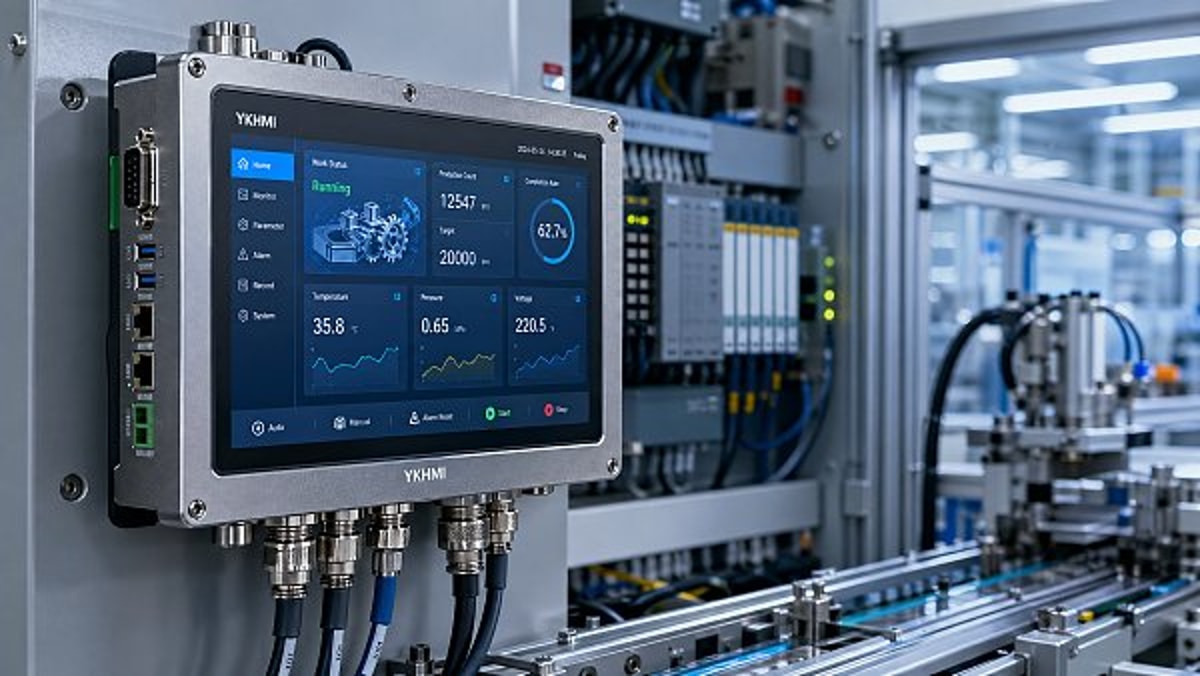
A larger screen can improve visibility, but it does not automatically improve process control. In many production lines, the better buying decision is a 7-inch or 10-inch panel with faster touch response, higher ingress protection, and better software compatibility rather than a larger unit with weaker field performance. Procurement teams should start by defining the operator task, viewing distance, and environmental load before comparing display dimensions.
For example, a packaging line operator standing 0.8 to 1.2 meters from the interface may only need a 7-inch to 10-inch HMI. A maintenance station viewed from 1.5 meters away may benefit from a 12-inch or larger screen. However, if the panel is installed in a dusty area with frequent washdowns, IP65 or IP66 front protection may matter more than diagonal size. In clean indoor electronics assembly, capacitive touch accuracy may be the higher priority.
Another blind spot is assuming all hmi touch panels with similar dimensions deliver similar user experience. Screen brightness, glove operability, processor speed, boot time, and communication latency can vary significantly. A panel that takes 45 seconds to boot after a power interruption may be unacceptable in operations where restart windows are under 10 minutes.
Questions Procurement Should Ask Before Shortlisting
Before requesting quotes, buyers should align internal stakeholders around a small set of operational questions. This avoids comparing hmi touch panels only by brochure visuals or unit price.
- What is the actual operating environment: clean room, factory floor, outdoor cabinet, or mobile equipment?
- How many hours per day will the panel run: 8, 16, or 24 hours?
- Does the system require PLC integration through Modbus, PROFINET, EtherNet/IP, CAN, or serial protocols?
- Will operators use gloves, wet hands, or stylus-based input?
- What lifecycle is expected: 3 years, 5 years, or longer?
These questions help narrow the field quickly. In many sourcing projects, eliminating one incompatible communication protocol early can save 2 to 4 weeks of evaluation time and avoid rework during commissioning.
The Core Technical Criteria to Compare hmi touch panels
A structured comparison model gives procurement teams a more reliable basis for supplier discussions. Instead of requesting generic “best price” offers, define 6 to 8 measurable criteria tied to the application. In most industrial projects, the key areas are display performance, touch technology, environmental durability, connectivity, computing capability, and software support.
Display performance should include more than resolution. Brightness levels of 300 to 500 nits may be acceptable indoors, while semi-outdoor or high-glare environments may need 800 nits or more. Viewing angle also matters in multi-operator stations. Resistive touch can still be valuable in harsh industrial conditions because it works well with gloves and contamination, while projected capacitive touch often provides a smoother multi-touch experience in cleaner settings.
Environmental durability should cover temperature range, vibration tolerance, front-panel sealing, and chemical resistance. A touch panel installed in a battery storage system, a food processing line, or a medical device assembly zone may face very different conditions. Procurement should verify whether the supplier provides clear operating ranges such as -10°C to 50°C or 0°C to 55°C, rather than broad marketing language.
Comparison Matrix for Key Specifications
The table below shows a practical framework for comparing hmi touch panels beyond screen size. It can be adapted into an RFQ or supplier scorecard for cross-functional review.
The most common buying mistake is to evaluate these criteria independently instead of in combination. For instance, a high-brightness screen may increase thermal load, which means enclosure ventilation and operating temperature limits must be reviewed together. Strong procurement decisions usually come from weighted scoring, not one-dimensional feature comparison.
Recommended Weighting Approach
A simple procurement model is to assign 25% to compatibility, 20% to durability, 20% to lifecycle support, 15% to usability, 10% to delivery risk, and 10% to unit price. The exact weighting will vary by sector, but this approach prevents low-cost bids from overshadowing integration or service concerns.
Integration, Software, and Lifecycle Support Matter More Than First Cost
For procurement teams, the biggest hidden cost in hmi touch panels is often not hardware failure but integration friction. If the panel does not work smoothly with the existing PLC, SCADA, MES, or edge gateway environment, engineering time can rise quickly. A lower purchase price may be erased by 20 to 40 extra hours of configuration, driver testing, or debugging during commissioning.
Software usability is equally important. Some hmi touch panels are backed by mature configuration tools, reusable libraries, and stable firmware release cycles. Others require more manual engineering effort or depend on limited technical documentation. Buyers should ask how often firmware is updated, whether backward compatibility is maintained, and how long the software environment is supported after product launch.
Lifecycle support is especially relevant in sectors with longer equipment depreciation periods. In advanced manufacturing or healthcare technology, a machine may stay in service for 5 to 10 years. If a panel becomes obsolete after 2 to 3 years, replacement can trigger redesign costs, validation delays, and spare-part complexity. Procurement should confirm product roadmap visibility, service lead times, and replacement policy before issuing purchase orders.
Lifecycle Questions to Put in the RFQ
Adding a few direct questions to the sourcing package can significantly improve supplier transparency and reduce downstream risk.
- What is the expected active supply period for this model: 3 years, 5 years, or longer?
- What is the standard lead time for spare units: 7–15 days, 2–4 weeks, or longer?
- Are software licenses one-time, subscription-based, or bundled with the device?
- What is the standard response time for technical support during commissioning?
- Is there a migration path if the model is discontinued?
In multi-site operations, these answers can be more valuable than a 5% hardware discount. Consistent support across regions reduces maintenance complexity and helps standardize operator training, spare inventories, and documentation practices.
How to Evaluate Total Cost of Ownership Across Different Use Cases
Total cost of ownership, or TCO, is where procurement teams can create measurable value. Two hmi touch panels may differ by only 8% to 12% in purchase price, yet one option may cost significantly more over 36 months because of higher failure rates, poor readability, limited spare availability, or longer installation time. TCO analysis should include direct and indirect cost drivers.
Direct costs include hardware, software, mounting accessories, communication modules, and replacement stock. Indirect costs include engineering hours, operator errors, unplanned downtime, maintenance visits, and retraining during model changes. In facilities running 16 to 24 hours per day, even one avoidable downtime event can outweigh the initial savings of a cheaper panel.
Use-case analysis is essential because requirements differ by industry. A smart electronics line may value high-resolution graphics and fast touch response. A green energy control cabinet may prioritize thermal resilience and remote diagnostics. A warehouse automation station may need simple UI durability with reliable network connectivity over advanced visual features.
Sample TCO Decision Table
The following table illustrates how procurement can compare hmi touch panels on a broader cost basis rather than unit price alone.
This kind of TCO framing is particularly useful when procurement must justify a higher-priced option to finance or operations leadership. It shifts the discussion from upfront expenditure to performance continuity, maintenance stability, and operational risk reduction.
Three Cost Drivers Buyers Commonly Miss
- Panel cutout mismatch, which can increase retrofit labor during replacement projects.
- License or runtime software costs that appear after the hardware quote is approved.
- Localization needs, including multi-language UI support for regional operator teams.
Reviewing these details during sourcing can reduce change-order risk and help standardize deployment across plants, contract manufacturers, and integrator partners.
A Practical Procurement Framework for Shortlisting Suppliers
Once the technical criteria and TCO factors are defined, procurement needs a repeatable method to compare suppliers. A good shortlist process normally includes 4 stages: requirement mapping, supplier prequalification, sample evaluation, and commercial negotiation. This approach is useful whether you are sourcing hmi touch panels for a single production cell or for multi-country rollout.
Requirement mapping should document application type, mounting method, environmental conditions, interface requirements, preferred screen range, and support expectations. Supplier prequalification should then verify manufacturing consistency, technical response quality, regional service capability, and documentation completeness. Even a technically strong product becomes risky if the supplier cannot support pilot deployment within the project timeline.
Sample evaluation is where many procurement teams gain leverage. Testing 2 to 3 candidate panels in a realistic setup for 1 to 2 weeks can reveal issues that are not visible in datasheets. Touch lag, glare, menu complexity, heat buildup, and connector accessibility often become obvious only during actual use. These findings help align engineering and procurement before final negotiations.
Suggested Supplier Scorecard
A structured scorecard makes cross-functional review more objective, especially when operations, engineering, and procurement have different priorities.
With this structure, procurement can move beyond subjective vendor preferences and build a decision trail that supports audits, internal approvals, and long-term standardization. It is also easier to defend sourcing choices when the scorecard links clearly to uptime, safety, and total operating cost.
Common Shortlisting Mistakes
- Selecting a panel based only on display size and quote price.
- Ignoring software licensing and protocol limitations until late-stage testing.
- Failing to request lifecycle and replacement policy details in writing.
- Skipping sample validation for projects involving 10 or more deployed units.
In sectors with regulated processes or distributed operations, these mistakes can delay implementation by several weeks and create avoidable redesign work. A disciplined procurement framework protects both project schedules and long-term asset performance.
FAQ for Buyers Comparing hmi touch panels
How many hmi touch panels should be tested before a bulk order?
For most B2B projects, testing 2 to 3 shortlisted units is a practical starting point. If the deployment volume exceeds 50 units or spans multiple facilities, a pilot run in at least 1 live application environment is recommended before locking the standard specification.
Which is better for industrial use: resistive or capacitive touch?
Neither is universally better. Resistive touch is often preferred where gloves, dust, moisture, or basic input reliability are key. Capacitive touch is often favored for modern interfaces, multi-touch functions, and cleaner environments. The correct choice depends on operator conditions, not general market trends.
What lead time should procurement expect?
Common lead times for hmi touch panels range from 2 to 6 weeks, depending on configuration, supplier stock, and region. Spare units may be available faster, sometimes within 7 to 15 days, but custom variants or bundled software packages can take longer. Always verify both initial delivery and replacement lead times.
What warranty terms are worth checking?
Buyers should confirm warranty duration, failure handling process, turnaround time, and whether advance replacement is available. A 12-month warranty may be acceptable in some projects, but for critical systems many teams prefer terms that align more closely with commissioning and early operation risk.
Comparing hmi touch panels effectively means looking beyond diagonal inches and focusing on operating fit, communication compatibility, usability, support continuity, and long-term cost control. For procurement teams in manufacturing, energy, electronics, healthcare technology, and supply chain automation, the strongest sourcing outcomes come from structured evaluation rather than feature-led purchasing.
TradeNexus Pro supports decision-makers who need deeper industrial insight, clearer comparison logic, and stronger supplier evaluation frameworks. If you are refining your shortlist, planning a panel standardization project, or reviewing lifecycle risk across multiple suppliers, now is the right time to get a tailored sourcing perspective.
Contact us to discuss application-specific requirements, request a customized comparison framework, or explore more B2B solutions for industrial interface sourcing.
Get weekly intelligence in your inbox.
No noise. No sponsored content. Pure intelligence.
 May 03, 2026AI Boom Drives Data Center Power Demand, Liquid Cooling Gains UrgencyAI Boom Drives Data Center Power Demand, Liquid Cooling Gains Urgency
 May 03, 2026Low-Altitude Economy in China's 15th Five-Year Plan Boosts Warehouse Robotics ExportsLow-Altitude Economy in China's 15th Five-Year Plan Boosts Warehouse Robotics Exports
 May 03, 2026EU REACH Adds 5 Organotin Compounds to SVHC List for ElectronicsEU REACH Adds 5 Organotin Compounds to SVHC List for Electronics
 May 03, 2026Western Land-Sea Expressway Boosts Solar PV Exports to ASEANWestern Land-Sea Expressway Boosts Solar PV Exports to ASEAN
 May 03, 2026Southeast Asia Smart Home E-commerce Grows 27.4% Amid New Matter 1.3+ Certification RulesSoutheast Asia Smart Home E-commerce Grows 27.4% Amid New Matter 1.3+ Certification Rules
 May 03, 2026FDA Updates IVD Software Guidance: AI Diagnostic Tools Require Independent Algorithm ValidationFDA Updates IVD Software Guidance: AI Diagnostic Tools Require Independent Algorithm Validation
 May 03, 2026Global Methanol EV Ecosystem Alliance LaunchedGlobal Methanol EV Ecosystem Alliance Launched
 May 03, 2026Vietnam GDP Growth Forecast Raised to 7.2% for 2026Vietnam GDP Growth Forecast Raised to 7.2% for 2026
 May 03, 2026UAE Emerges as Global AI Hub, Driving Demand for AI-Quality Inspection SystemsUAE Emerges as Global AI Hub, Driving Demand for AI-Quality Inspection Systems
 May 03, 2026OFID $500M Funding for Côte d'Ivoire Energy ProjectsOFID $500M Funding for Côte d'Ivoire Energy Projects
 May 03, 20265 Axis Milling Machines for Automotive: Buy New or Retrofit?5 Axis Milling Machines for Automotive: Buy New or Retrofit?
 May 03, 2026What to Check Before Sourcing OEM Machined Parts from IndiaWhat to Check Before Sourcing OEM Machined Parts from India
 May 03, 2026Why Sheet Metal Bending Machine Price Varies So MuchWhy Sheet Metal Bending Machine Price Varies So Much
 May 03, 2026Plastic Injection Molding Process Guide for Common Defect ControlPlastic Injection Molding Process Guide for Common Defect Control
 May 03, 2026Smart Manufacturing Technology Trends Reshaping Factory UpgradesSmart Manufacturing Technology Trends Reshaping Factory Upgrades
 May 03, 2026Automotive Die Casting Parts and the Hidden Cost of PorosityAutomotive Die Casting Parts and the Hidden Cost of Porosity
 May 03, 2026Assembly Line Robots: Flexibility Can Matter More Than SpeedAssembly Line Robots: Flexibility Can Matter More Than Speed
 May 03, 2026Smart Manufacturing in Energy: Which Upgrades Pay Back FasterSmart Manufacturing in Energy: Which Upgrades Pay Back Faster
 May 03, 2026Why Robotics Integration Fails After a Successful DemoWhy Robotics Integration Fails After a Successful Demo
 May 03, 2026How to Spot a Reliable Precision Components ManufacturerHow to Spot a Reliable Precision Components Manufacturer
 May 03, 2026Sheet Metal Bending Machine Specifications That Affect AccuracySheet Metal Bending Machine Specifications That Affect Accuracy
 May 03, 2026Oil and Gas Fabrication: Where Material Mismatch Gets ExpensiveOil and Gas Fabrication: Where Material Mismatch Gets Expensive
 May 03, 2026Construction Fabrication Delays Often Start at the Drawing StageConstruction Fabrication Delays Often Start at the Drawing Stage
 May 03, 2026Industrial Robotics Maintenance Guide for Fewer Surprise StopsIndustrial Robotics Maintenance Guide for Fewer Surprise Stops
 May 03, 2026Smart Manufacturing Technology Benefits Beyond Labor SavingsSmart Manufacturing Technology Benefits Beyond Labor Savings
 May 03, 2026Defense Components Need More Than Tight TolerancesDefense Components Need More Than Tight Tolerances
 May 03, 2026How to Vet a Die Casting Parts Supplier in MexicoHow to Vet a Die Casting Parts Supplier in Mexico