Machine Vision Systems and False Rejects: What Usually Causes Them
False rejects can quietly erode efficiency, increase waste, and frustrate operators on the production line. In machine vision systems, these errors are rarely caused by one issue alone—they often result from lighting changes, poor image setup, shifting part positions, or unstable inspection parameters. Understanding the usual causes is the first step toward improving accuracy, reducing downtime, and building a more reliable inspection process.
Why false rejects look different from one production scene to another
Operators often hear the same complaint across factories: the machine vision systems worked well during setup, but after several hours or a few shifts, the reject rate began to climb. The important point is that false rejects do not behave the same way in every environment. A high-speed packaging line running 180 to 300 parts per minute faces very different risks from a precision assembly cell checking connectors, pins, or solder presence at 20 to 60 parts per minute.
In practical terms, the cause of a false reject is usually tied to the scene in which the inspection happens. Transparent film, reflective metal, dark molded plastic, printed labels, and mixed-size components all create different image conditions. For users and line operators, this means that solving false rejects is not just about changing a threshold. It requires understanding the interaction between lighting, optics, part presentation, motion, and decision rules.
This is especially relevant in cross-industry operations such as advanced manufacturing, smart electronics, healthcare technology packaging, and logistics labeling. In many facilities, even a 1% to 3% false reject rate can create significant rework queues over a single 8-hour shift. Once manual verification is added, the real cost includes labor loss, line interruptions, scrap risk, and reduced trust in the inspection station.
A simple way to judge the problem
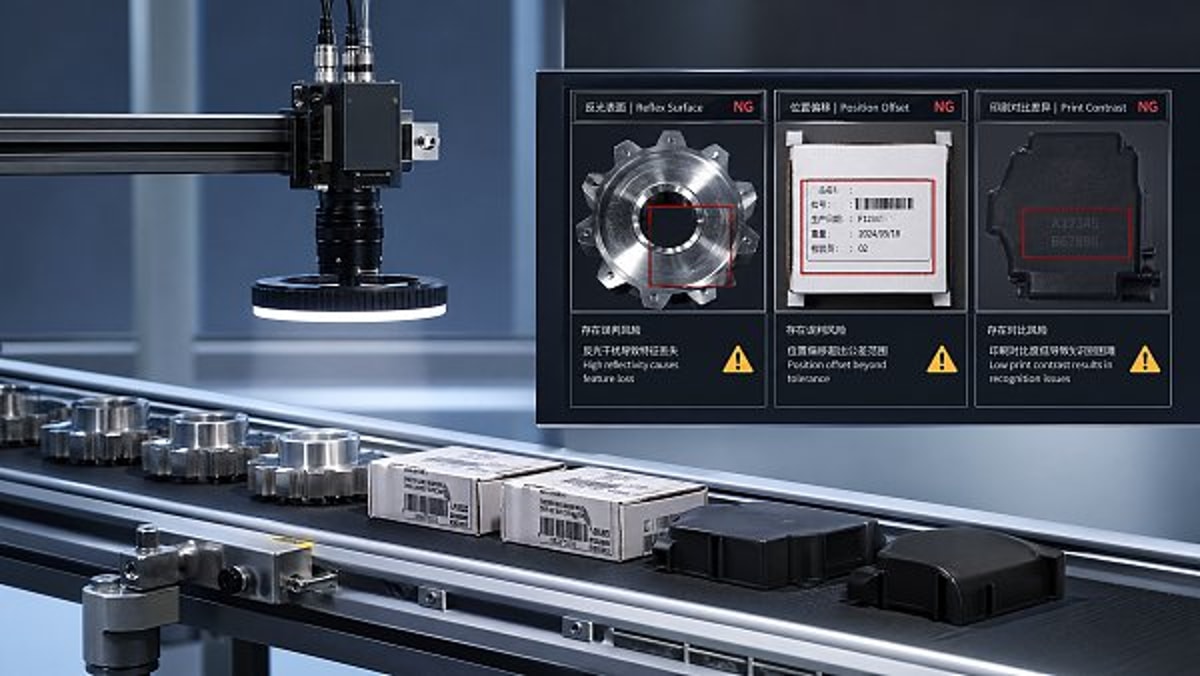
Before changing the machine vision systems setup, operators should first identify which production scene they are dealing with. In most factories, false rejects cluster into three broad situations: appearance inspection under unstable lighting, presence or position inspection under part movement, and code or print inspection under inconsistent contrast. Each scene has its own failure pattern, and each one should be corrected differently.
- Appearance inspection problems usually show up as random cosmetic failures, edge noise, or glare-related misses.
- Presence and position inspection problems often appear after conveyor vibration, fixture wear, or product orientation drift exceeds a few millimeters.
- Code and label inspection problems commonly increase when print quality changes between lots, suppliers, or thermal transfer settings.
That is why scene-based troubleshooting is more useful than generic advice. When operators classify the process correctly, they can shorten diagnosis time from several hours to a more focused 20 to 40 minutes of image review and line checks.
Three common application scenes where machine vision systems create false rejects
The most effective way to reduce false rejects is to compare the inspection scene with the way the machine vision systems were configured. The table below highlights three common application scenes, what typically changes during production, and what operators should watch first.
This comparison shows why one universal fix rarely works. In machine vision systems, the same reject result can come from very different root causes. A glare problem may look like a defect issue, while a trigger delay may look like an alignment issue. For operators, that distinction matters because it changes what should be inspected first.
Scene 1: Reflective or low-contrast surfaces
Reflective surfaces are one of the most common reasons machine vision systems reject good parts. Stainless steel, chrome-plated components, glossy plastic, foil sachets, and coated electronics housings can all reflect light differently as the line runs. Even a small angle change of 3 to 5 degrees from vibration or fixture movement can create a new hotspot and make the image appear defective.
In this scene, the false reject is often not caused by the algorithm itself. It starts with image instability. If the grayscale value of the inspected area changes too much between cycles, the software has no stable reference. Operators should look at whether exposure time, light intensity, and camera angle remain consistent across a full shift rather than during only a short setup window.
Another frequent issue is dust, oil mist, or packaging residue on lenses and lights. In some plants, a lens that appears clean at the start of the shift can accumulate enough contamination within 6 to 12 hours to change contrast noticeably. That is why preventive cleaning intervals are often more effective than repeatedly widening pass/fail tolerances.
Scene 2: Parts that do not arrive in a repeatable position
For many operators, this is the most frustrating scenario because the image looks acceptable, but the region of interest is no longer exactly where the software expects it to be. In machine vision systems used for cap inspection, connector checks, tray verification, or component presence detection, part shift of just 1 to 2 millimeters can be enough to trigger a false reject if the search window is too narrow.
This problem becomes more common when speed increases, fixtures wear out, or multiple product variants run on the same line. A vision tool that worked for one SKU may become unreliable when a second SKU has a different edge shape, color, or placement tolerance. Operators should verify whether the fixturing logic and image alignment tools were designed for the actual product mix, not only for the first approved sample.
Trigger timing also matters. If the camera captures a part slightly before or after its ideal position, motion blur or location drift can distort the measurement. On faster lines, a trigger offset error of only a few milliseconds can create enough image variation to increase rejects over hundreds of cycles.
Scene 3: Printed code, label, and text inspection
Code reading and print verification scenes are especially sensitive to supplier variation and consumable changes. A thermal printer ribbon, inkjet nozzle condition, label stock finish, or carton color change can shift contrast enough for machine vision systems to reject readable but visually inconsistent marks. This is common in packaging, healthcare consumables, warehouse labeling, and serialized product handling.
Operators should avoid assuming that every code-related reject is a print defect. In many cases, the print remains functionally acceptable, but the taught reference image is too narrow or too clean compared with real production. Good setup practice includes collecting accepted samples across different batches, not just one ideal sample from commissioning day.
When labels wrinkle, curl, or sit on uneven packaging surfaces, depth-of-field limitations can also contribute. If the focus range is too tight, text edges soften and the inspection score drops. In these scenes, optics and mechanical presentation are often just as important as software settings.
What usually causes false rejects inside machine vision systems
Once the application scene is clear, operators can trace false rejects to a smaller number of root causes. In most real production environments, the issue is not one dramatic failure but a combination of small variations that slowly move the process outside its inspection window. The table below maps common causes to their visible symptoms and practical checks.
These causes are common because machine vision systems are highly sensitive to repeatability. A system may be technically correct and still produce poor production results if it was tuned under ideal lab-like conditions. Operators should compare live line variation against the variation that was included during setup. If the setup covered only 10 perfect samples but daily production includes temperature shifts, different suppliers, and variable handling, false rejects are likely to appear.
Lighting drift is often underestimated
Lighting is one of the first things to review because it affects everything else in the image. Even durable industrial lighting can change over time due to heat, aging, vibration, or contamination. In some installations, brightness drift of a modest percentage is enough to push a grayscale threshold outside the accepted band, especially when the original setup already had limited contrast margin.
What to confirm on the floor
- Whether ambient light enters the inspection area during daytime, door opening, or nearby machine access.
- Whether the light bracket, camera mount, or enclosure shifted after cleaning or mechanical service.
- Whether the image histogram changes significantly between the start and end of a production run.
If operators track these factors once per shift for 1 to 2 weeks, they often identify repeatable patterns behind “random” rejects.
Inspection thresholds are often too clean for real production
Many false rejects originate from acceptable variation that was never included in the taught model. This is common when machine vision systems are commissioned under time pressure. The settings may work perfectly on ideal startup samples but become too narrow for natural production spread. That spread may include slight color tone changes, mold texture differences, print darkness variation, or allowable positional tolerance.
A better approach is to build the inspection around a meaningful sample range. For many applications, 30 to 50 good samples from different times, lots, and operators give a much safer baseline than a handful of pristine parts. This does not mean making the system loose; it means teaching it what “normal good” really looks like.
How operators can match the fix to the production scene
The right correction depends on where the instability comes from. In machine vision systems, operators get better results when they separate image quality issues from mechanical repeatability issues and from decision-rule issues. This structured approach prevents unnecessary parameter changes that only hide the real problem.
For reflective and cosmetic inspection scenes
Start with optics and lighting before touching software tolerances. Confirm whether a diffused light, backlight, polarizing approach, or changed incident angle would produce a more stable image. If the part surface changes by lot or finish grade, collect comparison images across that range before retuning the reject logic.
It is also useful to review maintenance habits. If the camera window or light cover is exposed to dust, adhesive mist, or coolant vapor, set inspection-area cleaning at fixed intervals such as every 4 hours or every product changeover. In many lines, this alone reduces nuisance rejects more effectively than broadening the tolerance window.
When possible, compare rejected parts under frozen image review. If the defect is visible only in the live image and not on the part itself, image condition is the likely root issue.
For position, presence, and alignment scenes
Check the mechanics first. A stable fixture, stop, nest, guide rail, or indexing mechanism is essential for repeatable vision results. If the product can rotate, slide, or bounce, the software must either compensate through pattern location tools or the mechanics must be improved. Otherwise, the inspection becomes sensitive to every small movement.
Operators should also ask whether line speed changed after the original setup. A station commissioned at 80 parts per minute may become unreliable at 120 parts per minute if exposure and trigger timing were never updated. In high-throughput settings, review trigger consistency, encoder integration, and blur risk whenever throughput rises by more than 10% to 15%.
If multiple variants run through the same station, store variant-specific recipes carefully and verify that each recipe uses the correct region of interest, threshold range, and pass criteria. False rejects often come from recipe mismatch rather than image failure.
For label, text, and code verification scenes
Begin by separating readability from cosmetic appearance. A code may be readable to downstream scanners even when it looks different from the reference image. Operators should define whether the station is checking content correctness, print placement, print presence, or visual quality. Each objective requires a different inspection strategy.
Next, compare samples from several lots and printing conditions. If label stock, substrate color, or ribbon type varies, machine vision systems should be adjusted around that approved range. It is safer to validate with representative production samples over several runs than to tune around one excellent example.
Finally, verify focus and depth-of-field. Curved containers, uneven pouches, and labels applied over seams can shift the print plane enough to soften edges. In that case, optical setup and part presentation should be improved before changing OCR or verification thresholds.
Common mistakes that make false rejects worse
Some reactions to false rejects create more instability over time. This usually happens when the team tries to restore line flow quickly without isolating the true cause. For users and operators responsible for daily performance, avoiding these mistakes can save many hours of repeated retuning.
Mistake 1: Widening every tolerance at once
This may reduce rejects temporarily, but it can also increase the chance of passing bad parts. In machine vision systems, broad tolerance changes should be the last step, not the first. If lighting drift or part movement caused the issue, tolerance expansion only hides the instability. The process becomes harder to control later.
A better method is to change one variable at a time, then test over a meaningful sample size such as 100 to 300 consecutive parts. That makes it easier to see whether the change improved robustness or only shifted the symptom.
Documenting the before-and-after reject pattern is equally important. Without that record, the same issue often returns during the next shift, product change, or maintenance cycle.
Mistake 2: Ignoring normal process variation
Production lines are not static. Material texture, ambient temperature, print darkness, handling position, and upstream machine behavior can all shift within acceptable operating limits. If machine vision systems are set up as though every part will look identical, false rejects are almost guaranteed.
For operators, the practical lesson is simple: validate the system against real production spread. Include at least several approved samples from different times, operators, and material lots. The wider the approved process window, the more representative the vision setup must be.
This is particularly important in mixed production environments where changeovers happen several times per week or even several times per shift.
Mistake 3: Treating vision as a software-only problem
Many false rejects start outside the camera. Worn fixtures, unstable conveyors, inconsistent feeders, weak print processes, and dirty mechanical stations all affect image quality. Operators should review the full inspection cell, not just the screen. In many cases, a mechanical correction produces a more stable result than any image parameter adjustment.
That is why strong machine vision systems performance depends on collaboration among operators, maintenance teams, process engineers, and quality staff. When all four groups review the same reject pattern, root cause isolation becomes faster and more reliable.
A practical operator checklist and next-step support
If your machine vision systems are producing frequent false rejects, the best next step is not guesswork but a short structured review. In most facilities, a focused checklist can identify whether the issue is optical, mechanical, timing-related, or threshold-related within one maintenance window.
Quick on-line checklist
- Capture and compare at least 20 rejected images and 20 accepted images from the same product run.
- Check whether the reject pattern increases after a certain runtime, such as 2 hours, 4 hours, or after changeover.
- Inspect lens, light cover, fixture position, trigger timing, and product presentation before changing software thresholds.
- Verify that the active recipe matches the product variant and current production conditions.
- Retune only after confirming whether the variation comes from the image, the mechanics, or the process itself.
For global manufacturers, exporters, and sourcing teams working across advanced manufacturing, green energy components, smart electronics, healthcare technology packaging, or supply chain labeling operations, this scene-based approach helps reduce repeated troubleshooting and improve line confidence. It also makes supplier discussions more precise because the problem can be defined in terms of image condition, part handling, inspection logic, and production variability.
Why work with us
TradeNexus Pro supports enterprise buyers, supply chain managers, and operational teams that need clearer decisions around industrial inspection technology and production reliability. If you are evaluating machine vision systems, troubleshooting false rejects, or comparing solution options across different application scenes, we can help you move from broad assumptions to usable selection criteria.
Contact us to discuss practical points such as inspection parameters, application fit, product selection, delivery cycle expectations, integration direction, custom solution planning, sample support, and quotation communication. If your team is trying to determine why good parts are failing inspection, a scene-specific review is often the fastest path to a more stable and efficient process.
Get weekly intelligence in your inbox.
No noise. No sponsored content. Pure intelligence.
 May 03, 2026AI Boom Drives Data Center Power Demand, Liquid Cooling Gains UrgencyAI Boom Drives Data Center Power Demand, Liquid Cooling Gains Urgency
 May 03, 2026Low-Altitude Economy in China's 15th Five-Year Plan Boosts Warehouse Robotics ExportsLow-Altitude Economy in China's 15th Five-Year Plan Boosts Warehouse Robotics Exports
 May 03, 2026EU REACH Adds 5 Organotin Compounds to SVHC List for ElectronicsEU REACH Adds 5 Organotin Compounds to SVHC List for Electronics
 May 03, 2026Western Land-Sea Expressway Boosts Solar PV Exports to ASEANWestern Land-Sea Expressway Boosts Solar PV Exports to ASEAN
 May 03, 2026Southeast Asia Smart Home E-commerce Grows 27.4% Amid New Matter 1.3+ Certification RulesSoutheast Asia Smart Home E-commerce Grows 27.4% Amid New Matter 1.3+ Certification Rules
 May 03, 2026FDA Updates IVD Software Guidance: AI Diagnostic Tools Require Independent Algorithm ValidationFDA Updates IVD Software Guidance: AI Diagnostic Tools Require Independent Algorithm Validation
 May 03, 2026Global Methanol EV Ecosystem Alliance LaunchedGlobal Methanol EV Ecosystem Alliance Launched
 May 03, 2026Vietnam GDP Growth Forecast Raised to 7.2% for 2026Vietnam GDP Growth Forecast Raised to 7.2% for 2026
 May 03, 2026UAE Emerges as Global AI Hub, Driving Demand for AI-Quality Inspection SystemsUAE Emerges as Global AI Hub, Driving Demand for AI-Quality Inspection Systems
 May 03, 2026OFID $500M Funding for Côte d'Ivoire Energy ProjectsOFID $500M Funding for Côte d'Ivoire Energy Projects
 May 03, 20265 Axis Milling Machines for Automotive: Buy New or Retrofit?5 Axis Milling Machines for Automotive: Buy New or Retrofit?
 May 03, 2026What to Check Before Sourcing OEM Machined Parts from IndiaWhat to Check Before Sourcing OEM Machined Parts from India
 May 03, 2026Why Sheet Metal Bending Machine Price Varies So MuchWhy Sheet Metal Bending Machine Price Varies So Much
 May 03, 2026Plastic Injection Molding Process Guide for Common Defect ControlPlastic Injection Molding Process Guide for Common Defect Control
 May 03, 2026Smart Manufacturing Technology Trends Reshaping Factory UpgradesSmart Manufacturing Technology Trends Reshaping Factory Upgrades
 May 03, 2026Automotive Die Casting Parts and the Hidden Cost of PorosityAutomotive Die Casting Parts and the Hidden Cost of Porosity
 May 03, 2026Assembly Line Robots: Flexibility Can Matter More Than SpeedAssembly Line Robots: Flexibility Can Matter More Than Speed
 May 03, 2026Smart Manufacturing in Energy: Which Upgrades Pay Back FasterSmart Manufacturing in Energy: Which Upgrades Pay Back Faster
 May 03, 2026Why Robotics Integration Fails After a Successful DemoWhy Robotics Integration Fails After a Successful Demo
 May 03, 2026How to Spot a Reliable Precision Components ManufacturerHow to Spot a Reliable Precision Components Manufacturer
 May 03, 2026Sheet Metal Bending Machine Specifications That Affect AccuracySheet Metal Bending Machine Specifications That Affect Accuracy
 May 03, 2026Oil and Gas Fabrication: Where Material Mismatch Gets ExpensiveOil and Gas Fabrication: Where Material Mismatch Gets Expensive
 May 03, 2026Construction Fabrication Delays Often Start at the Drawing StageConstruction Fabrication Delays Often Start at the Drawing Stage
 May 03, 2026Industrial Robotics Maintenance Guide for Fewer Surprise StopsIndustrial Robotics Maintenance Guide for Fewer Surprise Stops
 May 03, 2026Smart Manufacturing Technology Benefits Beyond Labor SavingsSmart Manufacturing Technology Benefits Beyond Labor Savings
 May 03, 2026Defense Components Need More Than Tight TolerancesDefense Components Need More Than Tight Tolerances
 May 03, 2026How to Vet a Die Casting Parts Supplier in MexicoHow to Vet a Die Casting Parts Supplier in Mexico