What Shortens the Service Life of HMI Touch Panels on the Floor
On busy production floors, hmi touch panels face constant vibration, heat, dust, moisture, and repeated operator contact—all of which can quietly shorten their service life. For after-sales maintenance teams, understanding these hidden wear factors is essential to reducing downtime, improving reliability, and planning smarter preventive care before minor panel issues turn into costly line interruptions.
Why a checklist-based approach works better for floor-level HMI maintenance
For after-sales maintenance personnel, the service life of hmi touch panels is rarely shortened by one dramatic failure. In most plants, the panel degrades through small and repeated stresses: a few degrees of extra heat, daily chemical wiping, minor enclosure leakage, or touch impact from gloved hands. A checklist-based approach helps teams identify these cumulative risks early, often during a 10-minute inspection rather than after a full production stoppage.
This method is especially useful in mixed industrial environments where one line may run 16 to 24 hours per day, while another only runs in short batches. Even when two machines use similar hmi touch panels, their wear profile can be very different because of operator frequency, ambient temperature range, cleaning routine, mounting angle, and exposure to vibration. A structured inspection list keeps maintenance decisions consistent across these variable conditions.
For teams responsible for spare parts planning, field service, and warranty analysis, checklist thinking also improves documentation. Instead of reporting that a panel “failed early,” technicians can record whether the issue came from LCD dimming after 30,000 to 50,000 backlight hours, membrane wear after high-touch operation, or corrosion triggered by moisture ingress. That level of detail supports better replacement timing, procurement decisions, and root-cause communication with customers.
Start with these priority questions before opening the cabinet
- How many operating hours does the panel see per day: under 8 hours, around 16 hours, or nearly continuous 24/7 duty?
- Is the panel installed near motors, drives, ovens, washdown areas, or high-dust transfer points?
- Do operators use bare fingers, gloves, styluses, or hard tools that may stress the touch surface?
- Has the panel shown early warning signs such as reduced brightness, slow touch response, delamination, or edge fogging?
- Are cleaning chemicals, panel seal condition, and cabinet cooling history documented in service records?
When those five questions are answered first, maintenance teams can usually narrow the likely life-shortening factors to three or four primary causes. That makes troubleshooting hmi touch panels faster and more repeatable, especially across advanced manufacturing, smart electronics, healthcare equipment production, green energy assembly, and logistics automation sites where floor conditions vary sharply.
Core checklist: the most common factors that shorten the life of hmi touch panels
The table below gives after-sales teams a practical inspection framework. It focuses on the floor-level conditions most likely to reduce the working life of hmi touch panels, the early symptoms to watch for, and the immediate action that can prevent a small defect from turning into a line stoppage.
In practical service work, heat and contamination are often the first two items to verify because they affect both electronics and the touch interface. A panel that operates in a cabinet consistently above common industrial comfort ranges, for example above 40°C to 50°C depending on design limits, will typically age faster than one in a stable and ventilated enclosure. Likewise, dust or oil buildup around the bezel can gradually compromise both thermal behavior and seal performance.
The five checks that should never be skipped
- Measure or review actual operating temperature during peak production, not only at startup.
- Inspect front gasket compression and look for uneven seal marks around the cutout.
- Check whether fans, vents, and filters have been serviced within the last 30 to 90 days.
- Review touch surface wear patterns in the most-used on-screen control areas.
- Verify cable strain relief and connector tightness where vibration is present.
These checks are valuable because hmi touch panels often fail progressively. Operators may adapt to slower response or lower brightness for weeks before reporting a problem. By the time service is called, the panel may already be near unplanned replacement. Capturing these indicators during scheduled maintenance can extend usable life and reduce emergency stock consumption.
How floor conditions change the wear pattern of hmi touch panels
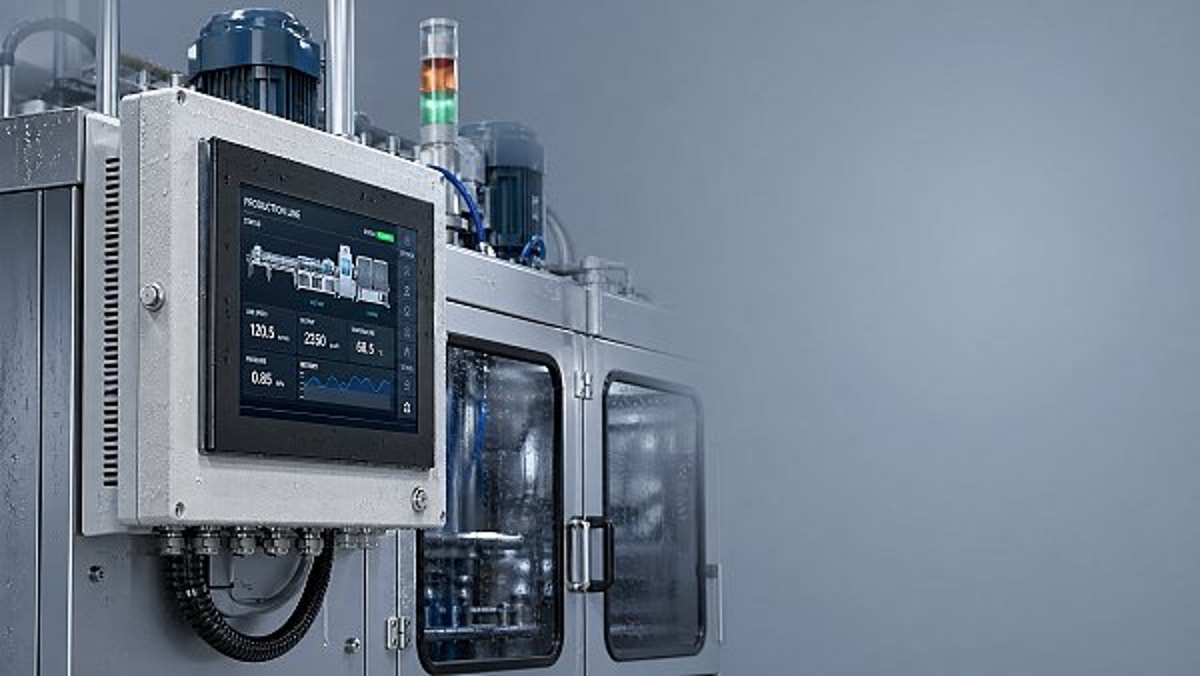
Not all production environments damage hmi touch panels in the same way. In electronics assembly, static-sensitive zones and fine dust may create one type of risk, while in packaging or food-adjacent lines, frequent wipe-down and moisture are more important. Maintenance teams should classify the environment first, then adapt the inspection routine instead of using one universal maintenance interval.
A useful rule is to group installations into low-stress, medium-stress, and high-stress duty. Low-stress panels may only need a detailed visual and thermal review every 90 to 180 days. Medium-stress locations often benefit from a monthly front-surface and seal check. High-stress applications, especially where vibration, coolant mist, or abrasive dust are present, may justify inspection every 2 to 4 weeks.
This matters for spare planning as well. If one facility has 40 panels but only 8 of them sit near high-heat drives or washdown zones, replacement stocking should reflect that exposure difference. Many after-sales teams overstock based on total panel count instead of risk concentration, which ties up budget but does not necessarily reduce downtime.
Environmental stress map for service teams
The following comparison table helps maintenance staff connect floor conditions with likely failure modes. It can also support internal service reports when explaining why one group of hmi touch panels ages much faster than another on the same site.
The table shows that service life depends as much on installation context as on panel quality. If maintenance records identify the stress class early, teams can better justify preventive replacement windows, protective accessories, or enclosure modifications instead of repeatedly treating failures as isolated incidents.
Scene-specific warning signs worth escalating
- In hot zones, brightness loss over a few months is often more meaningful than one-time touch delay.
- In wet areas, slight edge fogging or gasket softness can be an early sign of future ingress.
- In high-vibration stations, repeated connector loosening may indicate mounting redesign is needed, not just retightening.
- In chemically cleaned areas, surface haze can suggest coating damage even when touch still works normally.
For after-sales personnel, these differences are important because the correct action may be environmental correction, not immediate panel replacement. Replacing hmi touch panels without addressing the local stress source often leads to another premature failure within the next service cycle.
Commonly overlooked issues that quietly reduce service life
Some of the biggest life-shortening factors are easy to miss because they do not look like direct panel damage. One common example is over-tightened mounting hardware. Excessive compression at the panel cutout can distort sealing pressure, affect the front bezel, and create long-term stress around the touch layer. Another is poor cable routing, where constant flex or weight at the connector gradually weakens the electrical interface.
Cleaning practice is another frequent blind spot. Many plants clean hmi touch panels multiple times per shift, especially where hygiene or product dust control is important. If operators use solvents, abrasive cloths, or excessive liquid, the panel may develop micro-scratches, coating wear, or edge infiltration even though the display remains functional for months. The damage appears slowly, then accelerates.
Power quality also deserves attention. Repeated voltage fluctuation, unstable grounding, or electrical noise from nearby variable-frequency drives can contribute to intermittent resets and stress internal components. While this may not physically wear the touch surface, it can shorten overall service life of hmi touch panels by placing repeated electrical strain on power and control circuits.
Overlooked risk checklist for field service visits
- Check whether the protective film was left on too long, trapping heat or moisture against the front surface.
- Confirm the panel cutout is flat and free from mechanical twisting after machine vibration or cabinet work.
- Review whether nearby compressed-air cleaning pushes dust toward panel seams and vents.
- Inspect for UV exposure from skylights or process lighting in facilities with partial natural light.
- Verify that screen savers, dimming settings, or sleep modes are used where applicable to reduce unnecessary backlight hours.
These issues matter because even a modest reduction in stress can add months or years to useful panel life, especially on lines with 12-hour or 24-hour operation. In service economics, extending replacement intervals by even one planned maintenance cycle can reduce emergency labor, urgent shipping, and production disruption.
Execution guide: what after-sales teams should do during inspection, repair, and replacement planning
A strong maintenance routine for hmi touch panels should combine quick visual checks, periodic environmental review, and condition-based replacement planning. For many facilities, the best practice is not to wait for total failure. Once a panel shows recurring touch errors, visible seal degradation, or major brightness loss, the cost of delaying action can exceed the cost of a scheduled replacement window.
Field teams should also standardize what gets recorded after every service call. Useful data points include panel age, average daily operating hours, local temperature range, cleaning frequency, touch technology type if known, and the exact symptom pattern. Over time, this creates a practical life map that helps identify whether hmi touch panels are failing because of environment, operation style, or installation method.
Where multiple lines use similar interfaces, it is worth building a simple replacement threshold model. For example, units operating above a certain temperature band, exposed to heavy touch frequency, or installed in high-vibration locations may be placed into a shorter review cycle. This approach supports smarter spare stocking and avoids replacing low-risk panels too early.
Recommended service workflow
- Perform a 5-minute visual check for haze, cracks, seal damage, and contamination around the bezel.
- Review environmental conditions including cabinet heat, dust level, moisture exposure, and nearby vibration sources.
- Test touch response across all screen zones, not only the center or main operating buttons.
- Inspect mounting, cable routing, and connector support to eliminate avoidable mechanical stress.
- Document condition trend and decide between continued monitoring, protective correction, or planned replacement.
When replacement should move up the priority list
Move replacement planning forward when two or more warning signs appear together, such as touch dead zones plus seal degradation, or display dimming plus repeated overheating alarms. In many industrial settings, this combination means the remaining life is no longer predictable enough for critical production use. That is especially true on machines where operator access to alarms, recipes, or batch settings depends entirely on the front panel.
It is also wise to accelerate replacement when the panel is part of an older control architecture with longer lead times for compatible spares. A common mistake is waiting until failure, then discovering a 6- to 12-week replacement cycle for matching hardware or interface constraints. After-sales teams should flag these situations early and propose a phased replacement or retrofit plan.
Why choose us for HMI panel evaluation and next-step planning
TradeNexus Pro supports industrial decision-makers and service teams with focused insight across advanced manufacturing, smart electronics, green energy, healthcare technology, and supply chain software ecosystems. If your team is reviewing recurring issues with hmi touch panels, we help organize the right questions around operating conditions, replacement timing, sourcing risk, and technical fit—so maintenance action is based on evidence rather than guesswork.
You can contact us to discuss practical topics such as parameter confirmation, panel environment matching, inspection priority design, spare strategy, delivery cycle expectations, retrofit compatibility, custom protection considerations, and supplier communication points. This is especially useful when your after-sales team needs to compare several panel options or explain replacement urgency to procurement and production management.
If you are preparing a maintenance upgrade plan for hmi touch panels, reach out with your current installation conditions, operating hours, cleaning routine, enclosure setup, and replacement timeline. We can help you structure a clearer evaluation path for product selection, lead-time planning, quote discussions, sample support needs, and scenario-specific recommendations before small panel issues develop into larger operational losses.
Get weekly intelligence in your inbox.
No noise. No sponsored content. Pure intelligence.
 May 03, 2026AI Boom Drives Data Center Power Demand, Liquid Cooling Gains UrgencyAI Boom Drives Data Center Power Demand, Liquid Cooling Gains Urgency
 May 03, 2026Low-Altitude Economy in China's 15th Five-Year Plan Boosts Warehouse Robotics ExportsLow-Altitude Economy in China's 15th Five-Year Plan Boosts Warehouse Robotics Exports
 May 03, 2026EU REACH Adds 5 Organotin Compounds to SVHC List for ElectronicsEU REACH Adds 5 Organotin Compounds to SVHC List for Electronics
 May 03, 2026Western Land-Sea Expressway Boosts Solar PV Exports to ASEANWestern Land-Sea Expressway Boosts Solar PV Exports to ASEAN
 May 03, 2026Southeast Asia Smart Home E-commerce Grows 27.4% Amid New Matter 1.3+ Certification RulesSoutheast Asia Smart Home E-commerce Grows 27.4% Amid New Matter 1.3+ Certification Rules
 May 03, 2026FDA Updates IVD Software Guidance: AI Diagnostic Tools Require Independent Algorithm ValidationFDA Updates IVD Software Guidance: AI Diagnostic Tools Require Independent Algorithm Validation
 May 03, 2026Global Methanol EV Ecosystem Alliance LaunchedGlobal Methanol EV Ecosystem Alliance Launched
 May 03, 2026Vietnam GDP Growth Forecast Raised to 7.2% for 2026Vietnam GDP Growth Forecast Raised to 7.2% for 2026
 May 03, 2026UAE Emerges as Global AI Hub, Driving Demand for AI-Quality Inspection SystemsUAE Emerges as Global AI Hub, Driving Demand for AI-Quality Inspection Systems
 May 03, 2026OFID $500M Funding for Côte d'Ivoire Energy ProjectsOFID $500M Funding for Côte d'Ivoire Energy Projects
 May 03, 20265 Axis Milling Machines for Automotive: Buy New or Retrofit?5 Axis Milling Machines for Automotive: Buy New or Retrofit?
 May 03, 2026What to Check Before Sourcing OEM Machined Parts from IndiaWhat to Check Before Sourcing OEM Machined Parts from India
 May 03, 2026Why Sheet Metal Bending Machine Price Varies So MuchWhy Sheet Metal Bending Machine Price Varies So Much
 May 03, 2026Plastic Injection Molding Process Guide for Common Defect ControlPlastic Injection Molding Process Guide for Common Defect Control
 May 03, 2026Smart Manufacturing Technology Trends Reshaping Factory UpgradesSmart Manufacturing Technology Trends Reshaping Factory Upgrades
 May 03, 2026Automotive Die Casting Parts and the Hidden Cost of PorosityAutomotive Die Casting Parts and the Hidden Cost of Porosity
 May 03, 2026Assembly Line Robots: Flexibility Can Matter More Than SpeedAssembly Line Robots: Flexibility Can Matter More Than Speed
 May 03, 2026Smart Manufacturing in Energy: Which Upgrades Pay Back FasterSmart Manufacturing in Energy: Which Upgrades Pay Back Faster
 May 03, 2026Why Robotics Integration Fails After a Successful DemoWhy Robotics Integration Fails After a Successful Demo
 May 03, 2026How to Spot a Reliable Precision Components ManufacturerHow to Spot a Reliable Precision Components Manufacturer
 May 03, 2026Sheet Metal Bending Machine Specifications That Affect AccuracySheet Metal Bending Machine Specifications That Affect Accuracy
 May 03, 2026Oil and Gas Fabrication: Where Material Mismatch Gets ExpensiveOil and Gas Fabrication: Where Material Mismatch Gets Expensive
 May 03, 2026Construction Fabrication Delays Often Start at the Drawing StageConstruction Fabrication Delays Often Start at the Drawing Stage
 May 03, 2026Industrial Robotics Maintenance Guide for Fewer Surprise StopsIndustrial Robotics Maintenance Guide for Fewer Surprise Stops
 May 03, 2026Smart Manufacturing Technology Benefits Beyond Labor SavingsSmart Manufacturing Technology Benefits Beyond Labor Savings
 May 03, 2026Defense Components Need More Than Tight TolerancesDefense Components Need More Than Tight Tolerances
 May 03, 2026How to Vet a Die Casting Parts Supplier in MexicoHow to Vet a Die Casting Parts Supplier in Mexico